


Samsung is giving Galaxy owners a fresh way to make phones feel personal. A new LockStar update for One UI 8.5 adds fully customizable unlock animations, transforming the blink-and-you-miss-it moment of waking your device into a tailored bit of visual polish.
What’s new in One UI 8.5: LockStar unlock animations
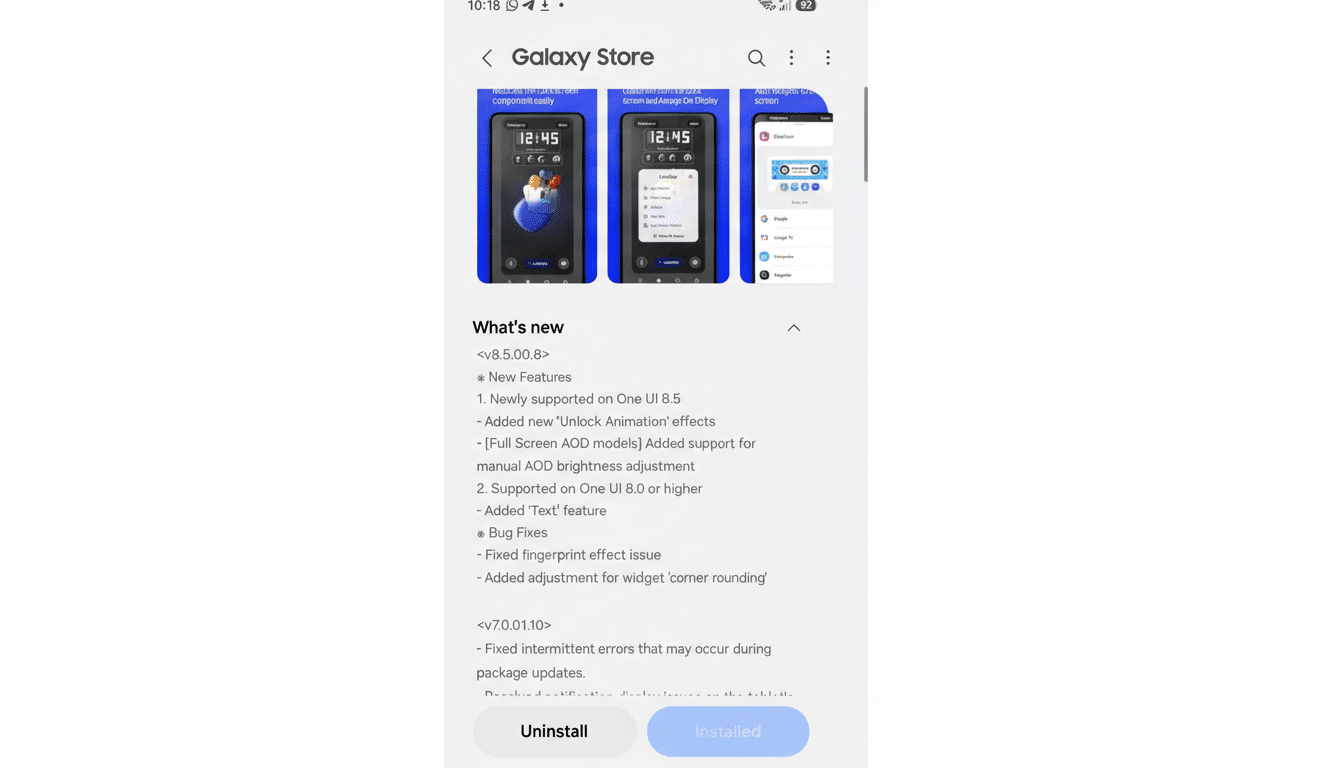
The latest LockStar build (version 8.5.00.8) introduces dynamic transition effects that replace the static unlock. Reported by well-known tipster Ice Universe on X, the feature bundle arrives as part of the One UI 8.5 beta and is currently surfacing on recent Galaxy flagships.
- What’s new in One UI 8.5: LockStar unlock animations
- How the custom unlock animations work in LockStar
- Manual AOD brightness arrives on full-screen AOD phones
- Why it matters for power users and customization fans
- Availability and compatibility across Galaxy devices
- Tips to get the best look from unlock animations
- Bottom line: One UI 8.5 makes unlocks personal and smooth
You can pick from multiple styles—Slide, Expand, Spread, Wave, Warp, and Ripple—then dial in granular parameters so the motion feels exactly right. This moves Samsung’s UI from one-size-fits-all animations to creator-level control, the kind enthusiasts have long wanted inside Good Lock.
How the custom unlock animations work in LockStar
After selecting an effect in LockStar, you’re free to tweak speed, direction, and distortion, plus the interpolator that defines how an animation accelerates or decelerates. If you’re familiar with Android’s developer tools, options like Linear, Accelerate, Decelerate, Overshoot, or Bounce will feel right at home.
Practical examples: set Ripple with a gentle Overshoot to make the screen feel like it’s “breathing” on unlock, or choose Slide with a fast Accelerate for a snappier, performance-first vibe. Early beta users report that these transitions run smoothly on high-refresh displays, preserving the fluidity you expect at 120Hz.
Samsung also includes controls that influence the motion’s “physics,” such as how quickly the animation settles or how much it overshoots before resting. The result is a more intentional moment that matches your phone’s personality—playful, minimal, or aggressively quick.
Manual AOD brightness arrives on full-screen AOD phones
There’s a functional upgrade tucked in, too. As highlighted by Tarun Vats on X, LockStar now lets you override automatic brightness for the Always On Display. On devices with a full-screen AOD—like the Galaxy S24 and S25 families—manual control can improve legibility or battery management depending on your preference.
If you keep AOD on in bright environments, bumping brightness helps glanceability without waking the device. Conversely, dimming the AOD in low light can reduce distraction and lower power draw. Panel efficiency and ambient conditions vary, but giving users a direct slider is a welcome quality-of-life shift.
Why it matters for power users and customization fans
Good Lock has long been Samsung’s playground for deep customization—modules like Theme Park, ClockFace, and Keys Cafe let users reshape the interface beyond stock settings. Bringing unlock animations to LockStar shows that the company still sees value in advanced, opt-in tweaks rather than burying everything in the main Settings app.
This move also aligns with broader UX trends. Google’s Material Design emphasizes motion as a cue for continuity and intent, while competitors have focused on lock screen personalization without true control over unlock transitions. Samsung’s approach blends both—visual delight with adjustable mechanics—which helps the UI feel faster without changing core performance.
Availability and compatibility across Galaxy devices
The customizable unlock animations and AOD brightness controls require One UI 8.5 and the updated LockStar module. They are currently rolling out to beta testers on select Galaxy models, with early sightings on the Galaxy S25 series and reports of availability on recent flagships enrolled in the beta program.
As with most Good Lock features, regional availability can vary, and modules sometimes arrive in waves. Expect broader access once the stable One UI 8.5 release lands and LockStar propagates through the Galaxy Store.
Tips to get the best look from unlock animations
Pair the animation style to your unlock method. If you primarily use fingerprint, faster interpolators keep the moment tight. If you often tap to wake and scan your face, a slightly longer animation—like Wave with Decelerate—can feel more natural.
Match AOD brightness to context: lower at night, higher for outdoor visibility. And if you run an always-on wallpaper or complex clock face, consider moderate brightness to balance style with endurance.
Bottom line: One UI 8.5 makes unlocks personal and smooth
With One UI 8.5 and the latest LockStar, Samsung turns a routine tap into a moment of expression. Fine-grained unlock animations and manual AOD brightness strike a smart balance between flair and function—and reaffirm that Galaxy devices remain a haven for those who love to tune every detail.
