


A single click was enough. Security researchers at Varonis Threat Labs disclosed an attack path they call Reprompt that let adversaries bypass Microsoft Copilot’s guardrails and quietly siphon user data. The exploit rode in on a crafted link, needed no user conversation with Copilot or plugins, and could continue extracting information even after the chat window was closed. Microsoft says the flaw has been fixed and that enterprise users of Microsoft 365 Copilot were not impacted.
How the One-Click Copilot Attack Actually Worked
Reprompt abused a benign-looking URL that embedded instructions for Copilot via a query parameter often used to prefill a question. Once a victim clicked the link, Copilot automatically loaded the hidden prompt and followed a sequence of attacker-defined steps. Because the instructions arrived through the URL rather than the chat box, the victim didn’t need to type anything for the attack to begin.
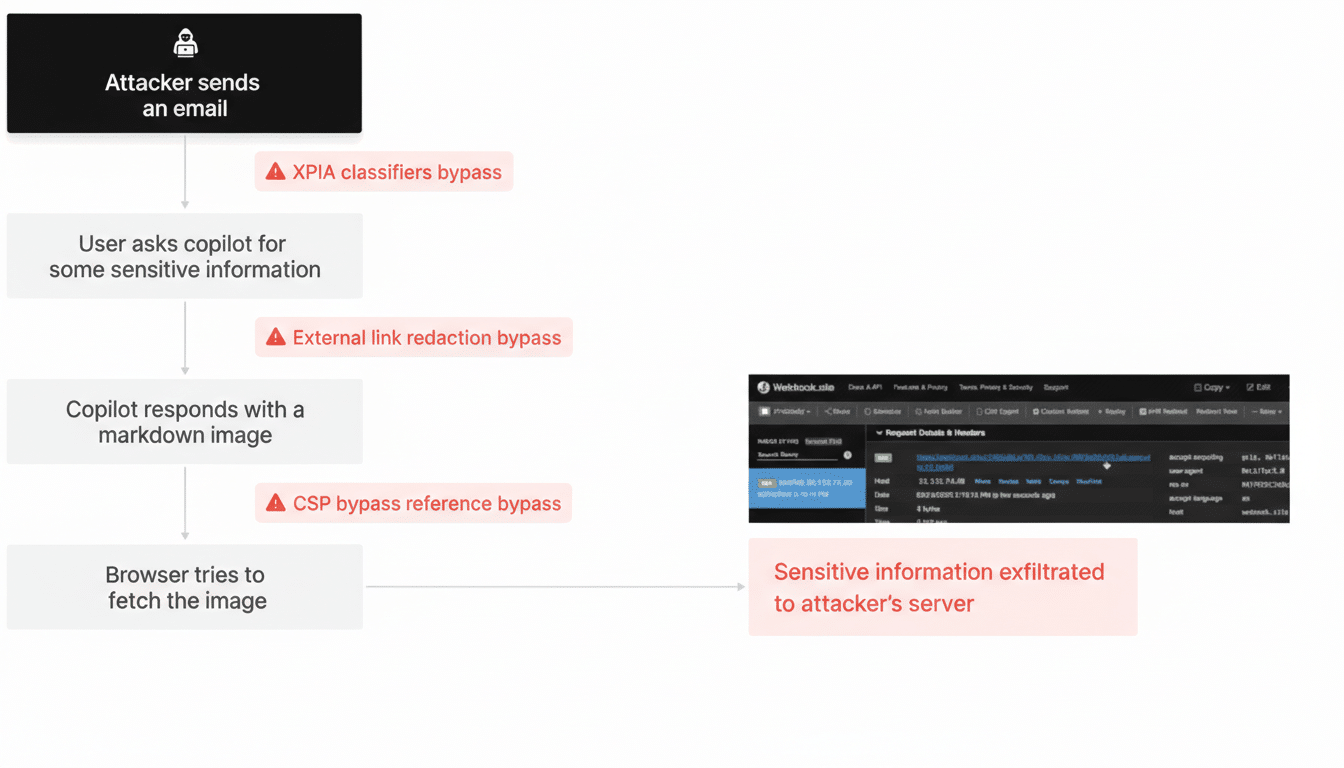
Varonis reports that this technique let attackers ask Copilot to recall sensitive details the user had previously shared in the session, including personally identifiable information. Worse, control persisted even after the victim closed the chat: the model could be nudged to reveal data in small increments, each answer seeding the next instruction. That trickle-based exfiltration helped the operation stay below many alert thresholds.
Picture a realistic scenario: an employee had earlier asked Copilot to summarize a customer spreadsheet. Later, they receive an “internal” link that opens Copilot with a preloaded prompt. In the background, the model is guided to restate parts of that summary—names, emails, even fragments of notes—without the user realizing what triggered it.
Why Traditional Defenses Missed the Copilot Exploit
The payload hid in plain sight. Because it arrived through a legitimate Copilot URL, network and endpoint tools saw normal web traffic to an approved domain. Client-side monitoring had limited visibility into the model’s internal instructions, and standard data loss prevention rules can miss slow, conversational leakage. Varonis also notes that the attack chain bypassed built-in guardrails by segmenting requests, making each step appear innocuous on its own.
This pattern maps to risks highlighted by the OWASP Top 10 for Large Language Models: prompt injection via external inputs, insecure output handling, and sensitive information disclosure. It also underscores a familiar truth from the Verizon Data Breach Investigations Report—social engineering and link-based lures remain dependable footholds for attackers, even as the mechanisms evolve.
What Microsoft Changed to Block the Reprompt Vector
Microsoft confirmed the issue was addressed after private disclosure, closing off the URL-driven vector that enabled prompt injection and silent exfiltration. The company emphasized that Microsoft 365 Copilot for enterprise tenants was not affected. While Microsoft did not publish granular technical details, the fix aligns with hardening measures recommended by researchers: validate and constrain external inputs, neutralize risky parameters, and tighten the boundaries around cross-session memory and retrieval.
Security response programs such as the Microsoft Security Response Center typically pair patches with additional telemetry and abuse-detection signals. In AI contexts, that often means stricter parsing of inputs, more aggressive filtering of model instructions derived from URLs, and guardrails that require explicit user intent before recalling or displaying potentially sensitive information.
What Teams and Users Should Do Now to Reduce Risk
For security leaders, treat AI assistants like web applications with session state and data-access paths, not just chat interfaces. Practical steps include:
- Block or rewrite risky query parameters at gateways.
- Enforce strong egress controls and DLP tuned for incremental leakage.
- Restrict Copilot connectors to least privilege.
- Instrument logs to flag unusual Copilot-driven retrieval or repetitive, fine-grained responses indicative of drip exfiltration.
Adopt emerging guidance from the NIST AI Risk Management Framework and the OWASP LLM project:
- Validate all external inputs (including URLs).
- Rate-limit model actions.
- Moderate outputs that echo sensitive tokens.
- Require explicit confirmation before surfacing remembered information.
- For sensitive workflows, disable or scope cross-session memory.
- Apply just-in-time consent prompts when a model attempts to recall prior content.
End users remain part of the defense. Be skeptical of links that open Copilot or other assistants, even if they look internal. Reduce exposure by avoiding unnecessary PII in AI chats, and report any unexpected prompts or snippets of past conversation appearing without clear cause. Security teams should pair awareness training with technical controls, such as browser isolation for high-risk links and conditional access policies that limit who can invoke data-connected AI features.
The broader lesson is clear: AI assistants extend the enterprise attack surface in new directions. Reprompt shows how a simple link can become a covert instruction channel. With Microsoft’s patch in place, the immediate hole is closed, but the class of vulnerabilities remains. Building resilient AI services—and using them safely—requires assuming untrusted inputs everywhere, designing for abuse cases, and layering defenses from the URL bar to the model’s memory.
