


Microsoft Copilot, which is already powered by OpenAI technology, is now growing beyond that through native integration of Anthropic’s Claude models to offer developers even more flexibility with which they can approach research, reasoning and content generation.
The move introduces the Claude Sonnet 4 and Opus 4.1 to Copilot experiences, with easy swapping between models for different tasks thanks to straightforward controls.
- What Changed in Copilot and Why It Matters Now
- Which Claude Models You Can Use Within Microsoft Copilot
- How To Get A Taste Of Claude In Copilot Researcher
- How To Use Claude Models Effectively In Copilot Studio
- Choosing The Right Model For The Task At Hand
- Privacy and Governance Considerations for Claude in Copilot
- Real-World Uses and Practical Tips for Copilot with Claude

What Changed in Copilot and Why It Matters Now
Default Copilot will still be powered by OpenAI, but customers can now run Anthropic’s frontier models when they want Claude’s style and strengths. Microsoft executives have described this as model flexibility, not a replacement, and have said on the company’s blog that Copilot will continue to be able to provide OpenAI’s most recent models as well as options from Anthropic.
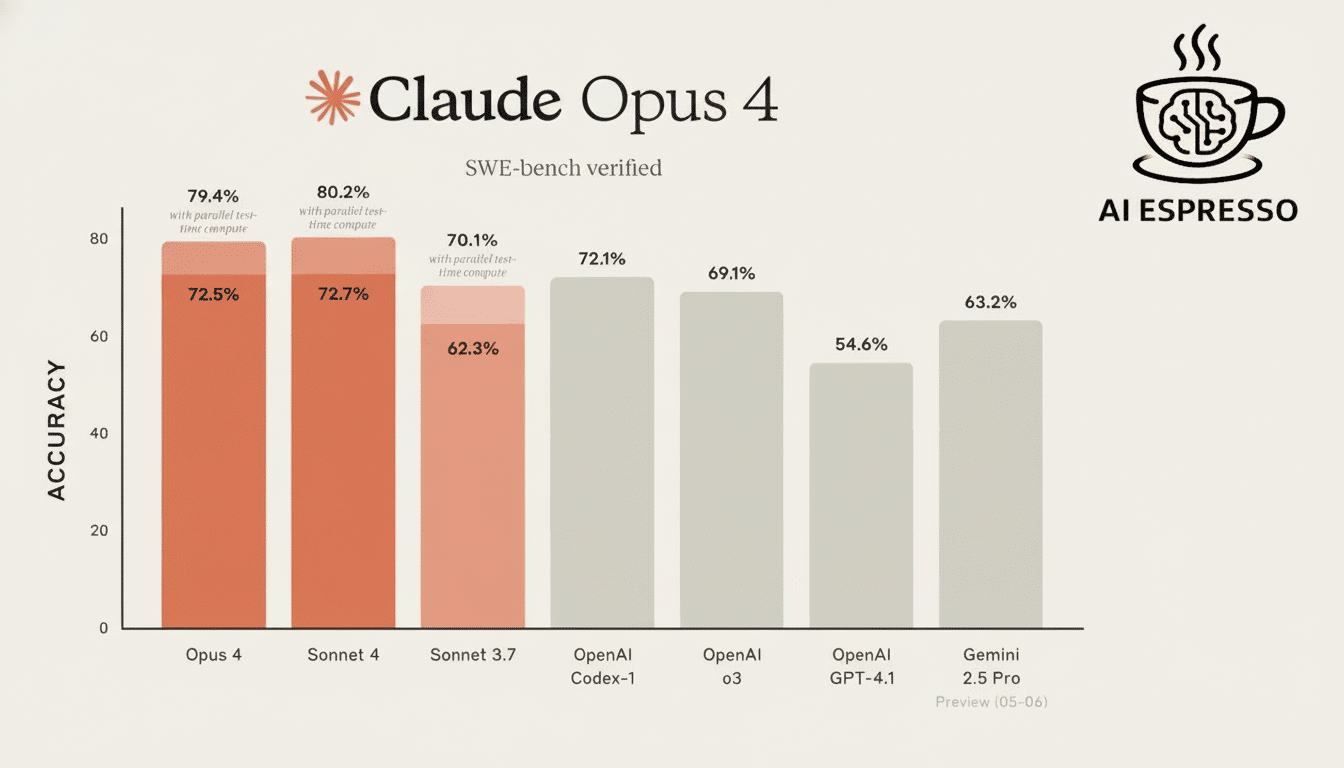
For businesses, it’s not just a toggle. Models behave differently under pressure to varying degrees. Claude specializes in strong summarization, careful tone, and long-form context use; OpenAI’s GPT-4o is strong at multimodal and conversational flow. Independent benchmarks, including the Chatbot Arena leaderboard and model cards released by Anthropic, indicate complementary strengths—which is exactly what Copilot is now surfacing to users.
Which Claude Models You Can Use Within Microsoft Copilot
In Copilot you now have two Anthropic options: Claude Sonnet 4 for the quick, capable general-purpose stuff and Claude Opus 4.1 for monster reasoning tasks.
In Microsoft’s interface, these models are presented as external providers, which is to say that they are integrated into Anthropic’s infrastructure and they come with its terms of service.
Copilot has largely remained set to OpenAI’s GPT-4o for general use. The implication: teams can opt for a Claude model when they need it to exhibit some particular behavior on a project, like conservative drafting in the case of legal or policy material, or continue with GPT-4o for rich multimodal conversations and expansive coverage.
How To Get A Taste Of Claude In Copilot Researcher
In Copilot’s Researcher experience, find a Try Claude button at the upper right of the canvas. Tapping it toggles the core model beneath the surface, from OpenAI to Claude Opus 4.1 for that specific session. You can proceed by asking Researcher to produce reports, create outlines, or compare sources using Claude’s measured tone and long-form style of reasoning.
You can opt out at any time. It’s ultimately just a button that you tap to indicate which model you want to run the next batch of steps, so it’s possible to A/B test the same prompt across models and keep whatever works best for your use case.
How To Use Claude Models Effectively In Copilot Studio
To do this, build a custom agent in Copilot Studio, then open the agent and go to the Details pane. Beside the agent’s model, click the ellipses to open the model picker. Use the drop-down to select Claude Sonnet 4 or Claude Opus 4.1. GPT-4o is still the default, but you can switch models at any time and even build agents that invoke different models at different stages.
Because they’re external models, your tenant could need to get admin approval or align policy before turning them on. A lot of companies police external AI access through data loss prevention, environment policies and so on, so ask your admin if you don’t see Anthropic in there.
Choosing The Right Model For The Task At Hand
Deploy GPT-4o for strongly conversational back-and-forth, multimodal inputs, or high coverage of tasks. Turn such problems over to Claude Sonnet 4 for rapid, well-organized drafting and summarization, or to Claude Opus 4.1 for complicated multistep reasoning where fidelity and caution are most critical. Teams that are running models as in-house benchmarks often enjoy tossing the same prompt at both and comparing tone, quality of citations, and factual robustness.
Research analyst firms like Gartner and Forrester have recommended a portfolio approach to generative AI, with consideration around the strengths of models in comparison to tasks and risk profiles. Copilot’s model chooser effectively puts that guidance into practice in working Microsoft 365 scenarios.
Privacy and Governance Considerations for Claude in Copilot
When you choose a Claude model, inputs and outputs are processed by Anthropic subject to its conditions. Microsoft labels these models as external for the sake of transparency. Go over your data classification policies, retention needs, and permitted model vendors before you turn on external models—particularly with regulated data. Through Microsoft’s admin center and Copilot Studio policies, customers have fine-grained control over who is able to use which models and in what environment.
Real-World Uses and Practical Tips for Copilot with Claude
Claude is favored by legal and policy teams for the cautious nature of drafting sensitive communications and policy summaries. Opus 4.1 can support research-driven roles in Researcher by helping produce literature reviews and presenting a methodical table of contents with suggested assumptions and caveats. Commercial marketing and support teams may wish to remain on GPT-4o for quick cycles of iteratively generating conversational content and multimodal tasks, with the potential to switch to Sonnet 4 as consistency in tone becomes more important.
The bottom line is simple. Now with Copilot, you can select the model that suits your work, instead of the other way around. Give the Try Claude switch in Researcher a try, or select Claude within Copilot Studio’s model selector and compare output side-by-side, then standardize on the one that best suits your workflow and risk posture.
