


Microsoft has acknowledged a widespread Microsoft 365 disruption that is preventing some customers from accessing Outlook and related cloud services, saying it is actively working to restore normal operation after identifying trouble in part of its North American infrastructure.
What Microsoft Says So Far About the Outlook Disruption
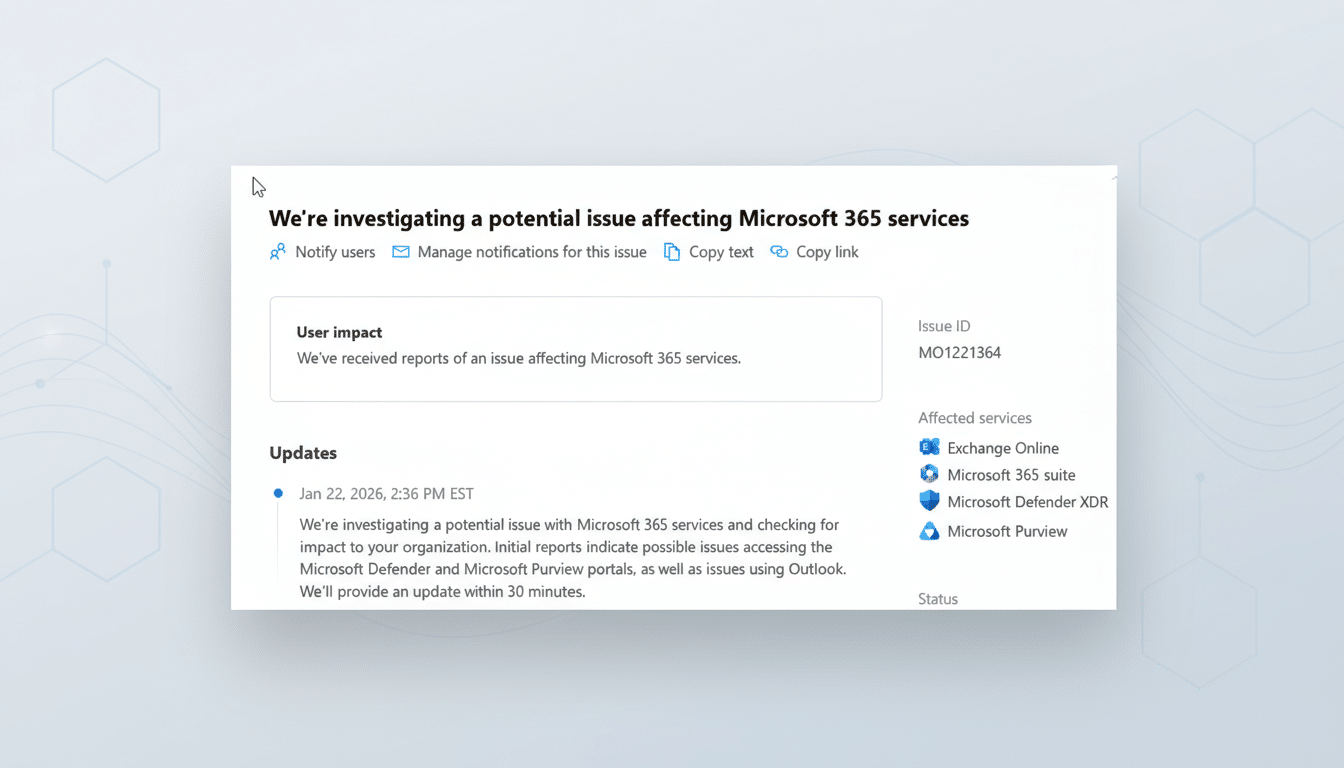
The company confirmed via its official status communications that users may experience degraded functionality or complete inaccessibility across multiple Microsoft 365 services. In public posts, Microsoft said it is investigating issues affecting Outlook, as well as security and compliance products including Microsoft Defender and Microsoft Purview.

Microsoft reported that a portion of service infrastructure in North America was “not processing traffic as expected.” Engineers have restored that infrastructure to a healthy state, according to the company, but further load balancing is required to fully mitigate impact. As part of the recovery process, Microsoft said it is directing traffic to alternate infrastructure while it rebalances service traffic.
Which Microsoft 365 services are affected and why it matters
Outlook is the front door to work for many organizations, and outages there tend to ripple quickly: messages fail to send, mailboxes stop syncing, and calendar updates stall. The mention of Microsoft Defender and Microsoft Purview is notable because those platforms underpin threat detection, data loss prevention, and compliance workflows. During an incident, some customers may see delayed alerts, backlogged policy evaluations, or gaps in dashboards until services catch up.
While the company has not attributed a specific root cause, the language around traffic management and load balancing points to issues at the service edge or regional front ends—components that route requests and enforce capacity policies. Recovery in these scenarios often involves rehydrating instances, rebalancing user sessions, and slowly raising traffic thresholds to avoid reintroducing failures.
How widespread the disruption appears across North America
Outage trackers reported sharp spikes in user complaints, and social media timelines quickly filled with reports of failed sign-ins and timeouts. Microsoft’s own statements referencing North American infrastructure suggest the brunt of the disruption is regional, but tenants with global footprints can experience knock-on issues as workloads retry or sessions are redirected.
For context, Microsoft 365 serves hundreds of millions of users worldwide. Microsoft has publicly disclosed more than 345 million paid seats for its commercial productivity suite in recent years, with tens of millions more consumer subscribers. At that scale, even a narrow infrastructure fault can manifest as a large visible spike in customer impact.
What IT teams can do right now to mitigate the impact
Monitor the Microsoft 365 Admin Center’s Service Health dashboard and the official status feed for tenant-specific advisories. If Outlook desktop is failing to authenticate, test Outlook on the web or a mobile client as a fallback—sometimes one path recovers faster during rebalancing. Avoid changing DNS or MX records; Exchange Online queues mail, and messages typically deliver once services stabilize.
For security operations, note potential visibility delays: validate that Microsoft Defender alerts eventually populate and review any gaps post-recovery. Communicate clearly to end users about expected behaviors (retries, delayed sends, intermittent access), and remind staff that major outages often attract phishing attempts masquerading as “account recovery” notices. Treat unsolicited password or MFA prompts with caution and route all troubleshooting through official channels.
What to watch next as Microsoft restores service capacity
Signs of improvement typically include a drop in throttling errors, successful mailbox syncs, and message traces catching up. Customers should expect some residual slowness as Microsoft gradually increases load on restored infrastructure. After major incidents, Microsoft typically publishes a post-incident summary for administrators detailing the cause, mitigation steps, and safeguards to prevent recurrence.
Organizations governed by service-level agreements should document the duration and scope of impact against their tenant, as SLA credits can apply if availability targets are not met. For now, the most reliable guidance remains Microsoft’s own status communications, which indicate that recovery is in progress as traffic is shifted to alternate capacity.
