


Gmail, the world’s most popular free email service, will soon look very different, thanks to a massive update from Google. Today Gmail is getting one of its biggest updates in years. We’re told these AI enhancements go far beyond just autocomplete: inboxes are now personalized and Google’s smarts can prevent embarrassing slip-ups.
A number of formerly paywalled features are likewise rolling out to all users, in a move that signals a wider push to make email feel less like a trap for to-do lists and more like an assistant.
- The AI Inbox, personalized for a high-signal view of email
- AI summaries in Gmail search extract answers from email
- Proofread polishes your emails with tone and clarity
- Popular AI tools go mainstream for more Gmail users
- Privacy and security notes for Gmail’s new AI features
- Why it matters: saving time and taming email overload
- Availability and what to watch as features roll out
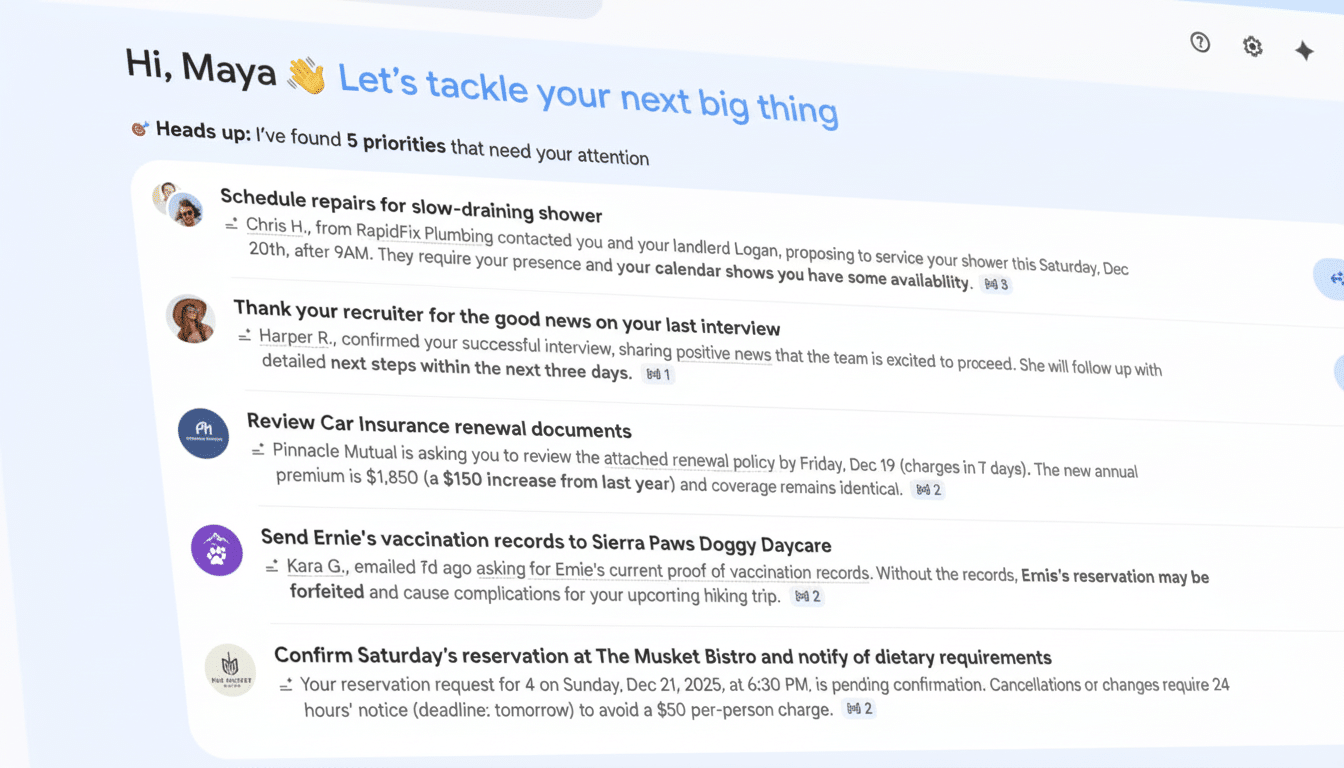
The AI Inbox, personalized for a high-signal view of email
The new AI Inbox visualizes a high-signal view of what’s important right now. And it surfaces “Suggested to-dos” like bills coming due or appointments needing verification, and organizes updates under “Topics to catch up on,” filing purchases and finances into tidy categories. Think returns processed, shipments received, and account statements ready to be reconciled — without having to sift through a pile of promotional threads.
Google emphasizes this is a view that you can switch off and isn’t replacing the old stuff in your inbox. Gmail “has your back” is how the company describes it, which means surfacing action items and changes in status that allow people to move more quickly, Huntsman says. The feature will be made available to trusted testers in the first instance, with a broader rollout likely following feedback.
AI summaries in Gmail search extract answers from email
Gmail’s search has received a natural language question function, along with an AI Overview that tries to pull the answer directly out of your messages.
Ask who quoted your kitchen remodel last spring, or what time the contractor said they’d show up, and you’ll receive a simple answer in which the important parts of those details are extracted; no thread spelunking required.
According to Google, the model producing these summaries is based on your email data alone. The goal of that “personal memory” approach is to minimize the noise and have the results be grounded in your own data. Gmail search AI Overviews is rolling out to Google AI Pro and Ultra-tier customers first.
Proofread polishes your emails with tone and clarity
And in addition to its search upgrades, Gmail’s new Proofread tool gives one-click suggestions for tone and clarity as well. It prefers the active voice, tidier word selection, and fewer words jammed into a sentence. Type “might inflict disturbance,” and it nudges you to “might disturb” — and even catches mix-ups like weather for whether. It’s a feature that will be old hat to anyone who has used specialized grammar helpers and is now native to Gmail for AI Pro and Ultra customers.
Popular AI tools go mainstream for more Gmail users
Google is expanding access to several AI staples as well. Help Me Write, which writes emails based on a simple prompt, is being made more widely available to users. AI Overviews for threaded emails will condense lengthy discussions featuring numerous replies, and Suggested Replies will provide simple answers to questions that are more attuned to context and tone. Until now, these were largely available only to paying customers.
Privacy and security notes for Gmail’s new AI features
Google said such features are optional and that the company does not train its foundational models on personal content like emails. The company added that personal data is processed in a completely separate environment. That position follows broader industry efforts to reassure users that the arrival of generative AI into our productivity tools doesn’t represent a threat.
Why it matters: saving time and taming email overload
Email is still an endless time suck. According to the McKinsey Global Institute, knowledge workers are spending 28% of their work week reading and responding to emails. The Radicati Group continues to monitor hundreds of billions of emails that are exchanged every day around the globe. And Gmail itself is used by well over a billion accounts, according to past disclosures from Google. So even small efficiencies at that scale add up to big time savings.
Gmail’s new AI Inbox is a direct attack on the “needle in a haystack” scenario: figuring out what you need to do right now and not drowning under newsletters, promos, and endless CCs. AI Overviews in Gmail search are part of a larger pivot across productivity suites toward question-and-answer interfaces. Microsoft has similarly staked ground with Copilot in Outlook, and independent clients like Superhuman have built their brand around triage and smart summaries. What Google gets is the bare-knuckled capability to integrate natively at Gmail scale.
The open question is reliability. Initial AI write-ups on the web have indicated that speed often wins over accuracy. By limiting Gmail’s Overviews to a user’s inbox, Google minimizes the chances of bringing in irrelevant or shady sources and reduces hallucinations and misunderstandings. Clear references to the original emails and easy methods for fixing or refining answers will be essential for trust.
Availability and what to watch as features roll out
- AI Inbox is launching into testing today, and it will open up on a larger scale after Google gets early feedback.
- AI Overviews in Gmail search and Proofread come to Google AI Pro and Ultra members first.
- Help Me Write, AI Overviews for threads, and Suggested Replies will roll out widely.
- Google is expanding the availability of several Workspace features to more users as part of its latest updates.
Keep an eye out for how well the AI Inbox sorts personal finance, shopping, travel, and work threads — and if natural language search becomes your first instinct for navigating through your mail.
If these tools reliably reveal the next best action and shrink the number of minutes we squander hunting for specifics, Gmail could essentially turn email’s worst pain points into a series of background tasks managed by machine learning. It would be a welcome upgrade users felt every day.
