


Google Maps is adding an automatic parked-car reminder that pins your parking spot on the map when you leave your vehicle, as another way to make it easier to find your car in a vast sea of spots or unfamiliar mall lots exposed to the elements and not covered inside your actual garage. The system knows a trip has ended if your iPhone is separated from the car by Bluetooth, USB, or CarPlay; it preserves the spot for up to 48 hours in case you parked under that last tree over there before erasing it again once you drive a little further.
Early sightings appeared after a Google Maps product lead mentioned the feature on LinkedIn, and industry watchers at 9to5Google pointed toward it surfacing for some iPhone users.
- How the parked car feature works in Google Maps
- Why this matters for everyday driving and parking
- How it compares to Apple Maps and Waze for parking
- Availability and platform outlook for iPhone and Android
- Privacy and control settings for automatic parking pins
- Real-world tips to get the most from the parked car feature
Google has long permitted manual parking saves, but the automation sidesteps more taps and puts Maps in line with rivals that have already employed this by default.
How the parked car feature works in Google Maps
When you arrive at your destination and unplug the phone from the car, Google Maps tags the spot with a parking marker on the map. If you’ve applied a custom car icon in Maps, it appears to mark the position; if not, a blue circle with a white “P” and brief description shows where you left the car. After 48 hours, the pin auto-expires or goes away as soon as Maps senses you’re driving again.
The detection is dependent on the state of your phone’s connection and location signals rather than an in-car mounted device, so there’s nothing to actually install. If your connection is flaky — or if you just use a wireless charger that isn’t Bluetooth-enabled — Maps can ask you to confirm a parking spot manually, an old fallback method in the app.
Why this matters for everyday driving and parking
Your car is not always easy to locate in a crowded urban area or multi-level garage, believe it or not. INRIX Research has consistently proven that hunting for parking means real costs, in time, fuel, and driver stress — particularly in large cities. Even after you have parked, one of the most common pain points is remembering where you left your vehicle — the exact level or zone — after an event or while traveling.
An automatic mark reduces the need to think: You don’t have to remember to make a note that you are at the marker or snap a photo of, say, pillar 29. It’s even handier for families that have to share a car, or for road warriors who might cycle through rental cars — anyone logged into the same iPhone/Mac is able to easily get back to the saved location.
How it compares to Apple Maps and Waze for parking
Apple Maps on iPhone has marked parked spots for years, once the phone is disconnected from CarPlay or the car’s Bluetooth. Waze, which is owned by Google, also provides parking reminders and notes. The addition of Google Maps matters because Maps is still the default navigator for millions of drivers, and by bundling the feature in the app many of us already have installed on our phones, it lowers friction and reduces the need to open separate apps.
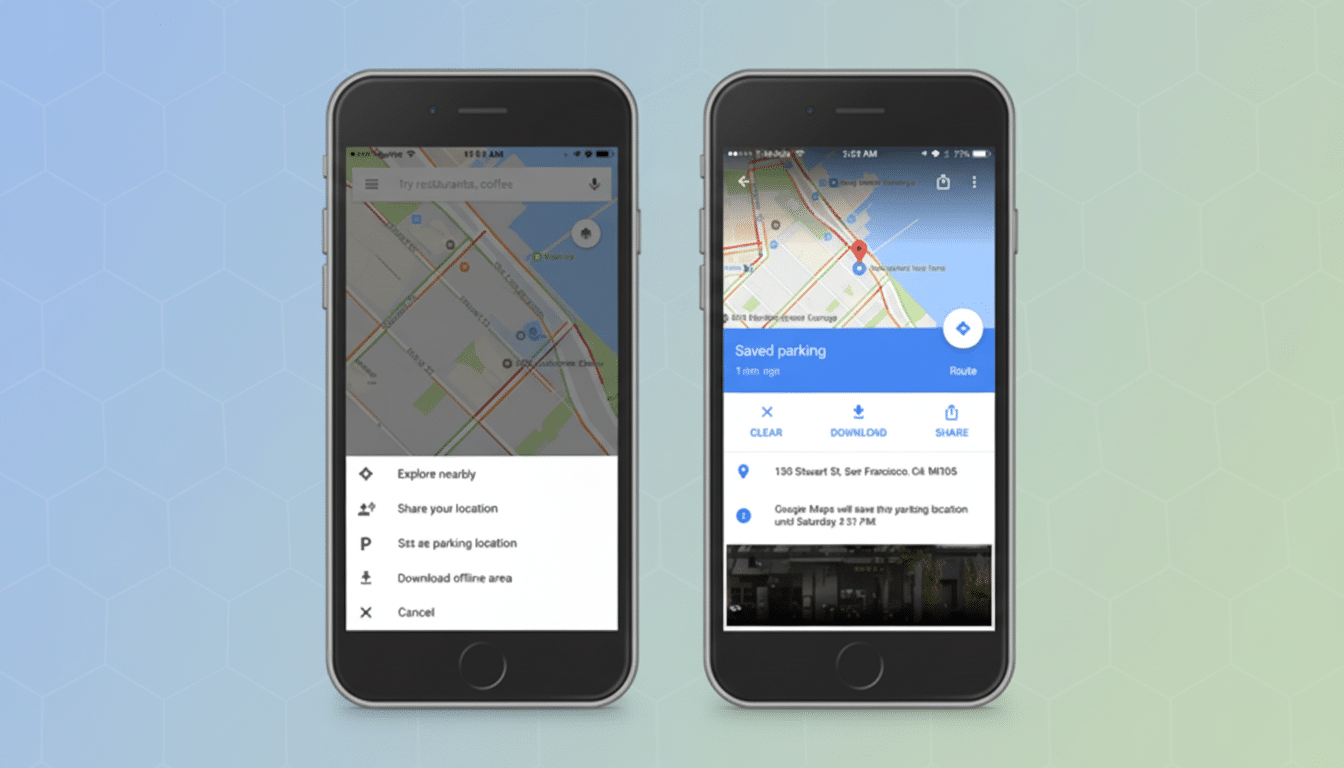
In most cases, the implementation is the same: A pin drops in automatically with an option to add notes such as a garage level, meter number, or time reminder. Google’s 48-hour window offers a compromise between being helpful and tidy: It wipes out markers, so your map isn’t dotted with where you might have parked years ago.
Availability and platform outlook for iPhone and Android
The feature is available first for iPhone, and you’ll need to give Google Maps permission to access both Bluetooth and location. So far, there’s no confirmed Android release. That asymmetry is curious, particularly since Google has its own Android Auto ecosystem, but for Maps, staged rollouts are par for the course as features get tweaked and scaled.
History would suggest Android users will see parity after Google confirms performance within the many car head units and Bluetooth stacks. For now, on Android at least, drivers can continue dropping and then editing a parking pin using the current manual Save Parking option in Maps.
Privacy and control settings for automatic parking pins
The parked-car pin works like any other saved location in Google Maps: you can drag and drop it, add notes, or set a timer if you’re parked in metered space, or remove it with a tap. And if you’d rather opt out of automatic detection altogether, there are options to remove Maps’ Bluetooth access in your iOS settings or disable all CarPlay connections and stop Location History within your Google account. Those controls allow you to personalize the level of context that Maps collects as you drive.
And because the marker is temporary and self-clearing, it can also prevent long-tail data pileups you get with permanent starred places. For a lot of drivers, that 48-hour breadcrumb shelf life is just enough to get them through a weekend drive, airport parking, or city errand without leaving behind any lingering proof on their vehicles.
Real-world tips to get the most from the parked car feature
In multilevel buildings, add a quick reminder: “floor, color zone, or closest stairwell” to the pin. In sprawling outdoor lots, you might drop the pin near a landmark like a cart return or row sign so that navigation directions take you to a visible reference point. This keeps Bluetooth naming simple, hopefully avoiding connection confusion if you frequently change vehicles.
It’s a small thing, but this quality-of-life improvement does something to close the gap for Google Maps and makes it feel a bit more intuitive at the conclusion of a drive. So whether you’re watching a game, rushing to a gate, or making your way around a busy mall, the whereabouts of your car should now be one less thing to worry about.
