


Google is giving Chrome a true autopilot. The new Auto Browse feature, powered by Gemini 3, can read your open tabs, click through pages, fill forms, and even complete checkout flows with your approval. It is available first to AI Pro and AI Ultra subscribers, signaling Google’s push to turn Chrome from a passive window into an active assistant.
What Auto Browse Actually Does on Real Websites
Think of Auto Browse as a task runner for the web. Give it a goal—“register me for this event,” “buy the items in this photo,” “clean up my apartment shortlist”—and it executes the steps you’d normally do by hand. In demos, Gemini removed non-pet-friendly listings from a Redfin favorites list, sourced decorations on Etsy from a party photo, and pulled details from multiple tabs to populate a registration form.
- What Auto Browse Actually Does on Real Websites
- How Auto Browse Works Inside Chrome’s Gemini Side Pane
- Shopping and a New Commerce Standard for Safer Checkouts
- Privacy Controls and Opt-In Personal Intelligence in Chrome
- Limits You Should Expect from Chrome’s Auto Browse Today
- How to Try Auto Browse Now and What Comes Next in Chrome
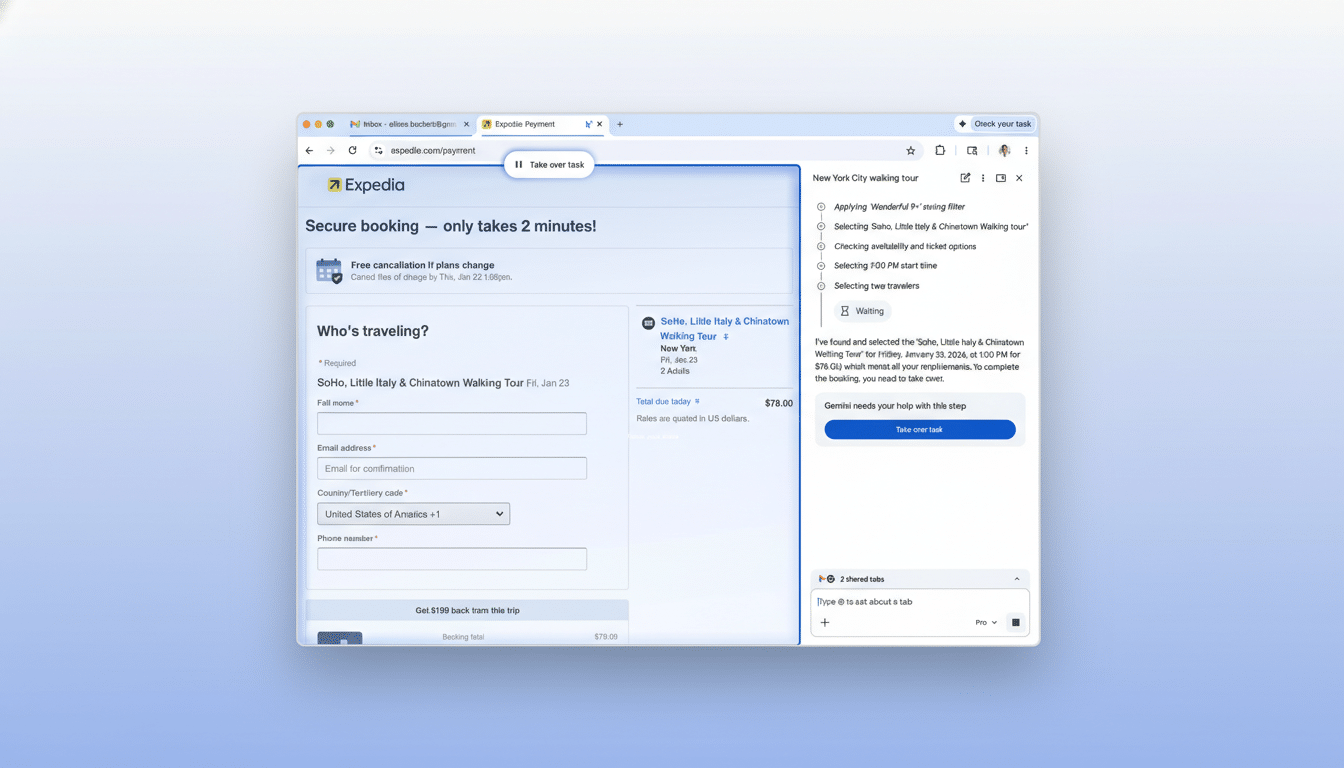
The important distinction: this isn’t just summarizing. Auto Browse navigates fields, selects options, searches, and types in the page like a diligent assistant, narrating each action and allowing you to pause or take over at any time.
How Auto Browse Works Inside Chrome’s Gemini Side Pane
Gemini in Chrome now occupies a larger side pane instead of a tiny corner box. You explicitly add the tabs you want help with, granting the model permission to view their content. From there, you describe the task in natural language. Gemini identifies the required steps, moves between your selected tabs, and performs actions on-page.
Key guardrails are built in. For high-risk actions—purchases, account changes, or sensitive form submissions—Auto Browse pauses and requests your confirmation. Payment details do not proceed without an explicit “approve” prompt, and a persistent Pause button lets you regain control instantly.
Because the agent lives inside the browser, it can see page state changes that traditional chatbots miss. That means fewer dead ends on pagination, pop-ups, and dynamic forms—the common speed bumps that make “AI to the web” feel brittle.
Shopping and a New Commerce Standard for Safer Checkouts
To make checkout less error-prone, Chrome now supports Google’s Universal Commerce Protocol, an emerging standard co-developed with retailers including Etsy, Target, Shopify, and Wayfair. The goal is to give agentic systems a predictable way to find carts, addresses, and payment inputs—reducing the guesswork that causes misclicks or failed orders.
In practice, this means Auto Browse can more reliably add items, apply saved information, and stage a purchase while still requiring your final approval. It’s closer to a “one review, then buy” flow than a reckless one-click bot.
Privacy Controls and Opt-In Personal Intelligence in Chrome
Google’s forthcoming Personal Intelligence option can connect Gemini with your data across Gmail, Drive, Photos, and YouTube for hyper-specific tasks—think pulling your frequent-flyer number or matching an order confirmation to a return form. This capability is off by default and opt-in, with policies to avoid assumptions about sensitive categories like health or finances.
Crucially, Auto Browse requires you to select which tabs it can see, keeping the agent scoped. That selective visibility will matter for trust as agentic features grow more capable.
Limits You Should Expect from Chrome’s Auto Browse Today
Auto Browse is built for structured chores—forms, carts, filters—where the path is deterministic. It is less reliable on open-ended creation or precise spreadsheet edits. Even with a strong model, natural-language instructions like “reformat column E as mm/dd/yy” can produce odd results in complex web apps. Google’s demos acknowledge this gap: the agent excels at routine web workflows but still benefits from human review.
The broader context matters: according to StatCounter GlobalStats, Chrome holds roughly 65% of worldwide browser share, so even small automation gains affect a huge slice of daily web use. But at this scale, misfires are magnified, which is why Google has layered confirmations and a visible action-by-action narration.
How to Try Auto Browse Now and What Comes Next in Chrome
Auto Browse is rolling out to AI Pro and AI Ultra subscribers in the latest Chrome build. To begin, open the Gemini side pane, add the relevant tabs, grant access, and describe your task. Watch the steps in real time, approve any sensitive actions, or hit Pause to steer manually.
Google’s VP of Chrome, Parisa Tabriz, framed the feature as tackling “digital laundry”—the repetitive chores that pile up. It’s a pragmatic target for agentic AI, and with the Universal Commerce Protocol and opt-in Personal Intelligence, Chrome is laying the rails for more capable automation.
The bottom line: Auto Browse turns Chrome into a doer, not just a viewer. It won’t replace judgment, but for routine online tasks, it can save minutes that add up fast—and it does so with a level of visibility and control that most users will actually tolerate.
