


Google is expanding its “Help me edit” chat-like photo editing to a bunch more Android devices, stepping the feature out of its original Pixel 10 exclusivity and putting Gemini-powered retouching right into the default editor on extra phones.
The expansion lifts something that was once a niche demo and turns it into a mainstream tool that can fix lighting, eliminate distractions, or even generate fantasy elements at your behest with no more than some text.

What the tool really does during photo editing
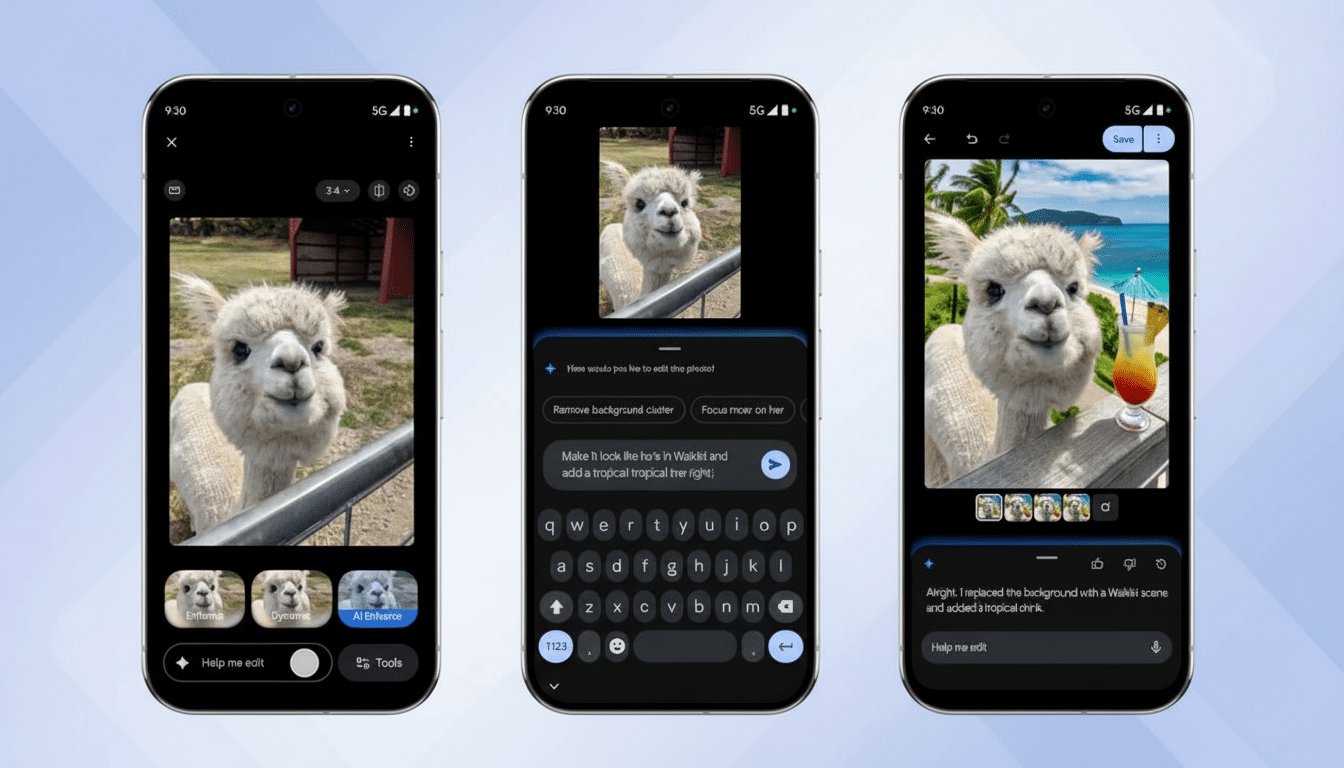
Instead of digging into sliders, you tap “Help me edit” when you’re in the photo editor, and just describe your goal: “make subject brighter and background blurrier,” “remove that crane on the left side,” or “restore this faded print.” The assistant reads the request, offers an edit, and allows you to iterate in natural language — “a bit warmer,” “make the sky moodier,” or “try again” result in another pass (without starting from scratch).
Google frames this as “conversational editing” done via Gemini. Under the hood, it probably mixes big multimodal models honed on vision tasks, like the image-centric ones that Google has presented in developer materials. The result is an editor that’s designed to get what you want (intent) rather than simple adjustments (slider-pulling).
Who can use it right now and where it’s available
The ability is being extended to more non-Pixel Android devices in the United States, where it’s available only in English and for people 18 or older. If it has landed on your device, you should see a “Help me edit” pill in the editor. No pro subscriptions or desktop software necessary — just an updated version of Google Photos to edit the images and a solid connection so Gemini can process requests.
Previously, the feature was exclusive to the Pixel 10 phone range, where it launched some time back alongside other camera-oriented bonuses. It’s significant that it’s covering a more general Android audience: there are around seven out of every 10 smartphones globally using Android, as IDC estimates, and so even with a staggered U.S.-first release, the AI editing tool is getting pushed out to an enormous number of users in very short order.
How it compares with rivals from Samsung and Apple
Google’s stance follows a trend in mobile imaging more broadly. Samsung has Galaxy AI and its Generative Edit feature in the Gallery app for object removal and background fills, while Apple introduced better cleanup tools and on-device intelligence to Photos. Adobe’s consumer tools have also popularized “remove,” “relight,” and “generative fill” workflows that previously required professional expertise.
Where Google stands out is in the conversational layer. There is no need to tap a brush and paint a mask manually; you can just say, “take out the person in the red jacket and keep the natural shadows.” It’s the same user-friendly philosophy that transformed voice assistants into utilities, applied here to pixel-level editing.
Why it matters for everyday mobile photography
So-called casual photos go wrong for predictable reasons: mostly backlit faces, backgrounds cluttered with new shipping containers, and a split-second photobomber. Conversational editing addresses these pain points without having to understand histogram curves or masking. In practice, that translates to more “keepers” out of the camera roll and fewer visits to desktop-quality software.
It also allows for some creative on-the-fly storytelling. Users can stylize a portrait, rebalance colors to match a brand palette, or create playful variations — such as adding seasonal details for a party invite — from their phone. The time saved and reduced learning curve are tangible benefits for creators and small businesses.
Privacy, processing, and limits you should know
Generally, Gemini has to perform conversational edits in the cloud, which includes having an internet connection and some data transfer. Google’s documentation does emphasize that image data used for cloud-based features is controlled by its privacy policies, and certain AI features might store prompts or anonymized telemetry to improve themselves. If you are particularly worried about sensitive images, you may want to visit the Photos app and go through account settings, backup preferences, and face grouping options.
There are also guardrails: the feature will not meet certain requests that violate safety policies, and more complex generative edits may have subtle artifacts or inconsistencies upon close scrutiny — as is to be expected for any image models. Google has publicly endorsed industry efforts like the Content Authenticity Initiative, and future versions may rely more heavily on content credentials to reveal when AI has significantly altered an image, especially as sharing extends across platforms.
Pixel perks still lead the pack—for now, with caveats
The company is still reserving some camera tricks for Pixel owners. Features including Camera Coach, which trains you in framing and timing your shots before letting Gemini take over for editing, are still unique. This pattern is likely to continue: first launch on Pixel, wider rollout onto Android once infrastructure and demand stabilize.
For Android users invited on board beginning Tuesday, the takeaway is straightforward — editing that once felt like a chore has turned into a conversation. Open a photo, tap “Help me edit,” tell it what you want, and repeat. Where the first result fails, you can “make it better.” The tool is snappy — and your camera roll can stand to gain.
