


Google is rolling out Auto Browse in Chrome, a Gemini-powered feature that can navigate the web and complete multi-step tasks on a user’s behalf. Available initially on desktop for subscribers to Google’s AI Pro and AI Ultra tiers, the release signals Chrome’s first major turn toward “agentic” browsing—where the browser doesn’t just display pages, it acts on them.
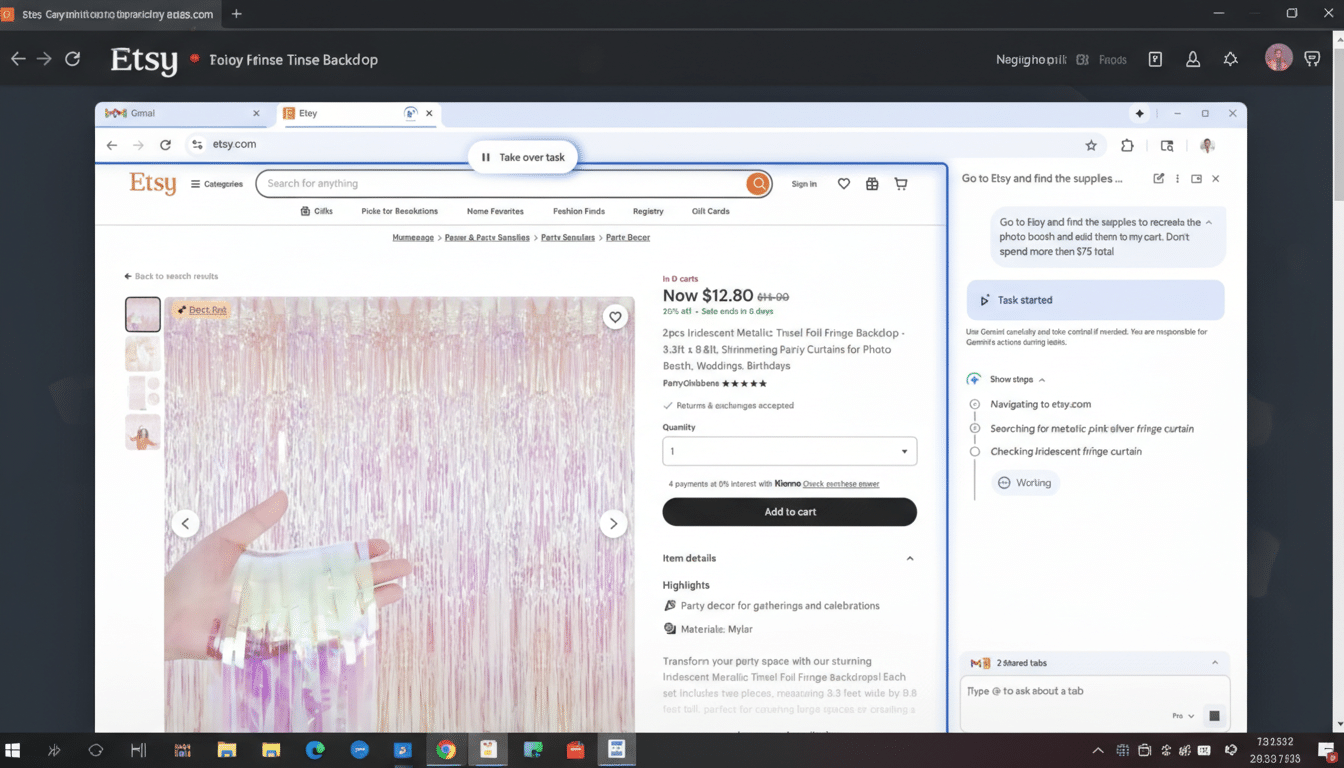
Instead of manually clicking through forms or shopping flows, users can describe what they want in a Gemini sidebar. From there, the AI handles the busywork: visiting sites, typing into fields, clicking buttons, scrolling, and reporting back as it goes. When a task kicks off, Gemini confirms with a simple status message: “Task started.”
What Auto Browse Does Inside the Chrome Browser
Auto Browse brings a hands-on agent into the browser frame. Google says the feature is powered by Gemini 3, its latest and most capable model, enabling the agent to follow instructions and adapt as it moves across pages. In an example Google shared, a user asks Gemini to source themed party supplies on Etsy within a set budget. Gemini searches, compares items, adds selected products to the cart, then pauses for the user to review before checkout.
The agent can also hunt for promo codes, and—if the user consents—tap Google Password Manager to sign in and keep the flow moving. The emphasis is on practical, end-to-end help: think form-filling for event registrations, comparing return policies across retailers, or assembling a shortlist of hotel options with filters applied.
How Auto Browse Works Inside Google Chrome
Gemini lives in a right-hand sidebar in Chrome. Users describe their goal in plain language, optionally naming the site they want to use. Auto Browse then executes inside the active tab like a careful assistant, visually stepping through actions. A persistent “Take over task” control sits at the top of the window, letting users immediately reclaim the wheel if the agent strays or they want to adjust a step.
Crucially, the agent doesn’t finalize purchases by default. It prepares carts or forms and then stops for human review. That human-in-the-loop approach is a practical hedge against the messy edge cases of the web—dynamic UIs, pop-ups, CAPTCHAs, or pages that change layout between visits.
Privacy Controls and Security for Gemini Auto Browse
Google frames Auto Browse as permission-based. Access to credentials flows through Google Password Manager only with explicit approval, and the agent surfaces what it’s doing step by step. The visible, interruptible UI is designed to reduce the “black box” feel of automation while enabling faster outcomes.

For sensitive actions—logins, payments, or account changes—best practice remains unchanged: verify every field before you submit. Enterprise admins will likely look for policy controls, auditability, and data handling assurances as this feature makes its way into managed Chrome deployments.
Availability and Pricing for Google’s Auto Browse in Chrome
At launch, Auto Browse is limited to Chrome on desktop and is rolling out to paying subscribers on Google’s AI Pro and AI Ultra plans. Google did not detail broader availability timelines. The company has been steadily layering AI across its products, from on-device Gemini Nano features in Chrome to expanded AI Overviews modes in Search, suggesting more cross-product handoffs are coming.
Why Gemini-Powered Auto Browse in Chrome Matters
Bringing an agent directly into the browser collapses the distance between intent and action. Instead of copying prompts into a chatbot and manually replicating results, Auto Browse executes within the web itself. That could meaningfully reduce routine friction for consumers and knowledge workers alike—think expense submissions, vendor comparisons, or follow-up actions after research.
The strategic angle is clear: Chrome remains the world’s dominant desktop browser, with StatCounter estimating a market share above 60% globally. Embedding an AI agent where hundreds of millions already work and shop daily raises the bar for rivals. Microsoft has been weaving Copilot deeper into Edge, while AI-first browsers like Arc experiment with automation and summarization. Google’s move shifts the competition from page-level assistance to goal-level completion.
There are limits. Websites evolve constantly; CAPTCHAs and anti-bot measures can block automation; and complex flows often require contextual judgment. Still, as models improve and guardrails mature, agentic browsing is likely to expand from shopping and forms to richer workflows. Today’s announcement plants that flag inside Chrome, turning the browser into a place where work gets done—not just displayed.
