


Google is weaving its Find Hub network directly into Android’s out-of-box experience, adding a setup screen that prompts users to enroll and decide how visible their devices should be so they can help locate a lost item. The shift takes a nuanced privacy-versus-reliability decision and recasts it as two clear options, presented to users at the time when adoption is most likely to become permanent.
What changes in Android setup with the new Find Hub screen
The new screen — which was spotted on a few other recent Android handsets — describes how the Find Hub uses a network of crowdsourced consumer Android phones to assist in finding things such as phones and Bluetooth tags. It offers two plain-English options: a “findable everywhere” mode that allows a single nearby device to report the location of an item you’ve lost, and a “findable in busy places only” mode which waits until multiple devices agree on something before updating.
- What changes in Android setup with the new Find Hub screen
- Why the change matters for Find Hub reliability and speed
- Privacy safeguards and what the default settings prioritize
- Rollout timing and availability across Android devices so far
- Competitive context alongside Apple’s Find My ecosystem
- What Android users can do now to set their Find Hub preference
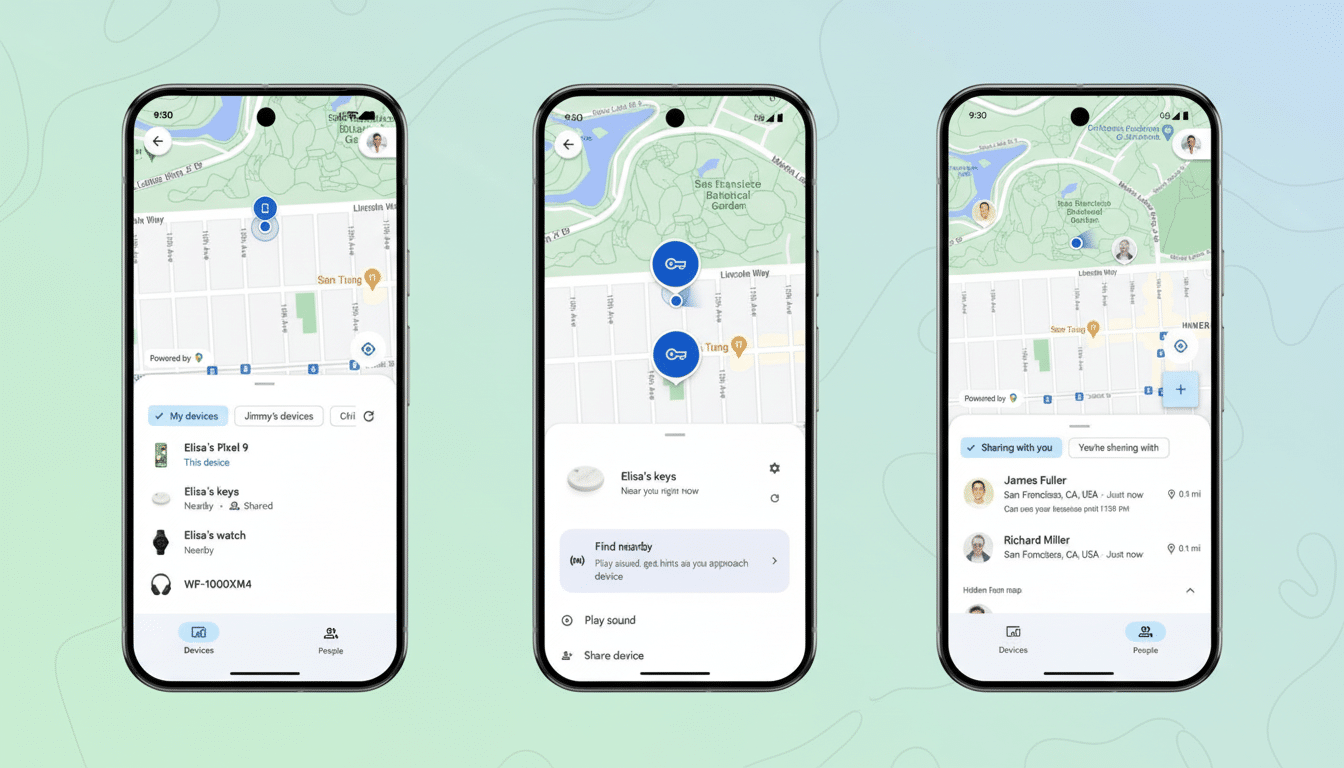
Previously, this setting was buried in the system menus and was easy to miss when auto-enrolling. By surfacing it during setup, Google cuts down on confusion created by wordy explanations and makes it clear that the default “busy places” option can slow recoveries in rural areas, parking structures, or transit corridors where there’s not much foot traffic.
Why the change matters for Find Hub reliability and speed
The efficacy of Find Hub relies on network density. In the stricter default setting, you won’t get an updated location on a lost item until multiple Android devices have identified it, a safeguard that cuts down false positives but can leave holes in places where there are not a lot of people walking by. By enabling “findable everywhere,” you can have one sighting trigger an update, vastly increasing your odds in the low-traffic areas.
Scale is the headline advantage. According to figures shared by Google at developer events, Android’s active device base exceeds 3 billion devices worldwide. Even a small bump in the number of “findable everywhere” choices that get made during setup could represent hundreds of millions more potential spotters. Assuming only 5% of all active devices opt for the more reliable option, that means we add about 150 million new contributors to the most responsive tier of the network.
To give a sense of how this plays out in the real world: if I lost a suitcase at a regional bus depot, then it is conceivable based on these parameters that no pair of two different devices would ever meet within the window of reporting. One detection could be the difference between a pin-dropping location and hours of mystery.
Privacy safeguards and what the default settings prioritize
Google’s conservative default is a reflection of a privacy-first posture that has been both praised and derided. This multiple independent detection before a location update helps mitigate possible misuse and location inference. Google’s Help Center and Android security guidance highlight a privacy-first approach to the network, with rotating identifiers and signing that provide additional privacy protections on top of anonymous tracker alerts that were developed in collaboration with other industry partners.
Most important of all, nothing about the underlying protections changes with this setup tweak. What’s new are the button presses moments before frictionless opt-in and clearer language about what’s up. Users who want maximum recoverability can select “findable everywhere”; those of us who have more stringent standards can go with “busy places only.”
Rollout timing and availability across Android devices so far
Initial reports are that the screen is showing up on newer hardware that’s shipping with fresh versions of Google Play Services (some recent Pixels), while some older models, or devices set up from an older build, may not see it yet.
In certain configurations, the preselected option seems consistent with what the user had established on a previous phone, suggesting migration of state rather than a simple switch to a universal default.
Google has not publicly laid out a full rollout schedule, or indicated that everybody will be switched automatically to the company’s preferred option. But the company had telegraphed the plan in its Google System Services release notes earlier this year, suggesting that early testers’ sightings are the front edge of a wider push.
Competitive context alongside Apple’s Find My ecosystem
Apple’s Find My network gets a boost from opt-in prompts during setup and the gravitational pull of an ecosystem encompassing more than a billion devices. Google is presumably chasing analogous network effects while avoiding flipping the switch on its privacy-sensitive defaults. And if just a tiny sliver of users choose to activate it rather than press the old setup-sources button, that means, over time, more people will be in a position where those emergency switchboards actually work.
What Android users can do now to set their Find Hub preference
If you’re configuring a new Android phone, pause at the Find Hub screen and choose your mode according to your environment.
Travelers and those who live in suburban, exurban, or rural areas are likely to take advantage of “findable everywhere.” If you’ve already configured your device, you can return to it in Settings by looking for Find Hub or Find My Device and modify the network visibility preference.
Bottom line: By folding Find Hub into the setup flow and by making the choice dead-simple, Google is quietly building a network that functions best when more of us are part of it.
