


Google has announced one of the biggest upgrades to its email service since it was created more than a decade ago. Here is how its Gemini AI model will be integrated into functions at the heart of Gmail that are designed to help people clear clutter and answer their regular emails faster.
The revamp adds AI Overviews for natural-language search and summaries, a new Proofread tool to help with cleaner writing, and an experimental AI Inbox that changes the way messages are organized. For a service that is used by more than a billion people, even fairly small changes ripple; they are not in the least bit tiny.
The push is a part of Google’s larger campaign to put Gemini all over its productivity suite, based on the bet that personalization and context awareness can win back time from email. McKinsey has long posited the figure that knowledge workers spend a quarter of their week reading and replying to email, and Google is eyeing that amount with automation that feels less like a bolted-on feature and more like a helper already hardwired into your inbox.
AI Overviews Comes to Your Email for Faster Answers
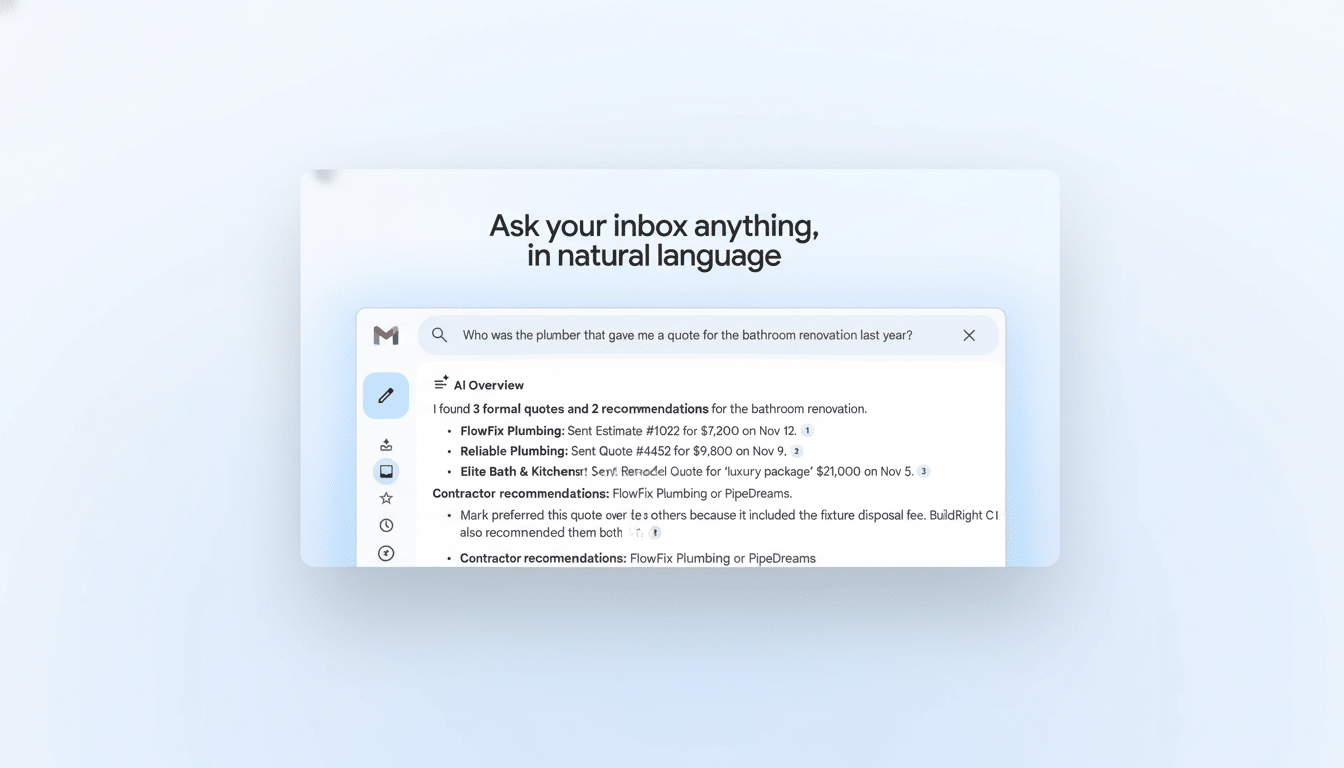
AI Overviews in Gmail allow you to ask questions in plain English and receive short, summarizing answers based on your messages. Instead of digging through threads and filters, you can type questions like “What are the key dates from my offsite emails?” or “How much did I spend in utilities last month?” and get a digest of details from the messages that matter most.
Importantly, Gmail’s Overviews do not scour the web. They are trained only on the information in your mailbox, so you won’t see things that are irrelevant or tangential and instead will see more of what matters to you. Think of it as a personal knowledge layer over your own email archive, optimized to answer questions that your inbox is uniquely equipped to answer.
Google notes that AI Overviews in Gmail is launching first in English for US-based users. Early access is open only on G1 Ultra and Pro tiers, but it will roll out more widely in the months to come.
Proofread Makes Drafts Clearer and Faster
And, in addition to Overviews, Gmail is gaining an AI-enhanced Proofread function that underlines clumsy phrasing, excessively long sentences, and tone misfires as you write. This is not a tool that does little more than fix typographical errors: It provides rewrites for clarity or brevity, and it can nudge a note from casual to professional with the click of an icon.
This goes beyond Smart Compose’s predictive text. It treats the entire message like an editable document, and it can help you stick to the point without sanding away your voice. According to Google, Proofread is also rolling out first to G1 Ultra and Pro subscribers.
AI Inbox Wants to Reimagine How You Look at Email
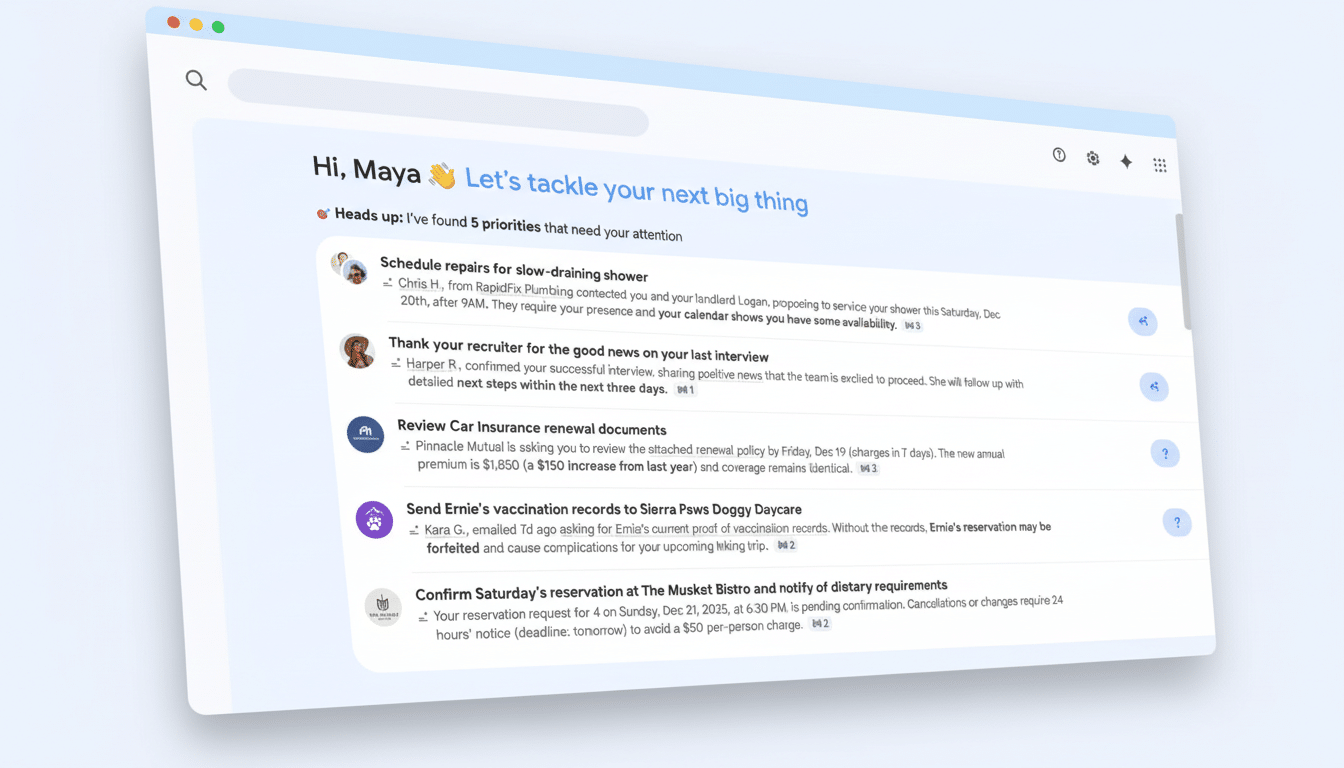
The most daring of these is AI Inbox, an optional view that interposes Gemini between you and the incoming flood of mail. Instead of a standard chronological list, the AI Inbox starts with “Suggested to-dos,” offering deadlines, approvals, and invoices — information that someone owes you or that is otherwise mission-critical — before adding a collection of “Topics to catch up on,” grouping related conversations so you can grok them in one go.
It’s a different philosophy: make email task-first, not message-first. That will excite some and concern others, so Google is testing it with its trusted testers program before a full release. Crucially, the classic Gmail display isn’t disappearing; the AI view is a distinct toggle so you can easily switch back when you want to.
If this approach takes off, it would be the continuation of a trend of AI features people do use. Google said Smart Reply accounted for about 10% of mobile replies shortly after it was introduced, a testament to the fact that small victories at scale count. AI Inbox works to accomplish this at scale, to move beyond scattered threads and prioritize them.
Privacy, access, and what’s free in Gmail’s AI update
Google will not train its machine learning models on your emails, it says, addressing a major concern as generative tools draw near to sensitive personal content. Overviews and Proofread work on the data in your inbox to generate summaries and suggestions without pulling information from the broader web.
The rollout is beginning with English for US users. AI Overviews and Proofread are starting to roll out to G1 Ultra/Pro users, while AI Inbox is restricted to trusted testers. And Google additionally says two commonly used AI features — Help Me Write and the personalized Suggested Replies — are graduating to become free for all Gmail users, going from available only on paid tiers to freely accessible.
Given how many users Gmail has — Statista among others estimates 3.9 billion — even tiny upgrades have the potential to change the way people communicate, at work and at home. Should Gemini’s inbox summaries, editing assists, and task-first view hold in the real world, email’s daily death march could begin to feel a little less like pasar un mal trago and more like pasar una nota.
