


Paid AI is no longer a curiosity line item—it’s an operating expense. After a year of testing, keeping, and cancelling an unruly stack of tools, I’ve landed on a shortlist that consistently earns its seat on my bill. The through line is simple: demonstrable time saved, fewer context switches, and results I can ship.
Below, I break down the AI subscriptions I’m actively keeping—and why they rise above strong free options and the growing pile of “nice-to-have” trials. Consider this a field report from someone who lives in code editors, design canvases, and research workflows every day.
- How I Judge ROI on AI Tools for Real-world Value
- The Core Keepers for Daily Work and Coding Sprints
- Visuals That Earn Their Keep for Creative Workflows
- Workflow Utilities Worth the Fee for Real Productivity
- Short-term Tests and Near-Keepers on the Watchlist
- What I Dropped or Downgraded and Why It Didn’t Last
- Who Should Pay for What Across Roles and Workloads
How I Judge ROI on AI Tools for Real-world Value
I measure value by billed hours avoided, not novelty. If a tool reliably compresses a multi-hour task to minutes, it’s in. If it stalls on edge cases, requires babysitting, or creates rework, it’s out—no matter how dazzling the demos are.
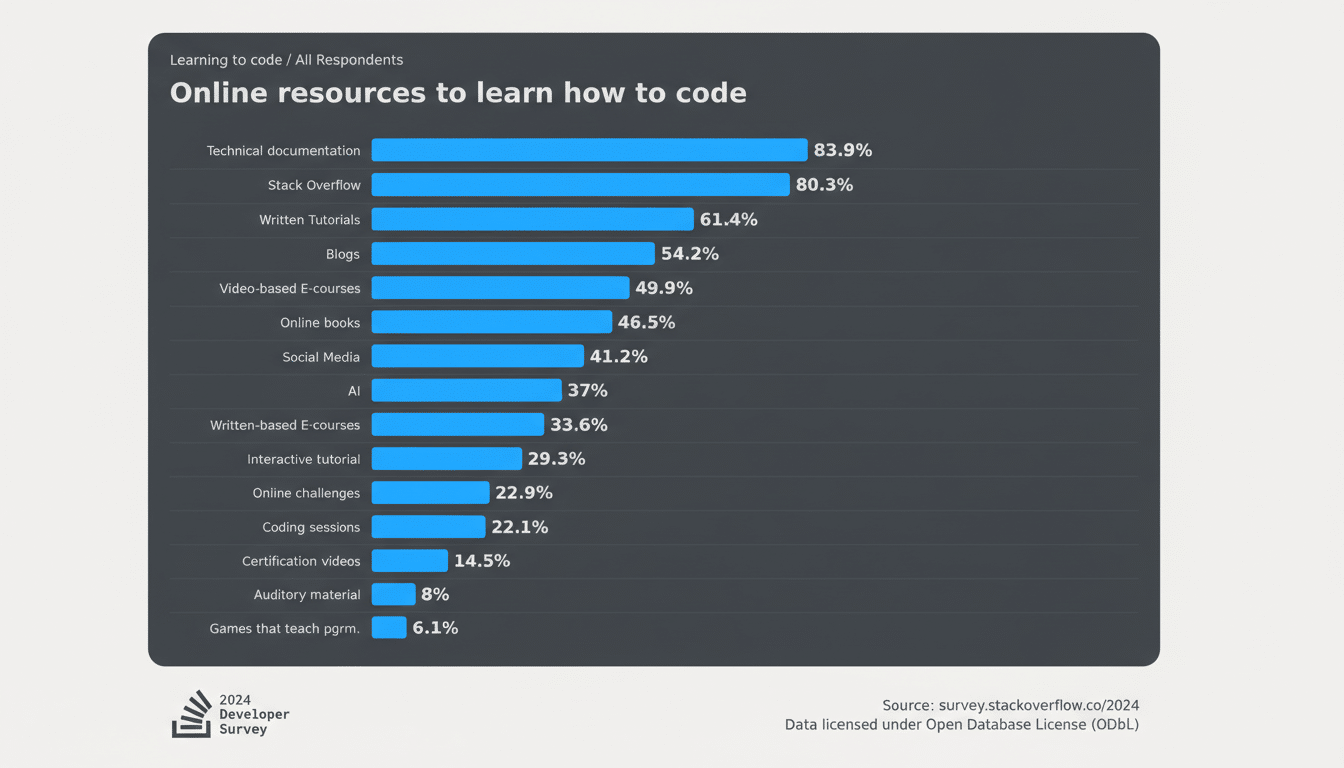
This mirrors broader research: an MIT study found generative AI can lift productivity by up to 37% on certain tasks, while Stack Overflow’s developer survey shows most coders now lean on AI assistants in some form. Gartner continues to project rapid growth in AI software spend as teams shift from experiments to embedded workflows. The lesson is consistent—return shows up where AI is tightly integrated into daily execution, not where it’s used as a once-in-a-while magic trick.
The Core Keepers for Daily Work and Coding Sprints
ChatGPT Plus ($20/month) stays because it removes friction across dozens of micro-tasks: structured research, data cleaning, troubleshooting, and “explain-then-fix” code help. The free tier is fine for light users; the paid tier’s capacity and advanced tools are what make it a dependable coworker. On heavier weeks, Plus has saved me 3–5 hours by turning messy CSVs into clean joinable tables, writing first-draft briefs, and generating unit tests I would’ve put off.
Claude Code Max ($100/month) earns its keep when I’m building at pace. It’s a terminal-first, agentic coding experience that works the way developers actually ship: plan, scaffold, run, critique, and iterate. Over a focused sprint, I shipped multiple production-ready WordPress security add-ons—work that would typically be quarter-long in solo-dev time. The catch is usage ceilings; if you need sustained high-throughput coding, budget for the higher tier rather than fighting throttles mid-project.
Both tools excel for different reasons: ChatGPT Plus for breadth and everyday reliability; Claude Code for deep, hands-on build cycles. If you code only occasionally, Plus is probably enough. If you’re shipping features weekly, Claude Code Max pays for itself quickly.
Visuals That Earn Their Keep for Creative Workflows
Midjourney Basic ($10/month) is my creative sandbox. When a campaign or product concept needs a visual direction fast, it generates distinctive styles and iterative options that spark decisions. I can reproduce decent utility images elsewhere, but Midjourney’s aesthetic range remains unmatched for exploratory work. If you regularly pitch concepts or storyboard ideas, this is a low-cost lever.
Adobe Photoshop Photography Plan ($20/month) stays because muscle memory is a moat—and Firefly-powered tools like Generative Fill collapse tedious tasks. I downgraded from the full Creative Cloud suite after realizing I was paying for apps I barely opened. One caveat: Adobe’s generative credits model means heavier months may require a $10 add-on pack. Even with that, the net reduction from the all-apps plan freed budget for tools that move the needle daily.
Pragmatically, this pairing covers both ends: Midjourney for ideation, Photoshop for precision edits and delivery. If you’re all-in on static social graphics, you might get by with Canva or free suites, but for professional control under deadline, Photoshop still saves me time I can invoice.
Workflow Utilities Worth the Fee for Real Productivity
Notion AI Business ($20/month) is a “sometimes tool” that justifies itself with a few decisive wins. It shines on database-heavy work: auto-structuring tables, transforming lists into relational records, and generating clean summaries from sprawling notes. I don’t trigger it daily, but when I do, it eliminates grunt work that stalls larger projects.
OpenAI API (pay-as-you-go) is my quiet MVP. I run automated keywording and summarization on a self-hosted article archive; ingesting roughly tens of thousands of items cost me less than a dinner out, and ongoing trickle-use barely registers. If you have repeatable backend tasks—tagging, semantic search, speech-to-text—API usage can be dramatically cheaper than piling on subscriptions.
Short-term Tests and Near-Keepers on the Watchlist
Gemini’s paid tier is on my bench for another cycle. It’s promising for multimodal prompts and image edits, and I want more time to test it against my real workloads. But overlap with ChatGPT’s new image features makes this a provisional expense, not a lock-in.
I also trialed Canva Pro and several image generators tied to it. Useful for quick social assets, but not essential in a stack that already includes Midjourney and Photoshop. Those trials were easy cancels.
What I Dropped or Downgraded and Why It Didn’t Last
I cut the full Adobe Creative Cloud license after realizing half my AI budget was underwriting unused apps. The photography plan plus occasional generative credits now gives me 90% of what I need at a fraction of the cost. Lesson learned: audit for “platform tax” creep—bundles feel efficient until you map real usage.
I also avoid stacking overlapping chatbots. Running two or three paid assistants month after month adds little compared to one primary and one specialized backup. Consolidation saves money and cognitive load.
Who Should Pay for What Across Roles and Workloads
Developers and technical founders: budget for one high-capacity coding agent during shipping sprints; pause or downgrade between releases. Marketers and creators: pair one ideation engine (Midjourney) with one production-grade editor (Photoshop or your pro equivalent). Researchers and ops teams: lean on API-based automations and a single, capable chatbot rather than multiple seat licenses.
Tactically, set a monthly AI cap, review statements weekly, and cancel fast when usage drops. I keep a running note of each tool’s last “time saved” win—if I can’t name one from the past 30 days, the subscription goes on the chopping block.
The bottom line: the AI tools worth paying for are the ones you can point to and say, “That shipped because of this.” For me, that’s ChatGPT Plus, Claude Code Max, Midjourney, Photoshop’s lighter plan (with occasional credits), Notion AI for database-heavy weeks, and low-cost API automations. Everything else has to fight its way back onto the card.
