


In a landscape where context switching subtly erodes attention, the right tools serve as guardrails. Time and again, Asana’s Anatomy of Work research has shown that knowledge workers manage a sprawling app stack and waste massive amounts of time on “work about work.” My own solution is sparer: eight apps that I use every day, picked because they eliminate friction — not add to it. Here’s how each one of them earns a permanent place on my home screen.
These selections cover the crucial phases of capture, planning, execution and recovery — when many of us lose our rhythm. The end product is that it helps me resist distraction, protect deep work and still get dinner on time.
- Notion for structured thinking and collaborative knowledge
- Google Keep for instant capture and effortless reminders
- Using Google Calendar for time blocking and deep focus
- Tomato for a customizable Pomodoro rhythm you can sustain
- Samsung Food for dinner without decision fatigue or waste
- Microsoft Phone Link for fewer pickups and fewer distractions
- Niagara Launcher for a zero-friction, focused home screen
- Raindrop.io for a calm, organized read-later commons
- The focused app stack that keeps me sane and on schedule
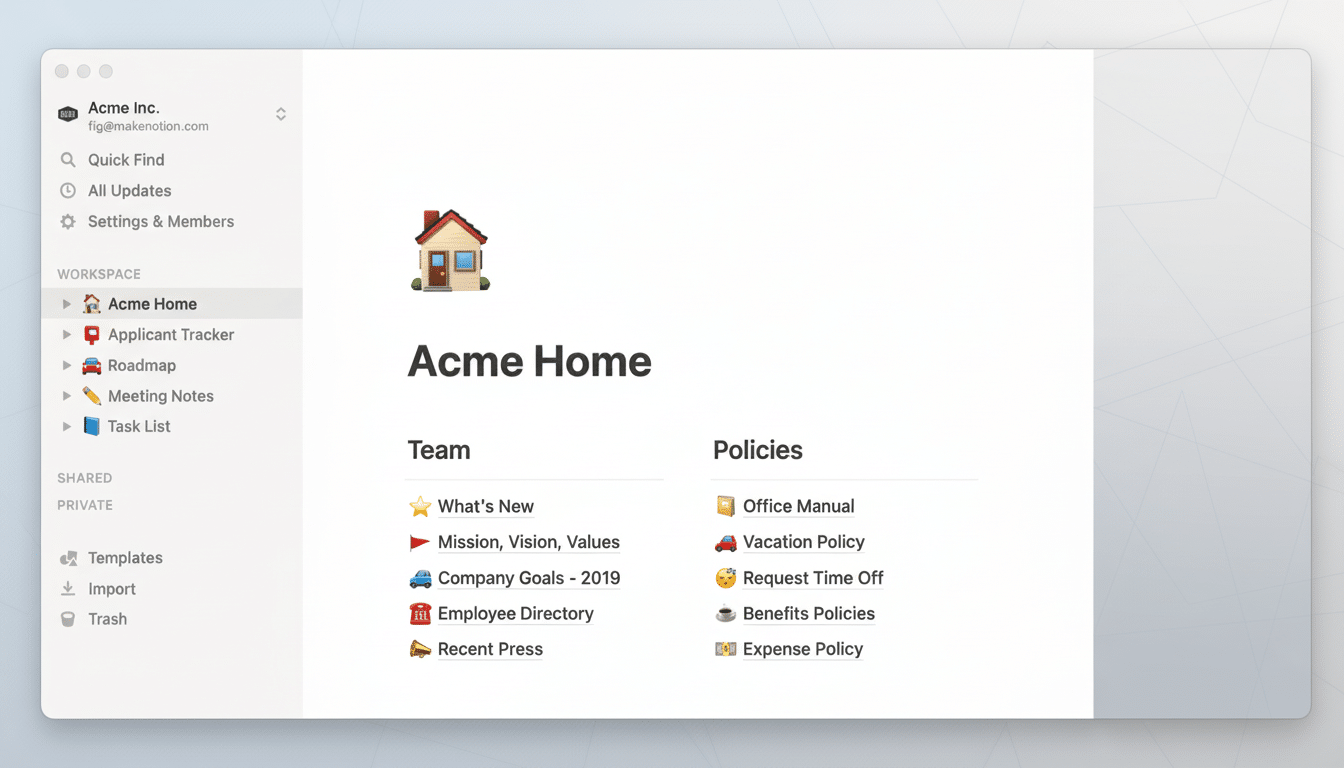
Notion for structured thinking and collaborative knowledge
Notion is my second brain and the home of slow thinking. I have lightweight databases for recurring projects, a vault for quotes and prompts, and a couple of page templates for briefs. It’s where ideas become theirs through structure—table, relationship and primary key properties—so they can be fetched back within seconds in later time.
If you are cross-device or cross-team, its doc+db mix is hard to beat. I have a “decision log,” kept weekly, that deprives re-litigation of oxygen on projects — small habit, big payoff. Obsidian or Joplin scratch the offline, text-first itch for purists; Notion is still my hub when collaboration counts.
Google Keep for instant capture and effortless reminders
Speed trumps fidelity for transient thoughts. Google Keep opens immediately, it accurately transcribes voice notes, and you can pin checklists without any hassle. Its location-based nudges are under-ballyhooed; I see the “return router” alert only when I’m within eyeshot of the post office, not all day.
This one-two with Notion forestalls a time-honoured trap, capture in one place, curate in another. I sweep my Keep notes into Notion every night. It takes mere minutes and prevents idea debt from mounting.
Using Google Calendar for time blocking and deep focus
Calendar events are deals between me and my future self. I keep three separate personal, shared and work calendars, time-blocking deep work between the immovables. The Work Trend Index from Microsoft has illustrated that meeting time has ballooned since 2020; time blocks are how I recapture focus from the calendar creep.
Two little rules keep it honest: Every block has a result in the title, and I claim margin before and after heavy bouts. That buffer lowers the carryover stress and makes that plan stick.
Tomato for a customizable Pomodoro rhythm you can sustain
I don’t worship 25/5 cycles. My cycle goes 30-5 and after four of them, I get a longer reset period. The Tomato app allows me to customize intervals, tracks my progress with live updates and gets out of my face. Small, frequent breaks aren’t indulgent; they help you stay sharp over long stretches, as research on attention and micro-recovery demonstrates.
If you’re into something cute and/or gamified, Pomocat or Focus To-Do is where it’s at. The mechanism itself is less important than finding a cadence that you can sustain over time, and then defending that cadence with your life.
Samsung Food for dinner without decision fatigue or waste
It’s evenings where productivity goes to die a quiet death. Samsung Food’s ingredient search allows me to plan three dinners from what I already have in the fridge, while Smart Cook Mode breaks down recipes into steps I won’t misread when tired. Psychologist Roy Baumeister’s research on decision fatigue says it all: Fewer choices, fewer mistakes.
There’s a practical win, too. According to the USDA, 30–40% of the food supply in the United States is wasted. By planning a few meals and syncing the grocery list to my capture system, I have measurably cut my own waste, not to mention saved on late-night takeout.
Microsoft Phone Link for fewer pickups and fewer distractions
My phone is both essential and toxic. I can triage texts and notifications on my Windows desktop with Phone Link, mirror the screen if I had to, use a universal clipboard. Asurion, for example, has said that people check their phones hundreds of times a day; moving some of those interactions to the desktop decreases the impulse loops.
It’s not perfect — occasional disconnects occur — but the net gain is massive. Most important, I filter aggressively so only VIP alerts interrupt deep work.
Niagara Launcher for a zero-friction, focused home screen
A launcher is a productivity app in disguise. Niagara’s minimalist recents list, edge-scroll alphabet navigation, and grouped notifications make visual noise non-existent. I pin five daily drivers, stow time-sinks away and search for anything else. Fewer icons equals fewer detours — classic progressive disclosure that enterprise usability sages like the Nielsen Norman Group have been pushing for years.
The result is a phone that acts more like a streamlined appliance and less like a one-armed slot machine. That framing alone has altered how often I ‘just check’ things.
Raindrop.io for a calm, organized read-later commons
I come across a lot more excellent articles than I ever have time to read at that moment. Raindrop.io is my inbox for the open web, with tags and collections that neatly keep research. And bedtime is read time, not rabbit-holed time, and weekend sittings begin with a curated queue, not random thumbing.
If you need a stripped-down reading mode, Instapaper or Reader by Readwise are excellent add-ons. The magic is having one canonical place for good links to live until you can give them the attention they deserve.
The focused app stack that keeps me sane and on schedule
Eight apps, one principle: Take out the friction in every stage of work. Capture fast in Keep, think long in Notion, guard time in Calendar, work in timeouts with Tomato, delegate what’s for dinner to Samsung Food, store notifications on the desktop with Phone Link and calm down the phone with Niagara — and quarantine the web inside Raindrop.io.
This is not about having more tools; it is about choosing fewer with intention.
As studies such as those by researcher Gloria Mark on interruptions show, it can take several minutes to refocus after a context switch. The most productive app is the one that, whenever possible, stops the switch from happening in the first place.
