


Discord is launching Checkpoint, a personalized year-in-review to make your voice chats, game sessions, and community accomplishments into a shareable highlight reel. Think Spotify Wrapped, but all about how you really game and hang out with friends on Discord.
It is the platform’s first personalized recap, introduced to honor its 10th anniversary and highlight how communities play together using voice and text. Discord has suggested that it may continue Checkpoint in the future, but for now it’s a celebratory one-off that provides an unexpectedly granular snapshot of your habits.
- What Checkpoint Tracks About Your Discord Activity
- Who Gets a Checkpoint and Eligibility Requirements
- How to See Your Checkpoint Recap on Discord
- Troubleshooting Checkpoint and Your Privacy Settings
- Limited-time Profile Frame Available for Checkpoint
- What Discord’s World-Making Recap Tells Us
- Why Gamers Should Care About Discord Checkpoint
What Checkpoint Tracks About Your Discord Activity
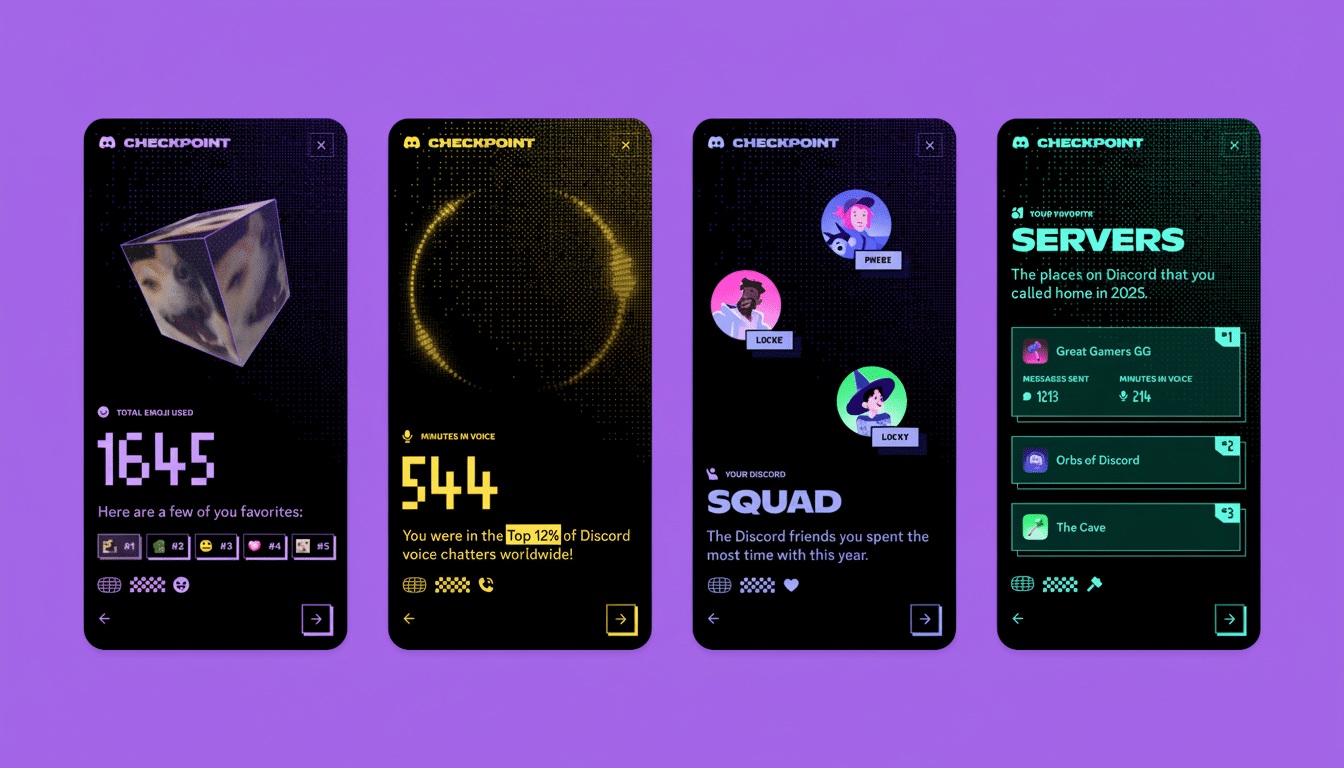
Checkpoint aggregates your most significant Discord patterns into bite-sized stats: the total number of hours spent in voice channels, the friends you talked to most and more; favorite servers by activity; emojis you reached for most frequently; games launched while connected. It’s also built for sharing, with a button right on the last card and layouts that snapshot nicely to screenshots for posting elsewhere.
Voice time is highlighted. Where classic game trackers will tell you about playtime per title, Discord finds the social layer around gaming — is this who you queued up with, which communities you vibed in, and how your game library intersects your friend graph.
Who Gets a Checkpoint and Eligibility Requirements
Checkpoint shows up for accounts that have been active this year and permitted Discord to use data to customize their experience. If you’re new to the service or only dropped in a few times, you might have no recap because there isn’t enough activity for it to analyze.
You can, at any time, go to the app’s settings and check your data preferences. If you’ve already turned off personalization, turn it on, try using the app, and come back to check — although Checkpoint is only for a limited time anyway.
How to See Your Checkpoint Recap on Discord
For most users, a pop-up prompt will appear when you open Discord on desktop or mobile. If you can’t find it, try the following:
- On the desktop: Find the flag icon at the top right of your app. Tap it to open your Checkpoint cards.
- On mobile: Tap the You icon in the bottom right of the app. You should see a green Checkpoint banner near the top — tap that to see your recap.
Once you’ve made it all the way to the end, click ‘Share’ and share your results to the server, or a competitive team’s DMs, or command a communal server’s attention by spitting truths, or post those pampered little rectangles onto your social media profile!
Troubleshooting Checkpoint and Your Privacy Settings
If Checkpoint doesn’t appear, ensure your app is current. Desktop usually refreshes with a restart; mobile updates may need to be manually refreshed through your app store. You should also verify that personalization is turned on in Settings > Privacy and Safety.
You decide what you collect and how it is used. Checkpoint, Discord says, uses the same activity data that fuels recommendations, and you can modify or revoke those permissions after checking out your recap. Just keep in mind that turning personalization off could take you out of the running for features such as this one down the road.
Limited-time Profile Frame Available for Checkpoint
When you see your Checkpoint, you gain access to a unique decorative frame for your profile photo. It’s a limited-time offer that will expire when the recap period ends. And even if you don’t make a full recap, trying for access to Checkpoint might still give you the shot.
What Discord’s World-Making Recap Tells Us
In addition to individual cards, Discord posted some global trends across its nearly 200 million monthly active users worldwide. Multiplayer online battle arena (MOBA) long-timer League of Legends was the most played game among Discord users, while co-op survival horror R.E.P.O. emerged as an indie breakout hit.
Using emojis also had its own story: the red heart was used most, with 2.18 billion uses, followed by the sobbing emoji with a mere 1.71 billion uses. It’s a reality check that Discord is not only a lobby before your session — it’s where fandoms, communities, and friends hang out between matches.
Why Gamers Should Care About Discord Checkpoint
Checkpoint captures the social plate tectonics landscape of play, an aspect of games that traditional game libraries miss entirely.
If your top stat is voice hours with a specific squad or a server you visit every day, that says a lot about where you feel most at home online. For community leaders, that information could inform everything from how to schedule events to how roles are structured; for players, it’s a feel-good snapshot of a calendar year spent teaming up and hanging out.
As more platforms get in on the year-end recap trend, Discord’s version distinguishes itself by focusing on the signees and settings that make up your hours of gaming. If you’re interested in learning about your habits — or just need a clean graphic to flex on your timeline — Checkpoint is worth a further glance before it bites the dust.
