


Google is sharpening Chrome’s productivity edge with three additions aimed at keeping work inside the browser: Split View, in-browser PDF annotations, and a new Save to Google Drive option. The move arrives as competition intensifies from both traditional rivals and a crop of AI-forward upstarts, and it signals a clear bet on workflow speed and tighter ties to Google’s ecosystem.
While the new tools aren’t AI features per se, they stack atop Chrome’s recent Gemini integrations and come as alternative “agentic” browsers experiment with built-in assistants and novel UI. According to StatCounter, Chrome still commands roughly 64–66% global browser share, but even a small shift can translate into tens of millions of users—making usability and multitasking more than cosmetic battles.
What’s New in Chrome: Split View, PDF Tools, Drive Save
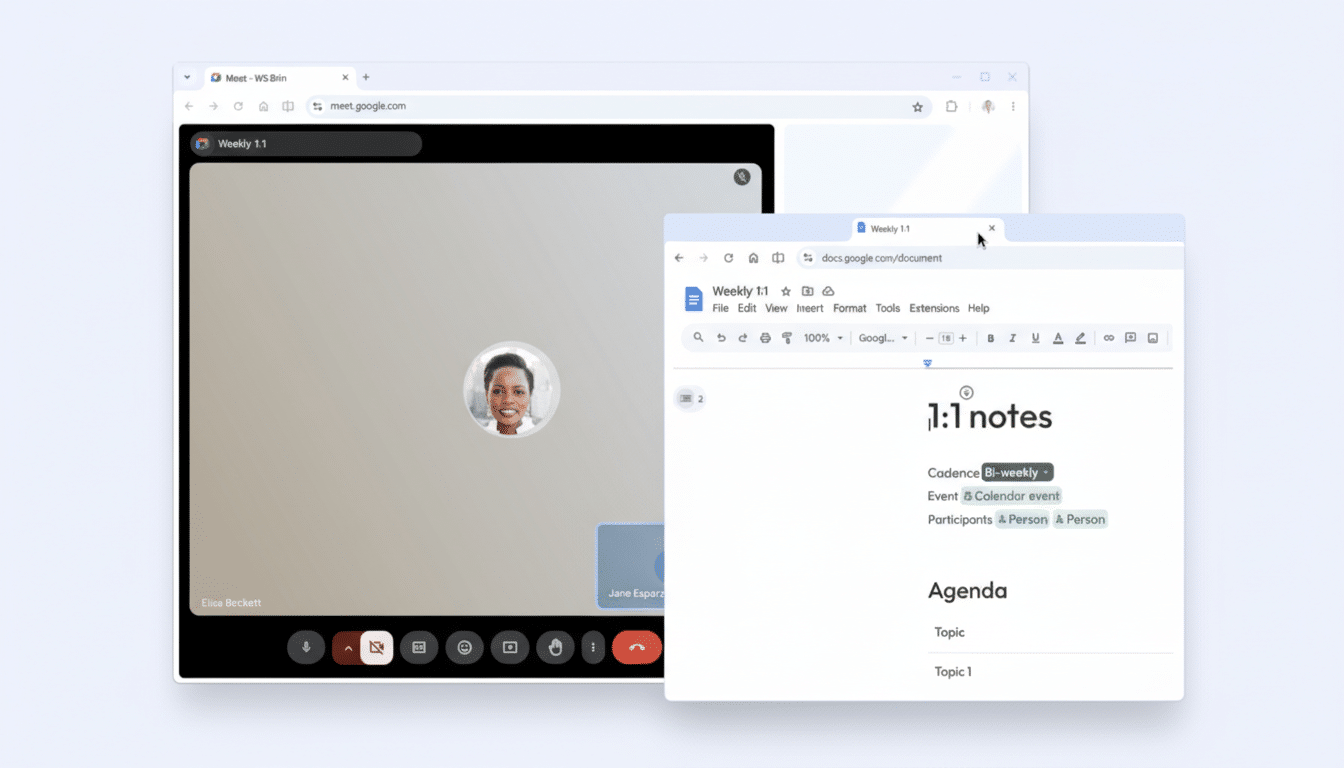
Split View lets you place two pages side by side within a single tab, reducing the alt-tab shuffle and the clutter of stacked windows. You can drag a tab to the left or right edge of the window to snap it into place, or right-click a link and choose Open Link in Split View. A right-click menu lets you revert to a single page when you’re done.
The obvious wins are research and reference tasks: product specs next to a purchase order, documentation alongside code samples, or a lecture video beside your notes. It also aligns Chrome with a growing trend among power-user browsers that make tab tiling and split panes core to their pitch.
Chrome’s new PDF annotations remove a long-standing friction point. You can highlight text, add comments, and handle basic markup directly in the viewer, so reviewing a contract, filling an expense form, or signing a permission slip doesn’t require downloading and switching apps. For many teams, that’s the difference between a 30-second edit and a five-minute detour.
Lastly, Save to Google Drive pipes PDFs from the browser straight into your Drive account, organizing them in a Saved from Chrome folder for easy retrieval. It’s a small but strategic nudge: fewer local downloads to misplace and a clearer trail for shared files inside organizations already standardized on Google Workspace.
Why It Matters in the Browser Wars for Google Chrome
Microsoft’s Edge has leaned hard into workflow features, introducing split-screen and vertical tabs years ahead of Chrome, while Vivaldi popularized tab tiling among enthusiasts. The Browser Company’s Arc reimagined tab organization with Spaces and vertical stacks, and its AI-focused offshoot Dia is testing agent-style interactions. Meanwhile, Perplexity and others are blurring the line between search and browsing with conversational retrieval.
Google’s response is pragmatic: meet feature parity where it counts, cut context-switching, and reinforce the value of staying in Chrome. The tighter Drive handoff is also a moat play. For enterprises with compliance needs, consolidating documents in a governed cloud reduces shadow IT—and gives IT admins clearer auditability and lifecycle controls.
The timing is notable. As AI assistants become ambient, the browser is turning into the operating surface for work. Even modest improvements to tab management and file workflows compound over thousands of micro-interactions per day, especially for knowledge workers who live in Docs, Sheets, Jira, Figma, and web-based IDEs.
Vertical Tabs on Deck: Native Layout Coming to Chrome
Chrome is also preparing native vertical tabs, a layout power users swear by for scanning long page titles and managing dozens of sessions without microscopic favicons. Early access is available via experimental flags, with a broader rollout expected after polish. Vertical tabs originated in enthusiast browsers and became mainstream through Edge, where Microsoft reported strong adoption among heavy tab users.
Combined with Split View, vertical tabs suggest Chrome is finally treating tab management as a first-class productivity domain rather than a UI afterthought.
Real-World Impact for Teams and IT Administrators
For individuals, the upgrades reduce “mode switching”—the cognitive overhead of bouncing between windows, apps, and save locations. An analyst can compare two dashboards side by side, annotate a PDF brief, and file it to a shared Drive without touching the desktop. Multiply that across a team and you get measurable time savings with almost zero training cost.
For IT, the Drive integration and in-viewer annotations curb uncontrolled file proliferation and improve data hygiene. Admins can lean on existing Google Workspace policies for sharing, retention, and DLP rather than chasing local copies. It’s not flashy, but it’s the sort of operational detail that reduces risk while making end users happier.
The Bottom Line: Chrome’s Updates Target Daily Friction
Chrome’s latest features won’t dominate keynote slides, but they target everyday friction points that keep workers in flow. In a market where rivals tout AI sizzle or inventive interfaces, Google’s bet is clear: ship tangible, habit-forming utilities and pair them with the gravity of Drive. With vertical tabs on the horizon and Gemini in the mix, the browser wars are less about homepage speed tests and more about who saves you the most clicks before lunch.
Sources: Google Chrome team communications, StatCounter GlobalStats, Microsoft Edge feature documentation, and product materials from The Browser Company and Vivaldi.
