


Spotify is offering listeners a simple way to silence repeat offenders. A new control allows you to prevent specific tracks from influencing your recommendations, so songs you don’t want to hear won’t keep appearing throughout your personalized playlists and Home recommendations.
The update fills a long-held hole in Spotify’s personalization toolbox. Up to this point, you had the option of omitting an entire playlist from your Taste Profile, a covert profile that dictates things like picks for Discover Weekly, Daily Mixes and Blend. You can also dial it in at the track level now, which means that you get precision adjustments without having to upend your listening habits.
- The Mechanics of the New ‘Exclude from Taste Profile’ Option
- What Changes in Your Personalized Recommendations on Spotify
- Why This Matters for Shared Devices and Households
- How It Compares to Apple Music, YouTube Music, Tidal, and Deezer
- Tips and Edge Cases for Using Spotify’s Exclude Feature
- The Bigger Personalization Picture for Music Discovery
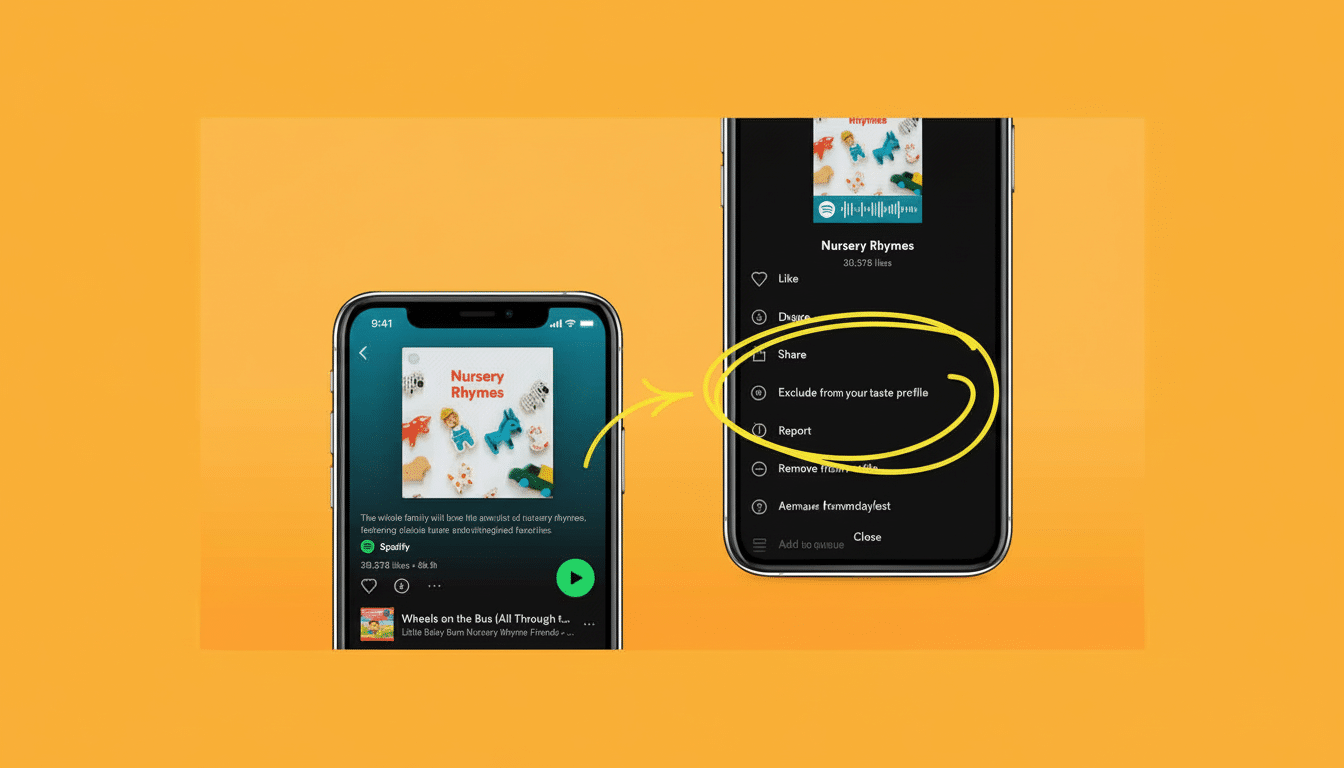
The Mechanics of the New ‘Exclude from Taste Profile’ Option
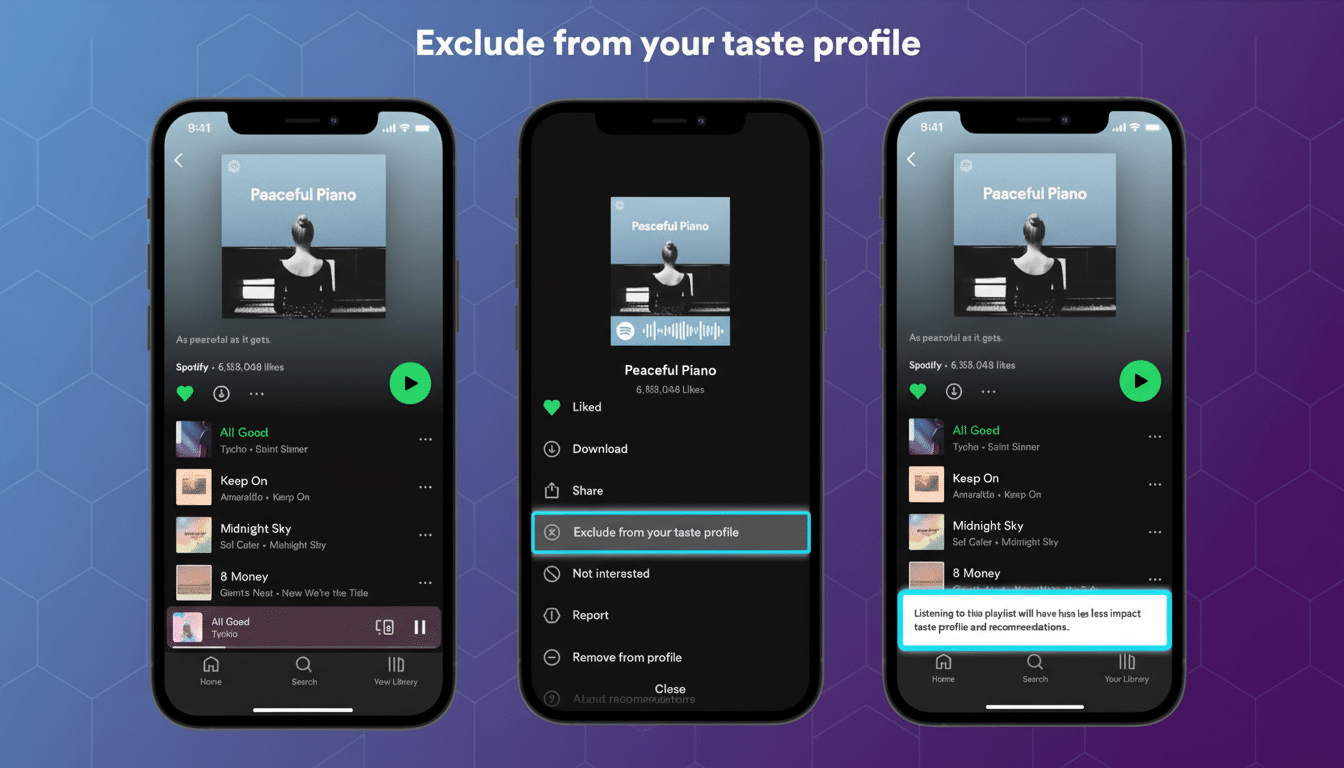
Locate the song you never want recommended again, tap the three-dot menu to its immediate right and select Exclude from your Taste Profile.
That’s it. Spotify will also start using the song as a negative signal now.
If you want to undo the decision, tap Include in your Taste Profile again. This toggle doesn’t remove the song from your library or liked playlists; it just changes some of the taste signals that Spotify uses to customize what it serves you next.
What Changes in Your Personalized Recommendations on Spotify
Blocking a track can help algorithmic playlists sanitize themselves of oddballs that infiltrated your stream because of shared devices, guest sessions or one-off listening. You’re supposed to receive fewer unwanted appearances in things like Discover Weekly, Release Radar, Daily Mixes, radio queues and the Made For You hub.
Crucially, this doesn’t shroud the song from the service entirely. You might still stumble upon it if you’re playing the album it’s a part of, following a friend’s public playlist or listening to an editorial playlist that has included it. The feature is meant to guide your personal recommendations, not scrub items from the catalog.
Spotify’s approach fits with how it describes Taste Profile: an evolving portrait of your listening that updates as you play, skip and save tracks. The company has long said in shareholder letters that personalized collections drive a significant amount of engagement across its more than 600 million monthly users worldwide, so granular controls like these can be particularly impactful.
Why This Matters for Shared Devices and Households
Households often skew recommendations. The kids, perhaps, loop a soundtrack in the car; a roommate pounds your speaker into submission with a marathon workout mix. Those sessions can spawn weeks of odd picks. Self-censoring the few tunes that do not reflect your tastes is quicker than cleansing play history or scrubbing entire playlists out of sight on your profile.
And it is practical for signaling nuanced tastes, too. You might adore an artist and loathe one inescapable single. You’re still a fan, you just can’t stand that one song.
How It Compares to Apple Music, YouTube Music, Tidal, and Deezer
Competing services have taken a variety of approaches to the “no thanks” problem. Tidal and Deezer have options to block an artist outright — a harsher tactic that can sweep out entire catalogs from recommendations. YouTube Music allows you to remove the items from your watch and listening history, which can help prevent future interference, but managing history proves tedious for people who listen all the time. Apple Music tries Love and Dislike feedback to steer the For You carousel, but its signals are less visible and can take longer to have an effect you will notice.
At one remove is Spotify’s per-track exclusion — more surgical than blanket artist blocks, more decisive than the generic thumbs-down. For the end user who frequents Discover Weekly or Daily Mixes, this detail can reap rewards fast.
Tips and Edge Cases for Using Spotify’s Exclude Feature
Start with repeat intrusions. Open the playlists in which you notice misfires most often (Discover Weekly and your Daily Mixes are frequent culprits) and remove the specific tracks that keep reappearing. It takes the system a couple of listens to recalibrate; Spotify’s models are biased toward recent activity, so expect your next few refresh cycles to reflect the shift.
If discovery turns you on, use exclusions sparingly. Too much pruning can narrow the funnel and limit serendipity. A more effective strategy is to block only the songs that you never want to hear again, and then reinforce what you do like by saving tracks or adding them to playlists.
The Bigger Personalization Picture for Music Discovery
User control over recommendation engines is an industry-wide theme, corroborated by research agencies such as MIDiA Research and trade press coverage from the likes of Music Business Worldwide. Features that give listeners ways to fix the record — without nuking their history — often lead to more satisfaction and time spent. Spotify’s track-level blockade is a tiny switch with outsized repercussions because it so neatly punctures the ouch point most users feel: that single song they never wanted, showing up, over and over again.
That doesn’t make the impact of this update any less significant; Spotify isn’t changing how its algorithms operate so much as handing you a sharper pencil. Mark those outliers up, and then leave the rest to the machine — your software is only going to be good for surfacing music you actually care about.