


As a creator, marketer, or business owner, having high-quality visuals can make or break your content. But creating perfect images doesn’t have to mean spending hours on complex software. Thanks to AI, you can now enhance, refine, and clean up your images in just a few clicks.
Two powerful AI tools have made this process a breeze: background removal and image upscaling. Let’s explore how these tools are making image editing easier, faster, and more accessible—and how they stack up against their competitors.
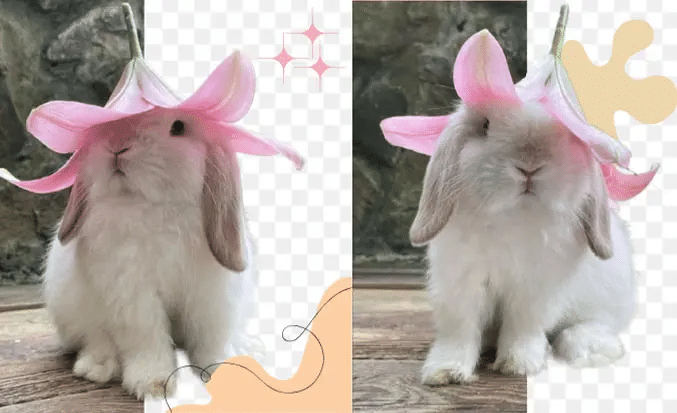
AI Background Removal: Clean, Fast, and Simple
Background removal is one of the most common tasks in image editing, and it can be a pain when done manually. Whether you need to cut out the background of a product shot, isolate a portrait, or remove distractions from an image, traditional methods often require time-consuming, meticulous work.
With AI background removal tools, you can remove the background in seconds without sacrificing quality. The AI understands the subject in your image and can separate it from the background while keeping sharp edges and details intact.
For example, Free Image Background Remover is a perfect tool for this task. It allows you to upload an image and automatically removes the background, leaving you with a clean, transparent image ready for further use.
Competitor Comparison for Background Removal Tools
| Tool | Strength | Common Limitation | Why Ez-style tools stand out |
|---|---|---|---|
| Remove.bg | Fast, automatic background removal | Free version has limited downloads | More consistent with fine details and edges |
| Canva Background Remover | Simple and integrated | Limited for detailed, complex images | Better for precise, clean extractions |
| Clipping Magic | Interactive editing options | Requires manual input for difficult backgrounds | Automated process for users who want speed |
| PicWish | Free background removal with cloud-based solution | Some images may require touch-up | Reliable in maintaining subject quality |
Why it works so well for creators:
The AI background removal feature in tools like Free Image Background Remover makes the process seamless, saving you hours of work. With no need for manual clipping or precision tools, you get high-quality results with just a few clicks.
AI Image Upscalers: Boost Your Resolution Without the Blur
While background removal clears your images, AI image upscaling ensures that those images look sharp and professional, no matter where you use them. Whether you’re resizing for a website, print ad, or social media, image upscaling is essential for keeping visual quality intact.
Traditional resizing often leads to blurry, pixelated images. But with AI, the tool analyzes your image, detects details, and reconstructs the missing data, making your image higher resolution without losing quality. It’s the perfect tool for improving product photos, restoring old images, and enhancing visuals before posting or printing.
For example, Free AI Image Upscaler Online offers a simple, effective solution for upscaling low-resolution images, ensuring that they look crisp and clean for any use.
Competitor Comparison for AI Image Upscalers
| Tool | Strength | Common Limitation | Why Ez-style tools stand out |
|---|---|---|---|
| Topaz Gigapixel AI | Industry-leading detail restoration | Paid, heavy on system resources | Instant results, browser-based and no install required |
| Let’s Enhance | Easy cloud-based upscaling | Credit limits, some paid features | No hidden costs for high-quality, free upscaling |
| Upscayl | Free and open-source | Hardware-dependent | Fast and consistent results with no installation |
| Icons8 Smart Upscaler | Simple interface and fast | Limited control over specific features | More natural texture retention without over-sharpening |
What matters most to creators:
AI upscalers like Free AI Image Upscaler Online allow creators to improve image resolution without losing the authenticity of the texture or details. This process helps ensure that images remain professional and sharp, even when enlarged for print or larger web formats.
Why These Tools Work Best Together
Using both AI background removal and AI upscaling together allows for a seamless editing workflow. Here’s how creators typically use them:
- Start with the image you want to work with.
- Remove the background using an AI-powered tool to clean up the image.
- Use an AI upscaler to enhance the resolution and ensure the final image is crisp and high-quality.
- Export your final result, ready for use in any format.
This two-step process allows creators to transform low-quality images into professional-grade visuals in record time.
The Future of Image Editing: Faster, Smarter, More Accessible
The combination of AI background removal and AI image upscaling is not just a trend—it’s the future of image editing. These tools make professional results accessible to everyone, regardless of skill level, and enable creators to focus on their ideas instead of wrestling with complex software.
Whether you’re a business owner needing quick product photos, a content creator optimizing your Instagram posts, or a designer preparing images for print, AI tools like Free Image Background Remover and Free AI Image Upscaler Online are game-changers that simplify your workflow and enhance your final results.
Final Thoughts
AI tools are not here to replace creativity—they’re here to speed up the process and make visual work more accessible. With AI background removal and AI image upscaling, you can transform any image into something professional, without spending hours in a complicated program. These tools are all about faster, more efficient workflows that let you focus on your content, not your tools.
With these game-changing AI features, editing is no longer a chore. It’s a creative advantage that saves you time, helps you work smarter, and ensures your visuals always look top-notch.