


In today's hyper-competitive digital landscape, capturing an audience’s attention is harder than ever. Whether you are a vlogger on YouTube, a brand running campaigns on Instagram Reels, or a trendsetter on TikTok, the visual quality of your content plays a massive role in your success.
Social media algorithms are designed to favor high-retention content. If a viewer scrolls past your video within the first three seconds because it looks blurry, grainy, or poorly lit, the algorithm takes note and stops pushing your content. In an era where even budget smartphones have high-resolution screens, delivering crisp, professional-looking footage is no longer optional—it’s the baseline.
The Hidden Cost of Poor Video Quality
Many content creators fall into the trap of believing that the story alone will carry a video. While narrative is crucial, poor visuals can be incredibly distracting.
Imagine filming a brilliant tutorial, only to realize later that the lighting was too dim, or capturing a spontaneous travel vlog where your hands were shaking. Additionally, when you transfer files or download clips from the internet to use as B-roll, they often suffer from compression and low resolution. Posting these sub-par videos directly can harm your channel's credibility and subscriber growth.
Fortunately, you don’t need to throw away your flawed footage or invest thousands of dollars in high-end camera gear. The secret lies in post-production video enhancement.
How Post-Production Rescues Your Footage
Video enhancement is the process of using software algorithms to improve the visual fidelity of your raw footage. If you have older clips or heavily compressed files, figuring out how to upscale video is a fundamental skill that can dramatically breathe new life into your content. Upscaling analyzes the existing pixels in a low-resolution video and intelligently generates new pixels to create a sharper, higher-resolution output, such as turning a standard 1080P clip into a stunning 4K masterpiece.
However, resolution is only one part of the puzzle. True video enhancement also addresses lighting, noise, and stability.
The All-In-One Solution for Creators
For creators who want professional results without spending weeks learning complex color-grading and VFX software, using a dedicated, user-friendly tool is the best approach. This is where Aiseesoft Video Converter Ultimate truly shines.
While its name highlights its powerful format conversion capabilities, it is highly regarded among creators for its built-in "Video Enhancer" toolbox. It offers four essential functions designed specifically to rescue and elevate everyday footage:
Upscale Resolution: With a single click, the software uses advanced algorithms to upscale lower-resolution videos to HD or 4K. It sharpens edges and enhances details, making your video look pristine on large monitors and modern smartphones alike.
Optimize Brightness and Contrast: Bad lighting can ruin a great shot. Instead of manually tweaking color wheels, this tool automatically balances the light and dark areas of your video, revealing hidden details in shadows and toning down overexposed highlights.
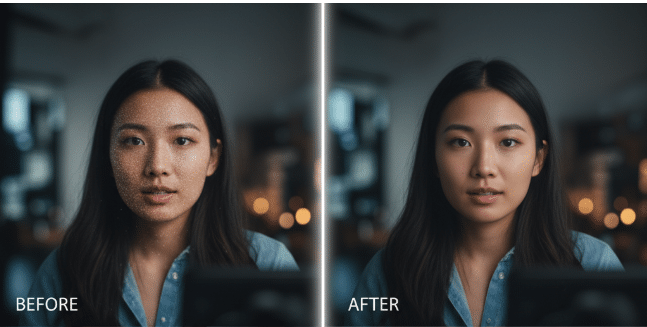
Remove Video Noise: If you shoot in low-light environments, your footage will likely suffer from digital noise (that annoying "grainy" or "snowy" effect). The software effectively filters out this dirt-like noise, resulting in a cleaner, smoother image.
Reduce Video Shaking: Handheld smartphone footage is notoriously shaky. The built-in stabilization feature compensates for camera movement, delivering steady, cinematic shots that look as though they were filmed on a professional gimbal.
Final Thoughts
As a content creator, your videos are a direct reflection of your brand. You shouldn't let minor hardware limitations or challenging shooting environments hold you back. By leveraging modern enhancement tools to upscale resolution, fix lighting, and stabilize movement, you can ensure that every video you publish on YouTube or TikTok meets the high visual standards your audience expects. Stop letting low-quality footage kill your reach—start enhancing your videos today.