


A veteran productivity tester has made a clean break from Google Docs in favor of Craft, citing a unified home for tasks, a fresher writing experience, and a newly available Android app that finally closes the platform gap. It’s a personal switch, but it taps into a broader trend: users want document tools that feel cohesive, fast, and thoughtfully designed, not just entrenched.
Why Craft Beats Google Docs For Daily Work
The sticking point wasn’t raw capability so much as orchestration. Google’s suite is powerful—Docs, Calendar, Tasks, and Keep can carry most workloads, and Google has steadily added connective tissue like smart chips and Tasks integration. But in practice, many users still bounce between apps to manage a single project, which heightens context switching and fragments attention.
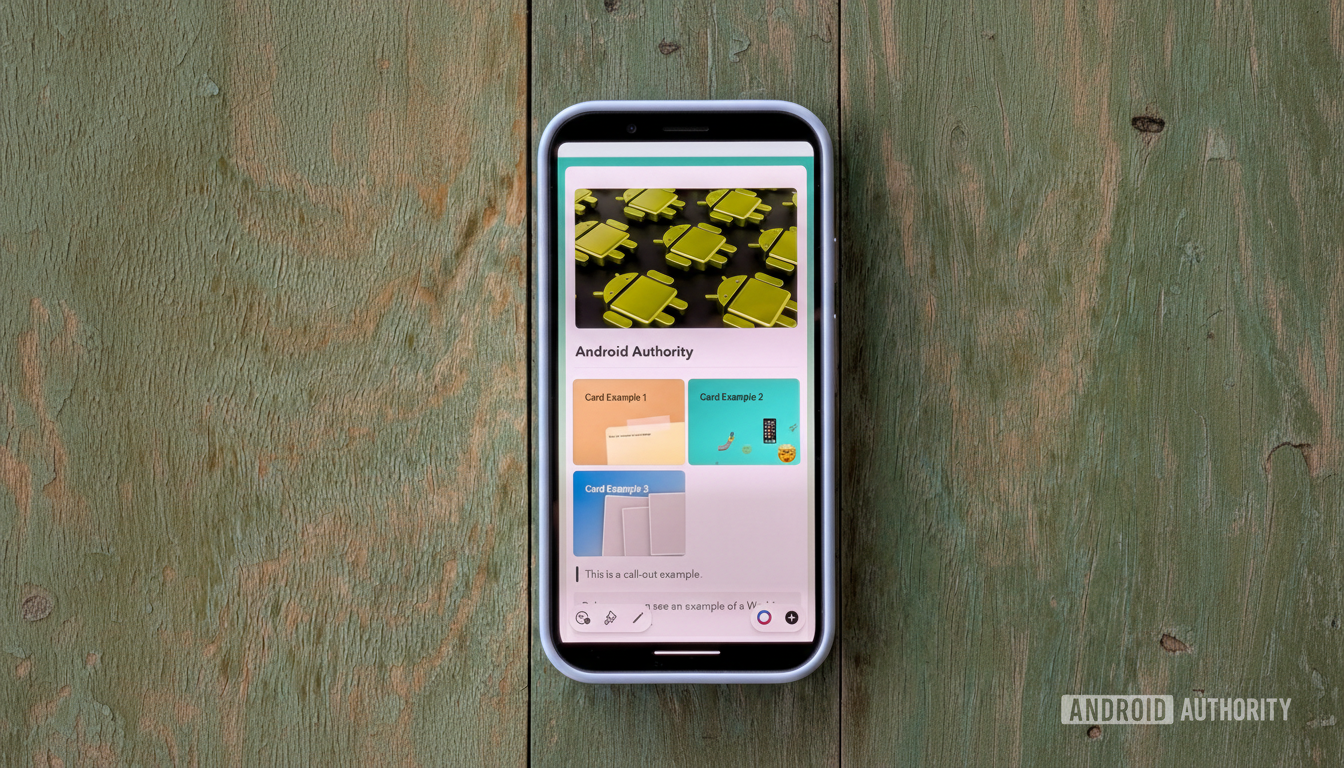
Craft’s answer is a genuine home base. Tasks created across documents flow into a single Tasks view, organized by due date and source doc. That bird’s-eye snapshot reduces the shuffle between planning and doing. It’s the difference between “where did I put that list?” and “what’s next right now?”—a subtle shift that, as Harvard Business Review has noted in studies on context switching, can materially influence output over time.
Google has made strides, especially for enterprise and education accounts that can turn comments and checklists into actionable tasks. But for personal accounts, the experience is still inconsistent. Given that Google says Workspace serves over 3 billion users globally, that gap matters. For creators and small teams not deeply embedded in Workspace, Craft’s built-in structure can feel immediately less scattered.
Design And UX That Invite Focus And Reduce Friction
Docs remains utilitarian by design. Craft leans the other way: modern, tactile, and intentionally delightful. The basics—headers, color themes, and backgrounds—look polished out of the box. But it’s the “rich blocks” that change the feel: whiteboards, spreadsheet-like collection tables, smart links with previews, embedded files, and internal cards that elegantly reference other pages.
Even micro-interactions feel considered. Subtle sound design (a pencil scratch on task completion, gentle paper rustle on new docs) and a distraction-trimming Focus Mode make long writing sessions less of a grind. This attention to UX detail isn’t frivolous; it nudges you back into flow. Microsoft’s Work Trend Index has repeatedly underscored how friction and interruptions degrade deep work, and Craft’s design seems built to minimize both.
The result is a document that doesn’t just hold information—it guides it. Cards connect work without breaking stride, separators can be made distinctive instead of generic, and pages can be styled to signal purpose. For creators who live in their editors, that matters every single day.
Android Beta Arrives With Rapid Updates And Fixes
One practical reason this switch took time was platform availability. Craft, long polished on Apple devices, is now on Android in beta. The first release prioritizes feature parity over flourish; animations aren’t as silky as on iOS or macOS, and the app feels closer to the impressive mobile web version than a fully native build. Still, it’s more than serviceable for drafting, organizing, and checking tasks on the go.
What stands out is the product cadence. Craft’s team iterates fast and in the open, with active communities on Reddit and Slack where users swap workflows and the developers frequently weigh in. That loop—feedback to ship—has kept the app evolving at a clip that rivals much larger players.
Where Craft Still Falls Short For Security And AI
Security-conscious users will note Craft currently lacks end-to-end encryption. Data is encrypted in transit and at rest, which aligns with many mainstream tools, but it’s not zero-knowledge. For highly sensitive material, alternatives like Standard Notes or Apple Notes’ locked notes offer E2EE, while Notion and several others sit in the same camp as Craft. For most work, Craft’s model is fine; for medical records or critical personal data, think twice.
On AI, Craft Assistant supports models from Apple, OpenAI, and Meta, but there’s no Gemini option yet. That’s a miss for Android-first users who want consistent system-level AI. Local model support partly offsets privacy concerns, though power users will want clearer controls and provenance cues over generated text.
The Bottom Line On Switching From Google Docs To Craft
For teams living inside Google Workspace, Docs still wins on ubiquity and enterprise guardrails. But for individual creators and small groups who crave a unified writing environment with built-in task oversight and a design that sparks focus, Craft is a compelling step up.
The switch here wasn’t about chasing novelty—it was about subtracting friction. After sustained use, the verdict is clear: less tab-juggling, a stronger sense of “home,” and an editor that makes work feel just a bit more crafted. If Docs feels like duty, Craft feels like momentum.