


Nintendo’s 2025 Year in Review is live, and the company isn’t just tallying the past 12 months. For the first time, the wrap-up includes lifetime stats for your original Switch, a thoughtful coda as the platform transitions toward its next generation. The recap shows your most-played games, total hours, genres, and monthly highlights, then zooms out to chart your history from the year you first powered on a Switch.
What’s new in this year’s wrap-up and lifetime view
The headliner is the lifetime view. You’ll see a year-by-year timeline starting from 2017 (or whenever you joined), listing your most-played title each year, the first date you launched it, total time spent, and even curated screenshots. It’s a personal museum of your Switch era, and notably, it spans all the way through December activity to provide a true annual snapshot.
- What’s new in this year’s wrap-up and lifetime view
- How to access your report and check privacy settings
- Lifetime stats as a farewell to the first Switch
- How it compares to other platforms and recap features
- Tips to get the most from your recap and play history
- Why this matters now for Nintendo players and accounts
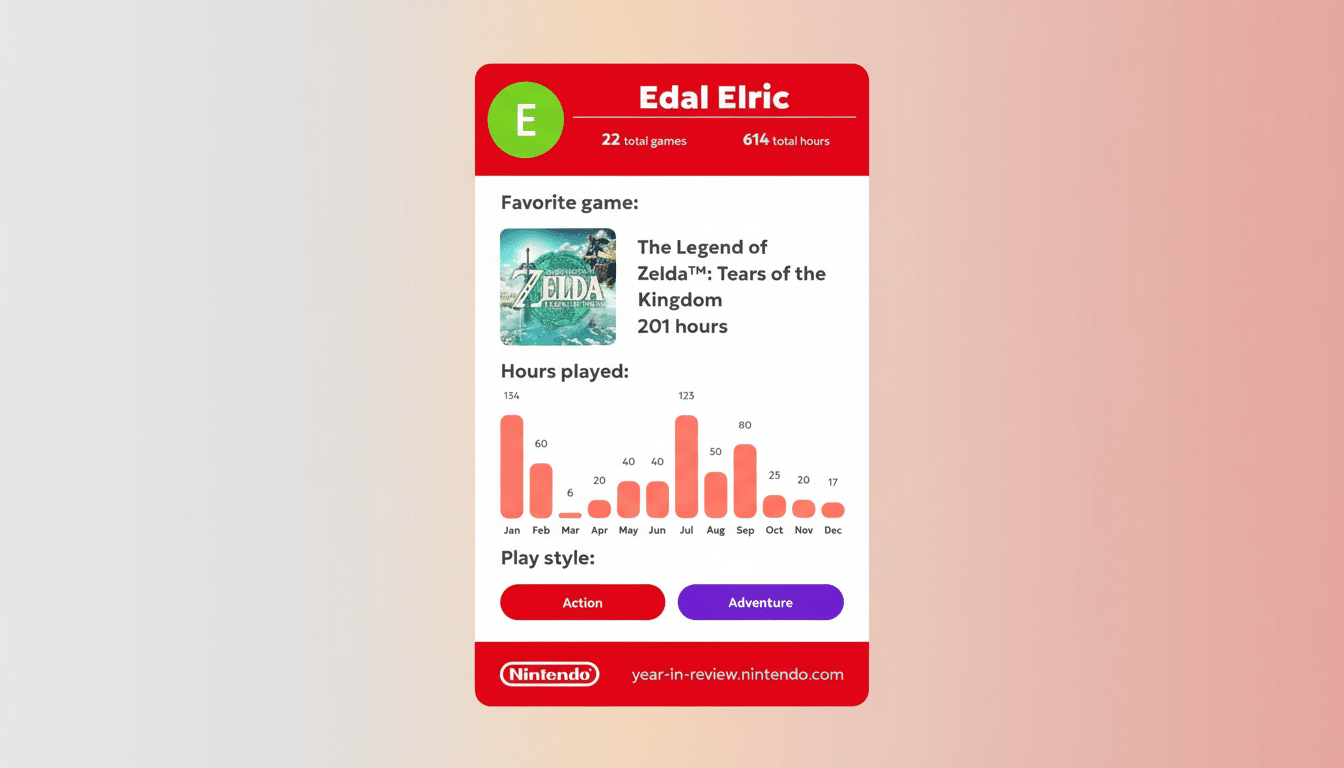
There’s also a “gaming style” section that identifies your dominant genre for 2025 and surfaces the next six where you spent significant time. As with prior recaps, you can pick a favorite game of the year, which feeds into a shareable card for social platforms. The presentation is cleaner and more granular than previous years, and it finally addresses a long-standing community request to see more than just the last 20 games in your on-device activity list.
How to access your report and check privacy settings
Sign in with your Nintendo Account when prompted on the Year in Review page. If your report seems sparse, check your account privacy settings and ensure play data sharing is enabled; historically, disabling it can limit what appears. The recap reflects all profiles tied to your account, so family users may want to toggle to the correct profile before sharing results.
If you want additional history beyond the recap’s presentation, your Switch profile includes a Play Activity list, and your Nintendo Account site shows purchase activity associated with the same account. On-device parental controls can also provide high-level playtime trends, useful if you manage multiple profiles.
Lifetime stats as a farewell to the first Switch
Including lifetime stats feels intentional. Analysts at Ampere Analysis and other industry trackers have pointed to the Switch entering a late-cycle phase, and Nintendo’s financial reports show the console has surpassed 140 million units shipped worldwide, placing it among the best-selling systems in history. A look-back is a fitting way to cap a generation that delivered hits like Mario Kart 8 Deluxe, which Nintendo lists as the platform’s top seller with over 60 million copies, and The Legend of Zelda: Tears of the Kingdom, which surpassed 20 million.
The lifetime timeline also doubles as a reminder of how player behavior evolves over a seven-plus-year cycle. Many users will see spikes that align with major releases or pandemic-era playtime surges, followed by shifts toward long-tail favorites like Animal Crossing: New Horizons or ongoing multiplayer staples. It’s a useful lens for understanding why Nintendo’s first-party titles maintain such long legs.
How it compares to other platforms and recap features
PlayStation’s Wrap-Up and Valve’s Steam Replay have set expectations for personal gaming recaps, but Nintendo’s lifetime arc is the differentiator this year. Whereas rivals focus squarely on the year, Nintendo is effectively closing the book on an era for many players by telling the whole story. The share card is also brisk and readable, highlighting your top game, total hours, and preferred genre without burying key stats.
One limitation remains: Nintendo’s recap centers on Switch-era data. If you want to revisit earlier generations, the 3DS and Wii U each have their own Activity Log on-device, and purchase histories are tied to your account records. For cross-era nostalgia, you’ll still be doing a bit of manual archaeology.
Tips to get the most from your recap and play history
- Spot meaningful trends: Look for month-to-month shifts when a new release landed or when co-op play picked up. This can inform what you buy next—or which backlog title you actually stick with.
- Compare across years: The lifetime view helps you see whether you lean toward long-form RPGs in winter, platformers during holidays, or evergreen party games on weekends. Patterns help you plan purchases and storage needs.
- Right-size your sharing: The share card is designed for quick social posts, but the detailed breakdown is worth saving privately. Screenshots of the lifetime timeline can be a fun keepsake as the hardware generation winds down.
Why this matters now for Nintendo players and accounts
A generation-spanning recap isn’t just fan service—it’s a smart bridge to what comes next. As libraries and cloud saves migrate forward, a clean record of your play history underscores the value of the Nintendo Account ecosystem and the staying power of iconic franchises. Expect this year’s wrap-up to become a reference point when you eventually boot up your next Nintendo system and decide which classics to reinstall first.