


Every so often a Linux distro nails the first impression so completely it resets expectations. StratOS, an Arch-based distribution that ships in Hyprland, GNOME, and Niri editions, is one of those rare builds—polished, cohesive, and immediately usable without the usual post-install tinkering.
What Sets StratOS Apart From Other Arch-Based Distros
The Hyprland edition is the showstopper. Hyprland is a dynamic tiling Wayland compositor designed for speed, fluid animation, and keyboard-first workflows. It combines the efficiency tiling fans expect with a visual finish that rivals traditional desktops.
- What Sets StratOS Apart From Other Arch-Based Distros
- Design That Balances Style and Clarity for Everyday Use
- Power Tools Included Out of the Box for Productivity
- Arch Under the Hood: Rolling Releases and the AUR
- Who Should Try It: Matching Editions to Your Workflow
- Why It Matters for Linux on the Modern Desktop
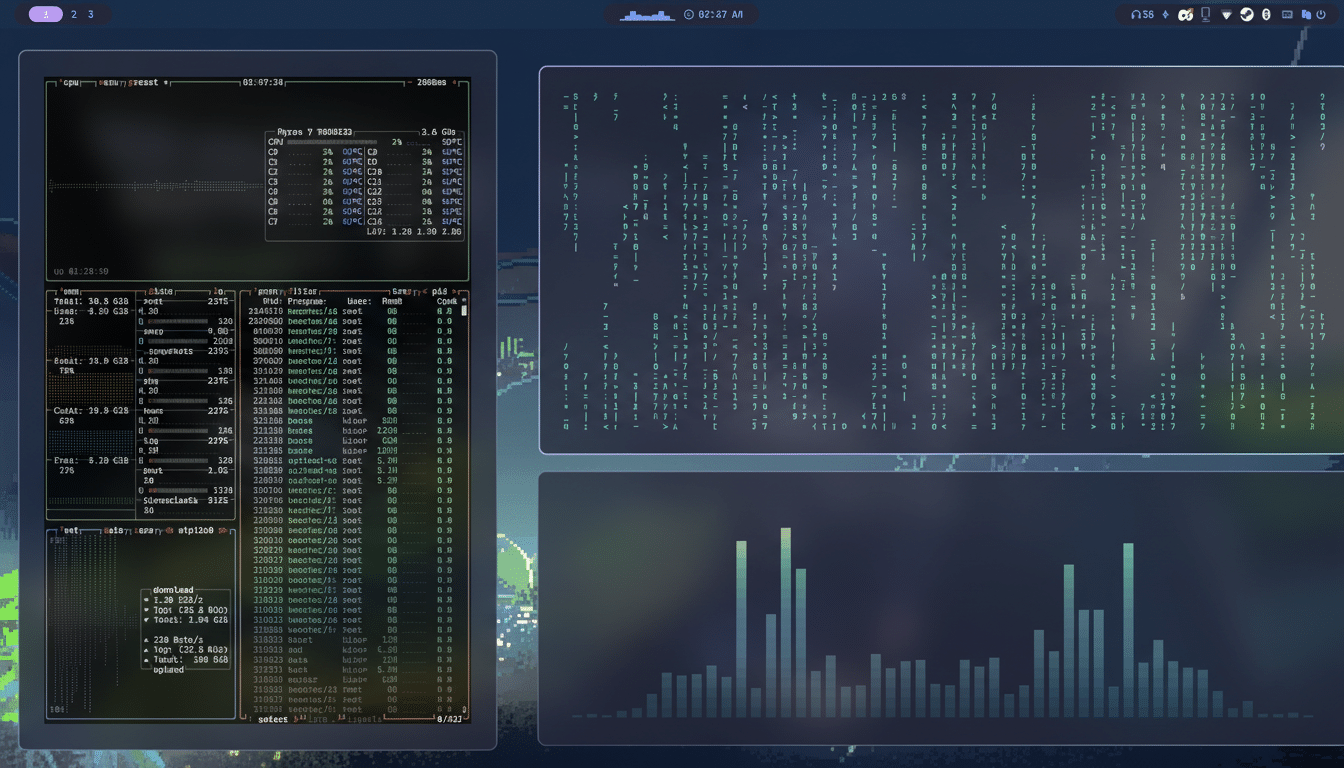
StratOS leans into that strength with a layout that makes sense on day one. Workspaces, system stats, clock, and subtle status indicators are arranged with intent, eliminating the “where do I click next” friction common to tiling setups. It’s the rare keyboard-driven desktop that feels welcoming rather than austere.
Design That Balances Style and Clarity for Everyday Use
Out of the box, StratOS favors a dark theme with tasteful translucency, consistent typography, and rounded accents that play perfectly with Wayland’s rendering. It looks modern without straying into gimmick territory—animations are restrained, and contrast is tuned for readability.
Crucially, the small touches land: a tidy resource monitor, uptime and notifications presented without clutter, and workspace indicators that feel instant. With Kvantum Manager available for Qt theming, the overall visual language stays uniform across apps.
Power Tools Included Out of the Box for Productivity
StratOS prioritizes capable defaults. You’ll find Ghostty for a fast GPU-accelerated terminal, Conky for lightweight system telemetry, Emacs and Neovim for editing, Thunar for file management, and the Zen Browser—a performance-focused Firefox fork—preinstalled. It’s a toolkit aimed squarely at people who build, test, and automate.
The app launcher (typically Super + Space) surfaces common actions without reaching for the shell: file search, theme switching, power controls, emoji search, configuration entries, and more. It’s a thoughtful layer that lowers the barrier to living fully in a tiling environment.
Arch Under the Hood: Rolling Releases and the AUR
As a rolling-release system, StratOS inherits Arch Linux’s latest kernels and packages via pacman, with easy access to the AUR for community software. That means cutting-edge drivers and rapid updates—ideal for Wayland-forward desktops and newer GPUs.

There’s no GUI app store by default, which is standard in many Arch derivatives. Users who prefer graphical management can install Pamac from the AUR with an assistant like yay. Pamac, developed by the Manjaro project, smooths out discovery, updates, and Flatpak integration while preserving the underlying Arch workflow.
Who Should Try It: Matching Editions to Your Workflow
The Hyprland flavor is best for experienced users or ambitious newcomers ready to embrace keyboard-centric navigation. If you’ve bounced off tiling in the past because it felt spartan, StratOS’s curated defaults might change your mind—this is tiling with taste.
If you’re easing in, the GNOME edition brings a gentler learning curve while retaining StratOS’s theme consistency and sensible defaults. There’s also Niri, a newer Wayland compositor with column-based tiling that’s gaining attention for simplicity and stability.
Why It Matters for Linux on the Modern Desktop
Linux continues to punch above its weight among developers—recent Stack Overflow surveys show strong adoption of Linux-based systems among professionals, commonly over 40%. Yet on the consumer desktop, StatCounter tracks Linux at roughly 3% share. Distros that pair power with polish help close that experience gap.
StratOS also reflects a broader industry shift toward Wayland. Projects like Fedora and Ubuntu have made Wayland the default, and compositors such as Hyprland are proving that performance, security, and design can coexist without compromise.
The takeaway is simple: StratOS with Hyprland feels crafted. It respects your time, looks fantastic, and delivers pro-grade tools without a weekend of dotfile spelunking. For users who value speed, aesthetics, and control, it’s one of the most compelling Linux desktops available right now.