


Samsung has previewed a unified AI image editor expected to debut with the next Galaxy S series, signaling a bigger push into on-device creativity tools and tighter integration across camera, gallery, and video workflows. Short teasers show the editor turning daytime scenes into convincing night shots, compositing multiple frames into a single image, and applying context-aware edits without hopping between apps.
What Samsung Showed in Early AI Editor Teasers
In a set of brief videos, Samsung demonstrates a single editing hub that appears to merge capture, photo, and video features. Quick examples highlight AI-assisted sky replacement, object transformations, and multi-shot merges that resemble bracketed exposure stacks but with generative fill to bridge gaps. The company says more details will arrive at the next Galaxy Unpacked, positioning the editor as a flagship capability for its upcoming phones.
While the teasers stop short of deep technical specs, the emphasis is clear: one tap to select a subject, one drag to relight or restyle, and one timeline to adjust stills and clips in the same place. That single-surface approach would remove much of the friction users face today when bouncing among the Camera, Gallery, and third-party apps for advanced edits.
Why a Unified Editor Matters for Mobile Creation
Most mobile edits fail not because people lack ideas, but because the workflow is disjointed. A unified editor condenses selection, relighting, resizing, background generation, and multiframe compositing into a continuous flow. For creators who publish fast, fewer context switches can mean minutes saved per post; scaled over a month, that is hours reclaimed. For everyday users, fewer tools to learn typically means more features actually get used.
The market context favors this move. Counterpoint Research projects that GenAI-capable smartphones will make up roughly 40% of shipments by 2027, and IDC tracks more than 1.1 billion smartphones shipped globally last year. If AI editing becomes a top-of-funnel feature—visible from day one in the camera—adoption jumps, and platform stickiness follows.
How It Compares to Current Photo and Video Tools
Samsung’s current Galaxy AI features, introduced on recent models, already include generative object repositioning and background fills, plus AI suggestions for common fixes. Google’s Magic Editor and Magic Eraser set a high bar for semantic selection and contextual fill, while Adobe’s Generative Fill in Photoshop has become a studio staple. The difference in Samsung’s teasers is not a single flashy trick, but the consolidation of multiple AI actions into a native, camera-adjacent workspace with apparent parity for photo and video.
If Samsung delivers consistent edge handling, physical lighting awareness, and temporal coherence for video edits, it could reduce the “AI tell” that often betrays composites. A credible step-up would include smarter shadows that match light direction, perspective-aware object scaling, and grain or noise harmonization so pasted elements blend with the sensor’s native texture.
On-Device AI and Privacy: Speed, Data, and Trust
Where edits run—on-device versus in the cloud—will shape both speed and privacy. Recent Galaxy devices mix on-device models for fast tasks with cloud models for heavier lifts using services such as Google Gemini. Expect the new editor to balance those paths dynamically based on task complexity and connectivity, with on-device NPUs handling selections and masks and cloud inference reserved for large generative fills.
Disclosure also matters. Samsung has already experimented with watermarks and metadata tags for AI-generated elements. Broader industry efforts like the Coalition for Content Provenance and Authenticity are moving toward standardized content credentials that travel with files. Clear labeling and export options would help this tool land well with publishers and platforms that now scan for altered media.
What to Watch at Galaxy Unpacked for the New Editor
Key questions remain.
- Will the unified editor be exclusive to new Galaxy S models or roll back to recent flagships?
- How much runs locally, and is there a cap before edits are offloaded to the cloud?
- Will Samsung offer pro controls—mask refinement, feathering, depth maps, LUTs, and curve-based relighting—so power users can override automation?
- What policies will govern watermarking, content credentials, and export formats for social platforms?
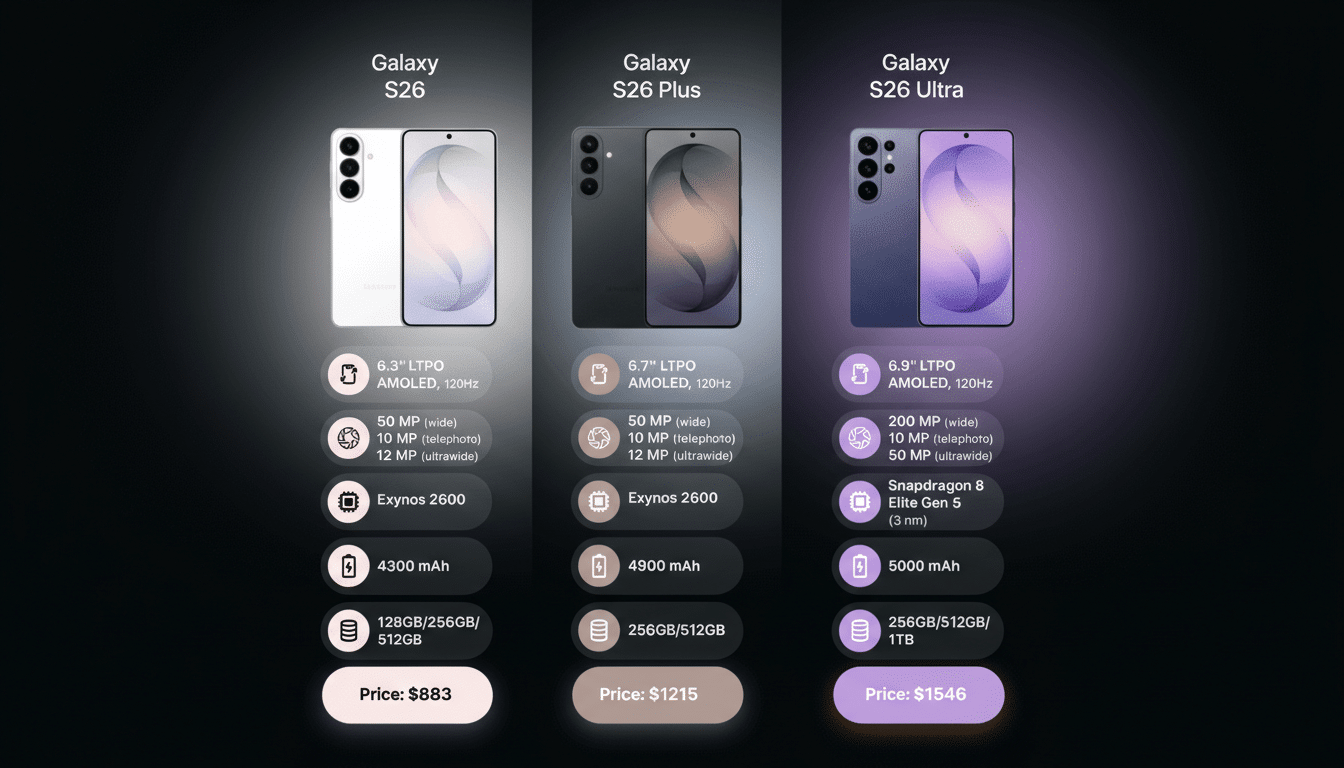
Samsung’s teasers suggest an everyday tool with pro-tier potential. If execution matches the promise—fast masks, faithful lighting, natural textures, and unified photo and video timelines—the Galaxy S26 family could turn AI editing from a novelty into a daily habit. The next reveal will show whether this editor is a polished front end on familiar tricks or a genuine rethinking of the mobile creative pipeline.