


A new index from MIT’s Computer Science and Artificial Intelligence Laboratory maps a fast-evolving reality: the most influential AI agents now span very different jobs and levels of independence, from careful chat assistants to hands-off browser operators. The study profiles 30 leading systems and shows that “agentic” software has quietly moved from novelty to a practical layer in work, research, and software operations.
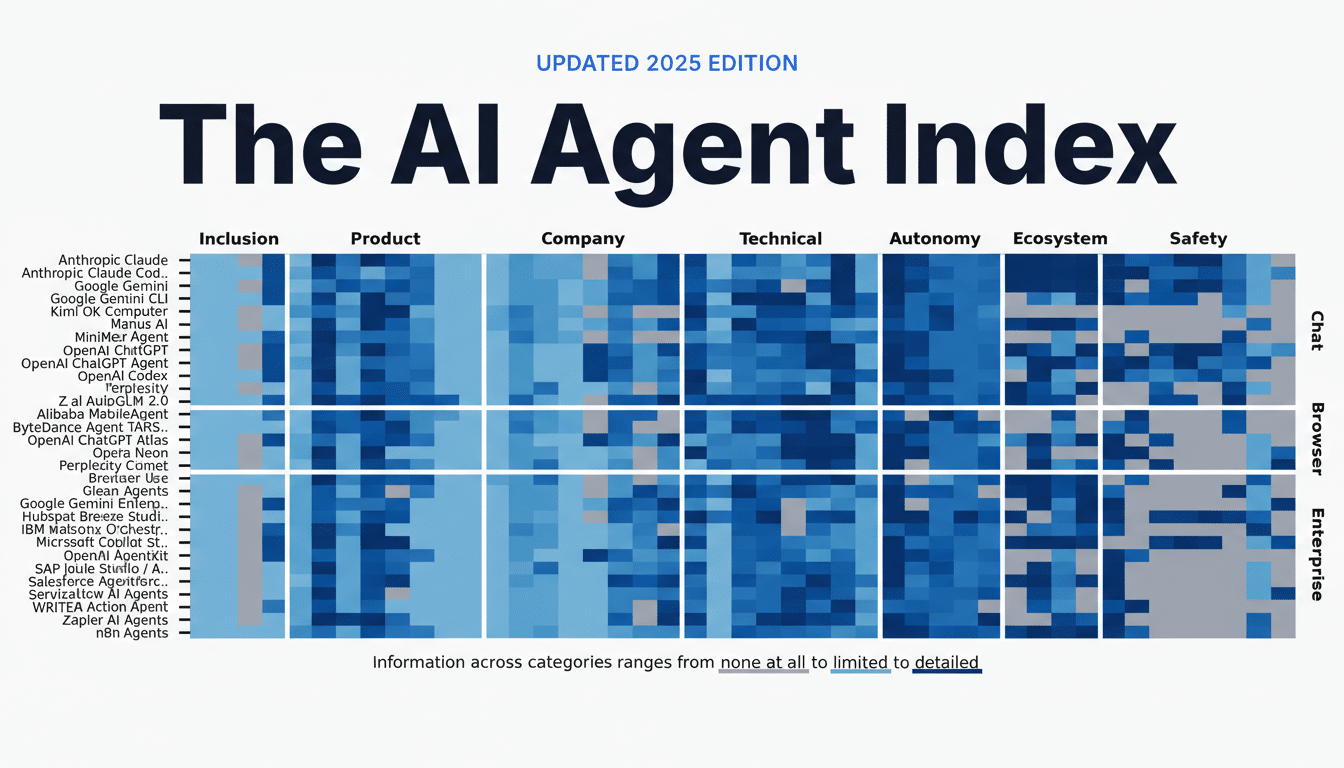
The MIT team analyzed 1,350 data points across products to compare capabilities, interfaces, and safeguards. The big takeaway is less about one “best” agent and more about fit for purpose. Some agents excel at orchestrating enterprise workflows; others shine when unleashed in a browser; chat-first tools remain deliberately constrained to preserve human oversight.
Inside the MIT AI Agent Index and Its Core Clusters
Three clusters dominate the landscape, covering enterprise workflows, chat applications, and browser-based tools.
- Enterprise workflow agents (13 of the 30) layer automation atop business systems. Think of Microsoft 365 Copilot, ServiceNow’s agentic tooling, or n8n-based orchestrations that trigger actions across email, CRM, and IT events.
- Chat applications with agentic tools (12 of the 30) offer conversational front ends with deep tool access. That group includes coding-centric aides such as Claude Code, and broader assistants like ChatGPT Agent or Manus AI that can call APIs, manage files, and draft content on request.
- Browser-based agents (5 of the 30) act directly on web pages and desktop environments. Perplexity Comet, ChatGPT Atlas, and ByteDance’s Agent TARS are built to navigate, click, form-fill, and transact. MIT flags these as higher risk because they can run in the background, trigger on events, and execute actions without a prompt-by-prompt pause.
Where AI Agents Deliver the Most Value Across Tasks
- Research and synthesis show up most often: 12 of the 30 agents specialize in gathering sources and compressing findings into briefs. That includes consumer assistants that scan the web and enterprise agents that mine internal knowledge bases, with examples like Glean and Gemini Enterprise enriching results with company context.
- Workflow automation ranks a close second with 11 agents. These tools route support tickets, update records, draft replies, and kick off approvals across HR, sales, and IT. The business benefit is less about flashy autonomy and more about reliable handoffs between systems—where a missed step can be costlier than a slow one.
- Seven agents emphasize GUI and browser controls for tasks such as booking, ordering, and form completion. In practice, teams use them to offload repetitive web work—screen-scraping is giving way to screen-doing. The operational caveat: these agents need tight guardrails around payment, identity, and data residency.
The Autonomy Spectrum From Chat Assistants to Browsers
MIT places chat-first assistants at the lowest autonomy level. Systems like Anthropic’s Claude, Google’s Gemini, and OpenAI’s ChatGPT typically execute one tool call or reasoning chain, then hand control back to the user. That turn-based rhythm keeps humans in the loop and audit trails clean.
Browser agents sit higher on autonomy. Once prompted, Perplexity Comet and peers proceed through multi-step plans without mid-execution steering. That makes them powerful for end-to-end tasks—and riskier if prompts, permissions, or site states shift unexpectedly during runs.
Enterprise platforms span both modes. During design, users configure triggers, actions, and guardrails through visual canvases; some platforms now auto-suggest flows. After deployment, these agents run on events—a new email, a ticket, a database change—often without human intervention. Products cited in the study include Glean, Gemini Enterprise, IBM watsonx, Microsoft 365 Copilot, n8n, and OpenAI AgentKit.
For sensitive operations, several vendors add “watch modes” or CLI confirmations. ChatGPT Agent and Atlas can request approval for file edits or command execution, and some browsers like Opera’s experimental builds surface real-time oversight panes. The design pattern is converging on explicit consent for destructive actions.
Who Builds These Agents and Why That Concentration Matters
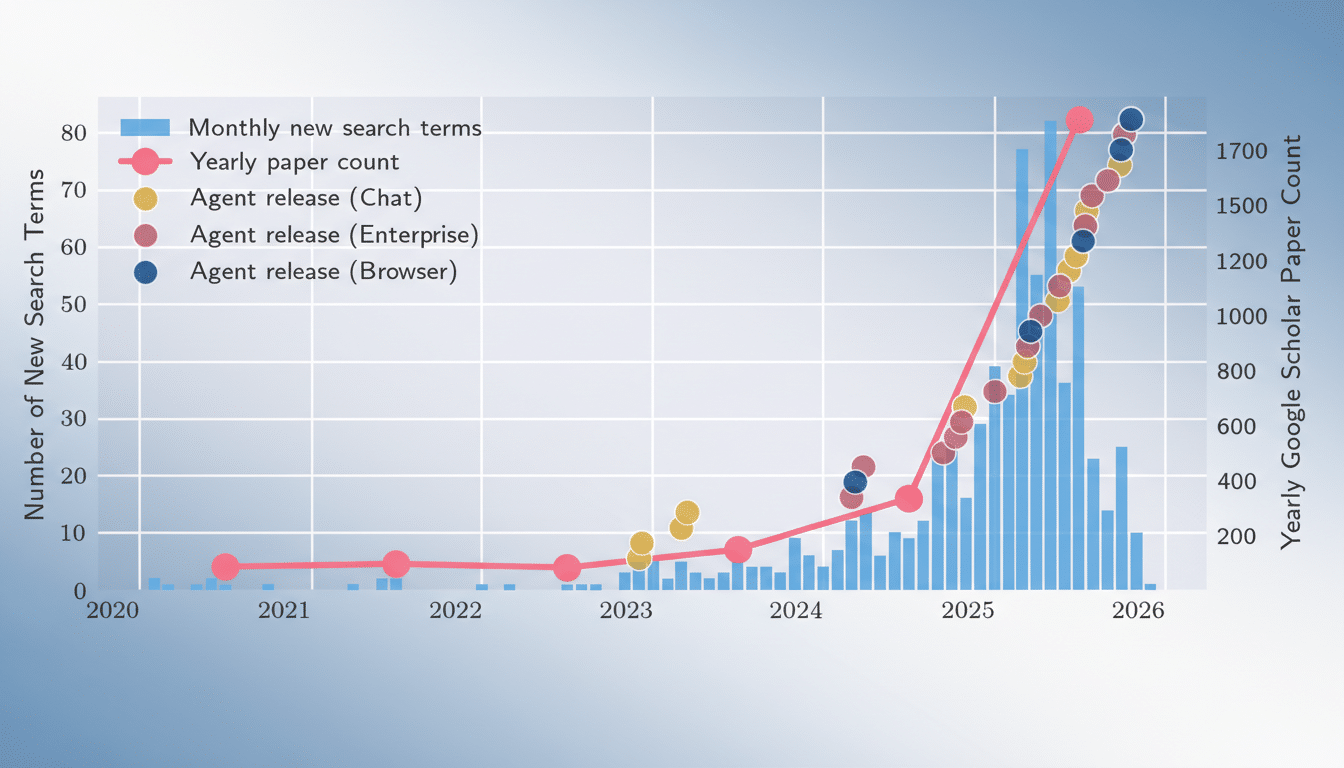
Developers are concentrated in the US and China, according to the index, which mirrors broader investment trends in foundation models and cloud platforms. That concentration shapes available integrations, compliance defaults, and language coverage. Regions with stricter data rules are more likely to adopt enterprise-first agents that support private deployments and fine-grained logging.
How to Choose the Right AI Agent for Your Workflow
Match the agent to the workflow.
- If the job requires system-to-system reliability and auditability, enterprise workflow agents with event triggers and role-based controls are the safer fit.
- For exploratory research, chat agents with strong tool access strike a balance between speed and oversight.
- When tasks demand hands-on web interaction, browser agents deliver speed—but only with well-defined scopes and spending limits.
Operationally, leaders should insist on three basics:
- Transparent logs of every action
- Sandboxed credentials per task or run
- Measurable outcomes such as cycle-time reduction or error-rate deltas
Start with low-stakes workloads, then graduate to higher autonomy as guardrails and monitoring mature.
The MIT index makes one thing clear: there is no single “agent future.” Instead, organizations will blend chat assistants, workflow orchestrators, and browser operators—each with the autonomy appropriate to the job. The winners will be the teams that design for control first, then scale what proves dependable.