


Microsoft Copilot has quietly added a new way to personalize your chats by tapping information from other Microsoft services you use. Buried under a Memory setting labeled “Microsoft usage data,” the assistant can ingest signals from Bing, MSN, Edge, and related products to shape responses. If that sounds unsettling, the good news is you can turn it off—and wipe what’s already saved.
The change, first spotted by Windows Latest and reflected in Microsoft’s own Copilot help materials, expands the assistant’s scope beyond what you type into a chat. Microsoft positions the feature as convenience: fewer repeated explanations, more relevant answers. But the quiet rollout and the cross-product nature of the data sharing raise obvious privacy flags for many users.
What Changed in Copilot Memory and Personalization
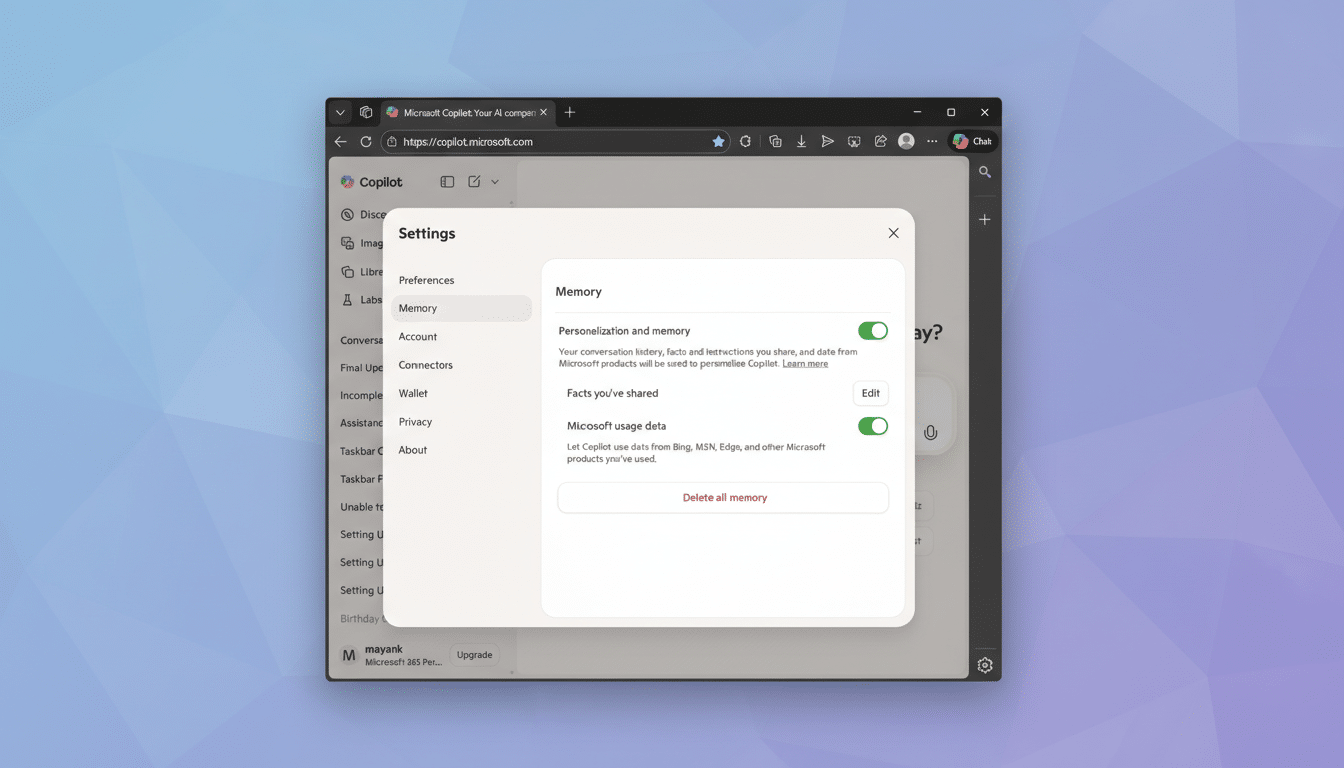
Copilot’s Memory section now lists three key controls: a master toggle for “Personalization and memory,” a “Facts you’ve shared” area where the assistant stores details you explicitly provide, and the new “Microsoft usage data” option. When enabled, that last toggle lets Copilot reference information linked to your Microsoft account from across Bing, MSN, Edge, and other services to tailor replies.
According to Microsoft’s Copilot FAQ and Privacy Statement, conversation data and related signals may be used for limited purposes such as performance monitoring, troubleshooting, abuse prevention, and product improvement. The company says it does not use your chats for foundation model training by default. There is a separate improvement setting that governs whether your content helps enhance Microsoft AI services—and you can disable that as well.
What Data Could Be Included in Microsoft Usage Data
Microsoft doesn’t publish an exhaustive list, but “usage data” typically covers signals like search activity in Bing, content and topic preferences from MSN feeds, and contextual cues from Edge. In practice, that might mean Copilot remembers your sports team from your MSN interests, infers a cooking preference from past Bing queries, or tailors summaries if you commonly browse certain tech topics in Edge.
Importantly, the setting is about personalization, not ad targeting. Microsoft states that ad personalization is controlled separately in your Microsoft Account’s Privacy dashboard under “Personalized ads & offers.” If you want fewer data-driven surprises, you’ll need to review both areas.
How to Opt Out of Copilot Usage Data in Seconds
- On the web, open Copilot, sign in, select your account name in the lower-left corner, choose Settings, then Memory.
- In the Copilot mobile app for iOS or Android, tap the menu icon, tap your name, and open Memory.
- First, switch off “Microsoft usage data.”
- Then, if you prefer a clean slate, turn off the master “Personalization and memory” toggle.
- To purge what Copilot has already saved, select “Delete all memory.”
- If you’ve entered details like your job role or preferences, use “Edit” next to “Facts you’ve shared” to remove items individually.
If you keep personalization on, be deliberate about what you reveal. Microsoft itself advises not to share sensitive information such as financial details, health data, or anything you wouldn’t want stored, even temporarily.
Ad Personalization, AI Training, and Work Account Rules
Remember that ad settings live outside Copilot. To limit targeted ads across Microsoft services, visit your Microsoft Account’s Privacy settings and turn off “Personalized ads & offers.” This does not affect Copilot’s Memory, so adjust both if you want maximum privacy.
Model training and product improvement are also governed separately. Look for the setting that controls whether your content can help improve Microsoft AI experiences and switch it off if preferred. This is distinct from the new “usage data” toggle.
Using a work or school account? Data policies may differ under Copilot for Microsoft 365, which follows your organization’s compliance and retention rules. If you’re unsure how Memory or usage data behaves in your tenant, check with your IT administrator.
Smart Privacy Habits for Safer AI Chats Today
Even with toggles off, the safest approach is to treat AI chats like semi-public spaces. Don’t paste confidential documents, remove personal identifiers where possible, and use the delete tools regularly. A Pew Research Center survey found that 81% of Americans feel they have little control over how companies use their data—good reason to favor opt-outs and minimal disclosure by default.
The bottom line: Copilot’s expanded memory can be helpful, but it shouldn’t be a surprise. Take two minutes to review the new “Microsoft usage data” setting, trim or erase what’s stored, and align your ads and improvement preferences. Personalization should work for you—not the other way around.