


Phones and laptops keep getting thinner, faster, and hotter—and their lithium batteries are carrying the load. When these cells misbehave, the results range from a swollen case to a smoky cabin on a flight. The good news is that most failures are preventable. Here’s why modern batteries still trip up our everyday devices, and six expert moves that cut your risk dramatically.
Why Lithium Batteries Fail In Phones And Laptops
At the heart of every smartphone and notebook is a lithium-ion or lithium-polymer cell that stores remarkable energy in a tight space. If internal damage, manufacturing flaws, or heat push the cell beyond safe limits, a runaway chemical reaction can ignite the electrolyte and vent flammable gases. That’s thermal runaway—the chain reaction that turns a warm battery into a fire in seconds.
Design pressure hasn’t helped. Ultra-thin chassis leave little room for impact protection or cooling. Fast charging drives high currents that elevate temperature. Over time, microscopic deposits can form inside cells, separators can be compromised, and the protective solid-electrolyte interface can degrade—especially when devices live at 100% charge or are frequently overheated.
Real-world reminders are everywhere. Samsung’s Galaxy Note 7 recall showed how a subtle design error can cascade into fires, while Apple’s 15-inch MacBook Pro battery recall prompted an FAA notice keeping affected units off flights. The Federal Aviation Administration has logged hundreds of battery-related smoke and fire incidents on aircraft since 2006, and the US Consumer Product Safety Commission continues to announce recalls of chargers, power banks, and laptops each year.
The Hidden Stressors You Can Control In Daily Device Use
Most failures aren’t freak accidents—they’re the result of everyday stress. Heat is the biggest enemy, whether from gaming, a sunbaked car, or charging under a pillow. Mechanical damage matters too: a dropped laptop can crease a pouch cell, and a bent phone can pinch the battery. Mismatched or counterfeit chargers can overdrive a device past what its power management expects.
Safety standards exist to catch these hazards—think UL 2056 for power banks, UL 62368-1 for IT equipment, and IEC 62133 for cells—but low-cost, noncompliant accessories are still common online. Buying from reputable brands and sellers does more for safety than any app setting ever will.
Six Ways To Cut Your Risk With Phones And Laptops
- Keep it cool and ventilated. Charge on hard, nonflammable surfaces with airflow; avoid couches, beds, and car dashboards. If a device gets unusually hot while idle or charging, unplug it and let it cool before trying again.
- Use certified power gear. Stick to the charger and cable your device shipped with or USB-IF-certified USB-C PD gear from known brands. Skip no-name fast chargers and questionable adapters. For Apple gear, look for MFi certification; for power banks, prefer units tested to UL 2056.
- Don’t live at 0% or 100%. Lithium cells are least stressed between roughly 20% and 80%. You don’t need to micromanage daily, but avoid frequent deep discharges and round-the-clock topping at 100%. Many phones and laptops now offer “optimized charging” or “battery health” modes—turn them on.
- Update firmware and drivers. Battery safety is partly software. Vendors regularly push updates that refine charging curves and thermal limits. Keep your OS, BIOS/UEFI, and device management apps current, especially on laptops with vendor battery utilities.
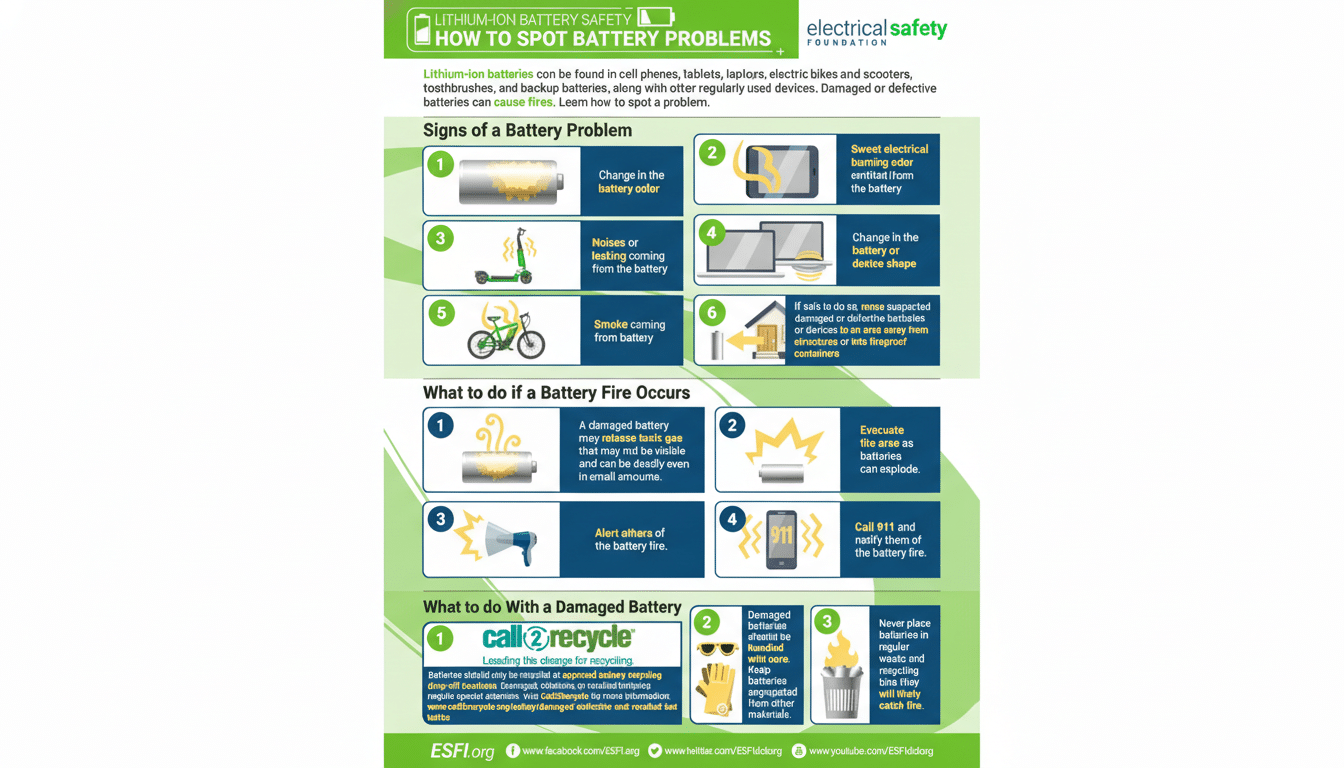
- Retire damaged or swollen packs. Warning signs include a lifting trackpad, a wavy phone screen, new gaps in the chassis, a sweet or solvent-like odor, hissing, or rapid self-discharge. Power down, unplug, and seek authorized service. Do not puncture or compress a swollen battery.
- Store and travel smart. For weeks-long storage, leave devices around 40–60% state of charge in a cool, dry place. When flying, keep spare batteries and power banks in carry-on only, with terminals protected; airlines follow FAA guidance and can confiscate recalled or damaged items.
Warning Signs And What To Do During Battery Emergencies
If a device smokes, pops, or vents hot gas, don’t panic—act fast. Unplug it if safe, move it away from flammables, and place it on a noncombustible surface. For small electronics, cooling with water or using a class ABC extinguisher helps; the National Fire Protection Association advises copious water to cool lithium-ion cells and prevent re-ignition. Evacuate and call emergency services if the fire persists.
After an incident, don’t toss the device in household trash. Follow local e-waste guidance or manufacturer take-back programs; many municipalities and retailers accept damaged lithium batteries in special containers.
What Comes Next In Battery Safety For Consumer Devices
Manufacturers are adding thicker separators, better thermal interface materials, and smarter battery management systems, while moving toward chemistries with wider safety margins in some categories. Solid-state cells promise gains but remain early for mass-market phones and laptops. Until then, disciplined charging, quality accessories, and attention to warning signs remain your best safety features.