


Huawei’s latest MatePad 11.5 S doubles down on premium hardware—especially its class-leading matte display—while conceding ground on endurance. The tablet feels purpose-built for note-takers and digital artists who value low glare and pen-on-paper tactility, but anyone chasing all-day battery life will need to plan around its power draw.
Design And Build: Thin Aluminum Body, Handle With Care
The MatePad 11.5 S adopts a clean, understated chassis: aluminum, 6.1mm thin, and roughly 515g. It’s light enough to hold for extended reading and sketching sessions, yet sturdy. There’s no stated IP rating for water or dust resistance and no marketed glass durability, so it’s a device to treat with care. Compared with similarly sized tablets like Apple’s 11-inch iPad Air and Samsung’s premium 11-inch models, the industrial design here is competitive without shouting about it.
- Design And Build: Thin Aluminum Body, Handle With Care
- Matte 2.8K 144Hz Display Leads The Story
- Performance And Audio: Capable Chipset and Loud Quad Speakers
- Battery Life Reality: 2.8K 144Hz Screen Demands Frequent Charging
- Stylus And Keyboard Accessories Enhance Note-Taking and Typing
- Software Ecosystem Caveats Without Google Mobile Services
- Early Verdict: Strong Creative Tablet With Shorter Battery Life
Matte 2.8K 144Hz Display Leads The Story
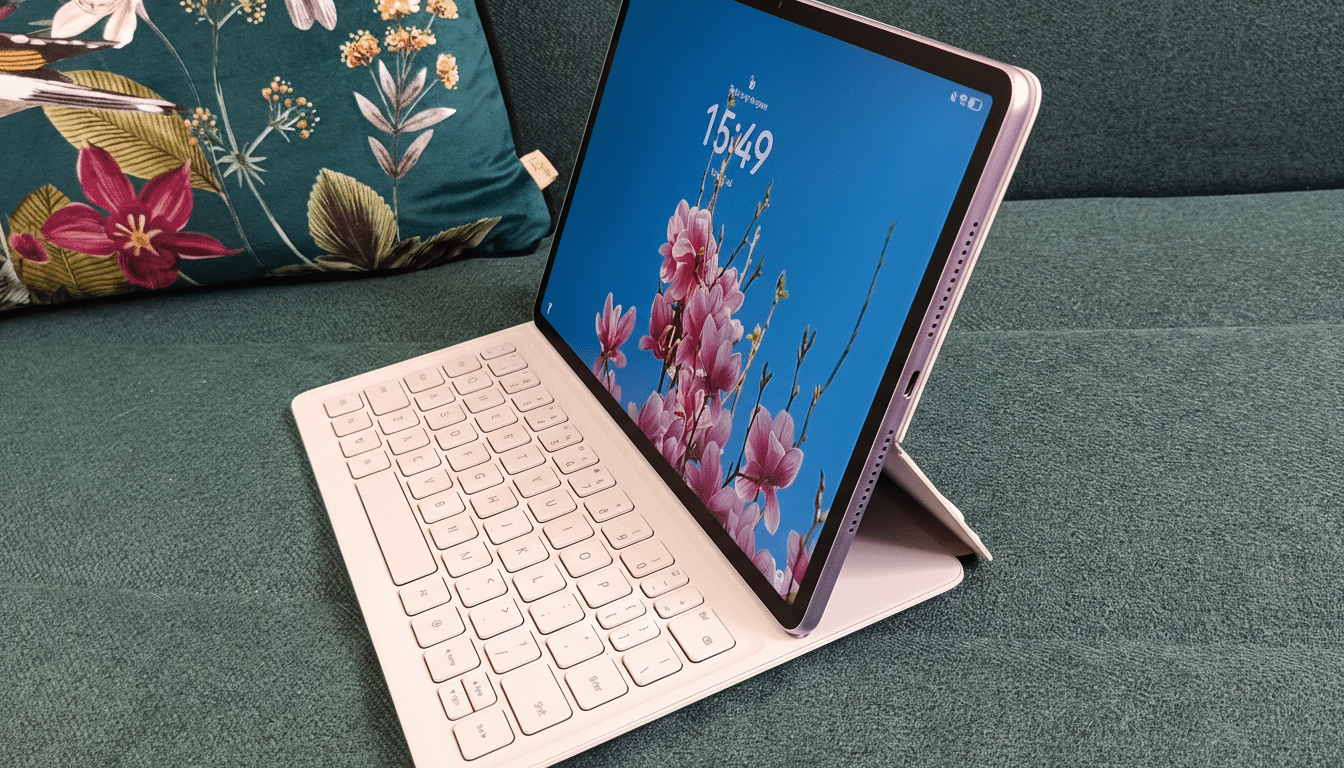
The screen is the headline. Huawei fits a 2,800 × 1,840 IPS panel that runs up to 144Hz and, more importantly, uses a nano-etched matte finish to dramatically cut reflections. Under overhead lighting, glare is subdued to the point where white pages stay readable, and the etched texture adds a convincing drag when used with a stylus. It evokes the “nano-texture” approach seen on high-end creative displays and recent pro tablets, but here it’s standard rather than a pricey add-on.
Color punch won’t match OLED’s inky blacks, yet motion clarity is excellent, scrolling is silky, and the anti-reflective treatment avoids the sparkly grain that plagues cheaper matte films. For outdoor note-taking and studio sketching with strong lighting, this panel is a genuine advantage over glossy rivals.
Performance And Audio: Capable Chipset and Loud Quad Speakers
Powered by Huawei’s Kirin 9000WE with eight CPU cores and paired with 8GB of RAM, the tablet feels confident in real creative work. 4K canvases in drawing apps remain responsive, multitasking with notes and reference windows is smooth, and the high refresh rate makes pen tracking feel immediate. It’s not a gaming-first chipset, but for productivity and illustration, it holds its own.
Four speakers push surprising bass for a device this thin and get loud enough for movie trailers or lecture playback. Mids and highs can sound recessed, which warms voices but softens detail in strings and cymbals. It’s a fun, full sound for casual listening, though accuracy-focused creators will still want headphones.
Battery Life Reality: 2.8K 144Hz Screen Demands Frequent Charging
Here’s the trade-off. An 8,700mAh battery and 40W charging are respectable on paper, but a 2.8K panel at 144Hz is demanding. In mixed use, the tablet can slip well below the 10-hour benchmarks claimed by competitors; continuous browser-based video at lower resolutions yielded around five hours in our stress-style testing. Under lighter loads or with the display capped to a lower refresh rate, stamina improves, but heavy streaming, sketching on bright screens, or long browsing sessions will drain it faster than many 11-inch peers.
For context, Apple rates its 11-inch iPad Air for roughly 10 hours of web or video, and independent lab tests often put Samsung’s mid-to-flagship 11-inch tablets in a similar range. That makes the MatePad 11.5 S a clear case of premium visuals at the expense of unplugged longevity. The upside: 40W charging helps top up between classes or meetings, but frequent charges or a power bank will be part of the kit for road warriors.
Stylus And Keyboard Accessories Enhance Note-Taking and Typing
Huawei’s M-Pencil Pro is a strong partner for the matte screen, bringing 16,384 pressure levels plus rotation, a side button, double-tap, and a pinch gesture. In practice, pressure and tilt response feel consistent, rotation is detected reliably, and the double-tap shortcut works as expected. The pinch gesture, however, isn’t foolproof and can misfire. The pen is sold separately and commands a premium, pushing total cost into laptop-adjacent territory if you’re all-in on accessories.
The magnetic keyboard case is cleverly engineered: it snaps on, charges itself, works wirelessly via Bluetooth, and separates from a kickstand backplate so the tablet can prop up without the keys. There’s still no trackpad, which limits laptop replacement ambitions, but the typing feel and modular design are standouts in the tablet space.
Software Ecosystem Caveats Without Google Mobile Services
The MatePad 11.5 S runs Huawei’s HarmonyOS, which continues to ship without Google Mobile Services. That means the usual Google and Microsoft apps many students and professionals rely on aren’t natively available, and workarounds can be uneven. On the positive side, Huawei’s own Notes app is polished—closer to premium iPad note-takers than most stock offerings—and GoPaint is a capable drawing suite that feels tuned to the display’s texture and high refresh.
Huawei is pushing deeper into a native-first HarmonyOS ecosystem, but adoption hinges on developer support. Research firms like IDC and Counterpoint have repeatedly shown that app availability is one of the strongest predictors of tablet satisfaction in North America and Europe. For buyers who don’t depend on Google-centric workflows, HarmonyOS can be perfectly livable; for those who do, the friction is real.
Early Verdict: Strong Creative Tablet With Shorter Battery Life
If your priorities are a glare-free writing surface, fluid pen response, and a premium-feeling slate at a sensible price, the MatePad 11.5 S is remarkably compelling. It looks and sounds better than many midrange rivals and nails the fundamentals for students, illustrators, and note-takers.
If you need marathon battery life, a built-in trackpad, or frictionless access to Google and Microsoft apps, it’s a tougher sell. In short, this is a tablet that trades endurance for experience—and if that experience aligns with your daily tasks, the compromise makes sense.