


Video has become one of the most important formats in modern business communication. Companies use it to explain products, train teams, support customer education, build social media visibility, and strengthen brand trust. Yet for many organizations, video production has traditionally remained expensive, slow, and difficult to scale.
That gap is now narrowing. As artificial intelligence becomes more practical for creative workflows, businesses are beginning to treat video not only as a campaign asset, but as an everyday communication tool. Platforms such as insMind are making AI-assisted visual creation more accessible to teams that need faster content output without building a full production department.
- The Business Case for Faster Video Production
- From Static Assets to Dynamic Brand Communication
- How to Turn a Written Idea into a Business Video
- Step 1: Start with the right creation mode
- Step 2: Select a model and basic output settings
- Step 3: Write a specific prompt and generate the preview
- Step 4: Download the video and adapt it for distribution
- Why AI Video Matters for Marketing Efficiency
- Practical Use Cases Across Business Functions
- Human Creativity Still Defines the Outcome
- Conclusion
This does not mean every business video should be automated. It means companies now have more flexible options for matching production quality, speed, and cost to the purpose of each piece of content.
The Business Case for Faster Video Production
For years, the biggest challenge with video was not demand. It was capacity. Marketing teams wanted more product explainers, short ads, training clips, launch videos, and social media creatives, but traditional production workflows often required planning, filming, editing, revisions, and approvals across several teams.
That process still matters for high-budget brand campaigns. However, it is not always realistic for everyday content needs. A startup may need a product demo by the end of the week. An ecommerce team may need multiple versions of a promotional video for different audiences. A sales team may need a simple explainer to support a new offer.
AI video tools help reduce this operational friction. Instead of waiting for a full production cycle, teams can test ideas quickly, create drafts for approval, and produce short-form content at a pace closer to the speed of digital marketing. With an AI video generator, teams can turn prompts, scripts, or product images into usable video content with far less dependence on cameras, large production crews, or complex editing software.
From Static Assets to Dynamic Brand Communication
Many companies already have a large library of static assets: product photos, landing page copy, blog content, social posts, customer FAQs, and presentation materials. The challenge is turning those assets into formats that perform well across today’s digital channels.
AI-powered video creation allows businesses to repurpose existing materials into motion-based content. A product image can become a short showcase. A written script can become a social media clip. A campaign concept can be tested in several visual directions before the final version is selected.
This is especially useful for small and mid-sized businesses that may not have in-house video teams. A text to video generator gives marketers, founders, and content teams a way to convert written ideas into video drafts without starting from a blank editing timeline.
The result is not just faster production. It is a more experimental approach to business communication. Teams can create more variations, learn from audience response, and refine messaging with greater agility.
How to Turn a Written Idea into a Business Video
For teams that already work from briefs, campaign notes, or product descriptions, the workflow is simple enough to fit into a normal content planning cycle. The goal is to move from a clear written concept to a usable video draft, then refine the result for the right channel.
Step 1: Start with the right creation mode
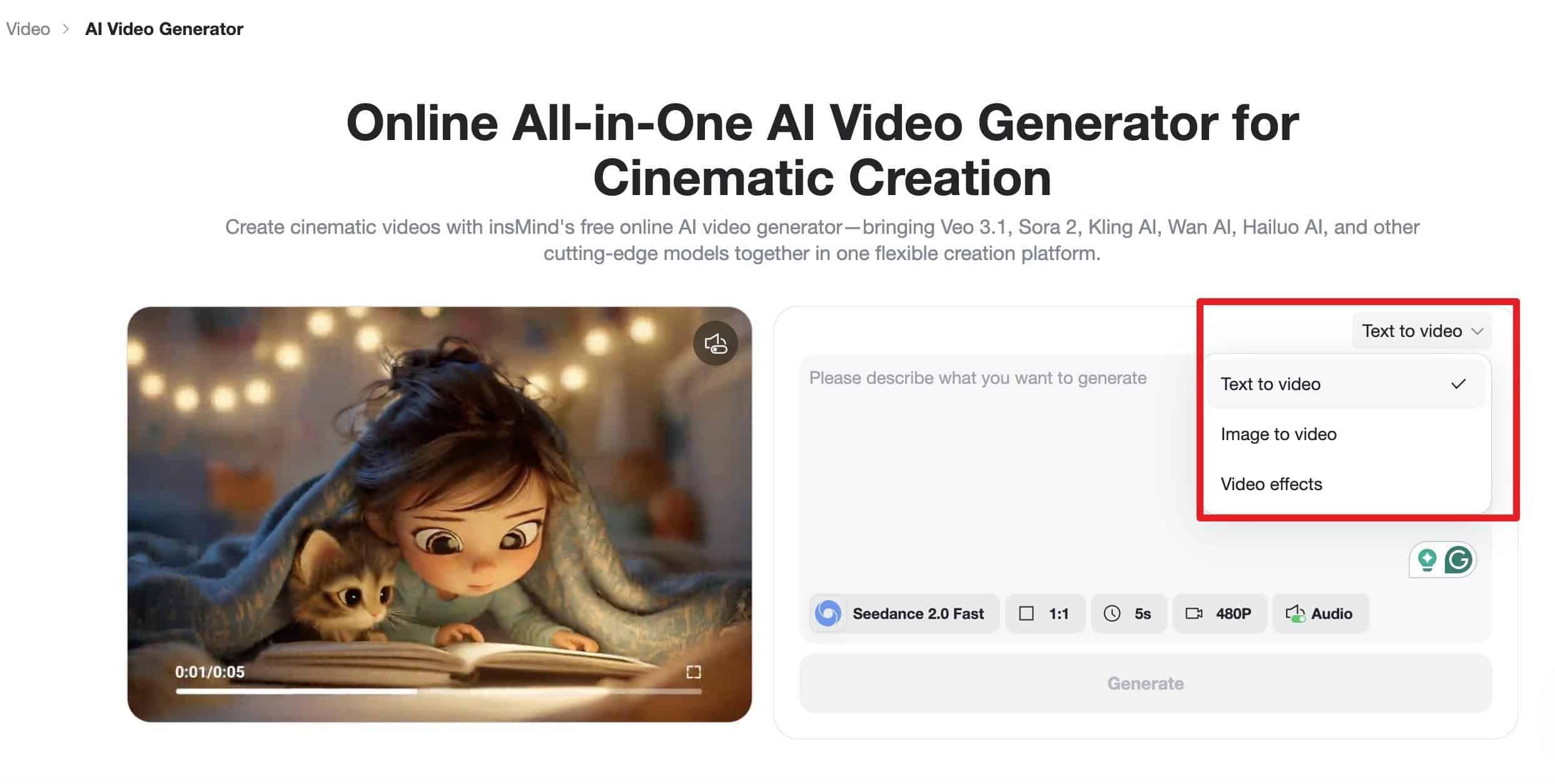
Open the video creation workspace and choose text-to-video as the input mode. This tells the platform that the written prompt, rather than an uploaded image, will drive the scene, style, camera direction, and output.
Step 2: Select a model and basic output settings
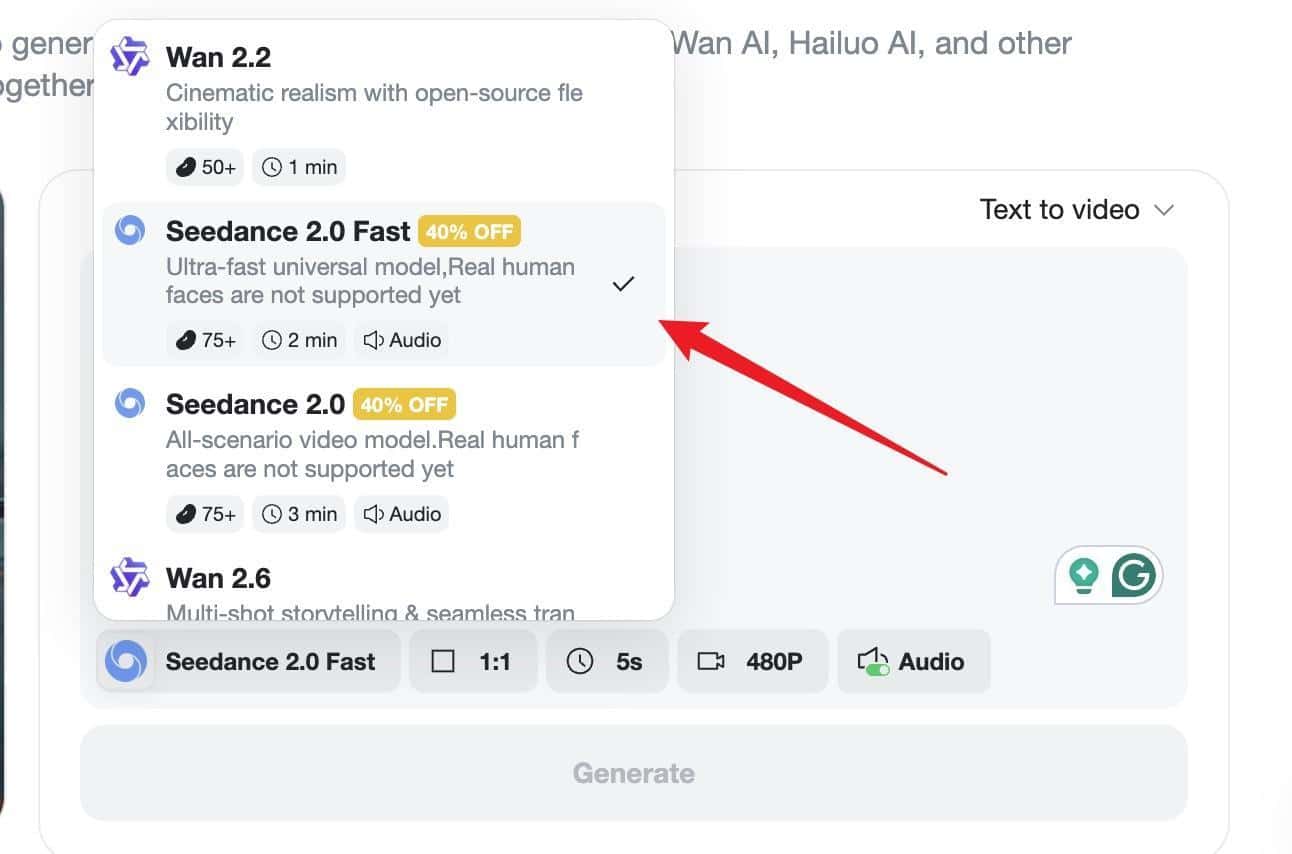
Choose an AI model that matches the job. A fast model is useful for quick creative testing, while a more advanced model may be better for polished campaign assets. Teams can also set practical details such as aspect ratio, duration, resolution, and audio support before generation.
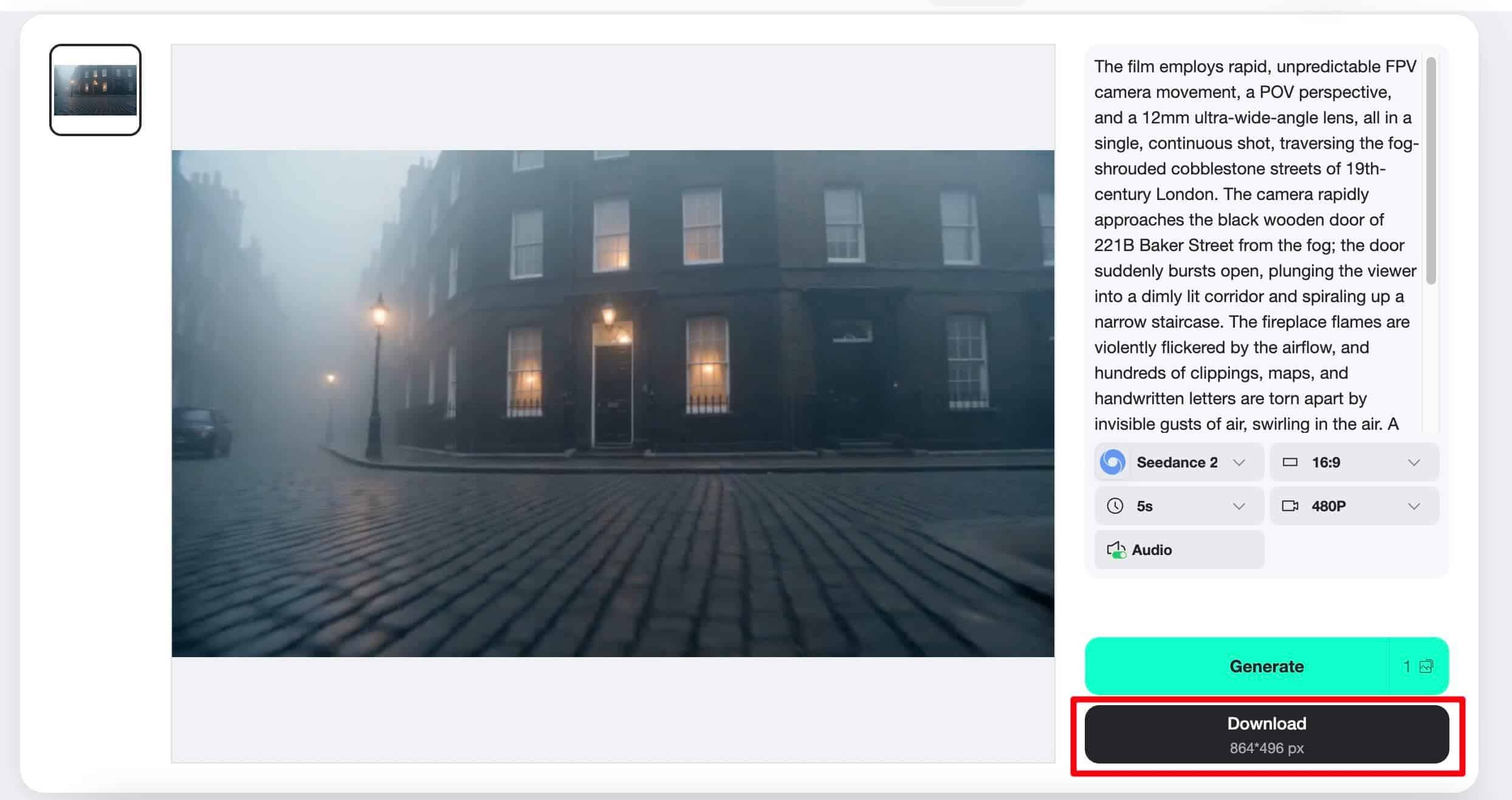
Step 3: Write a specific prompt and generate the preview
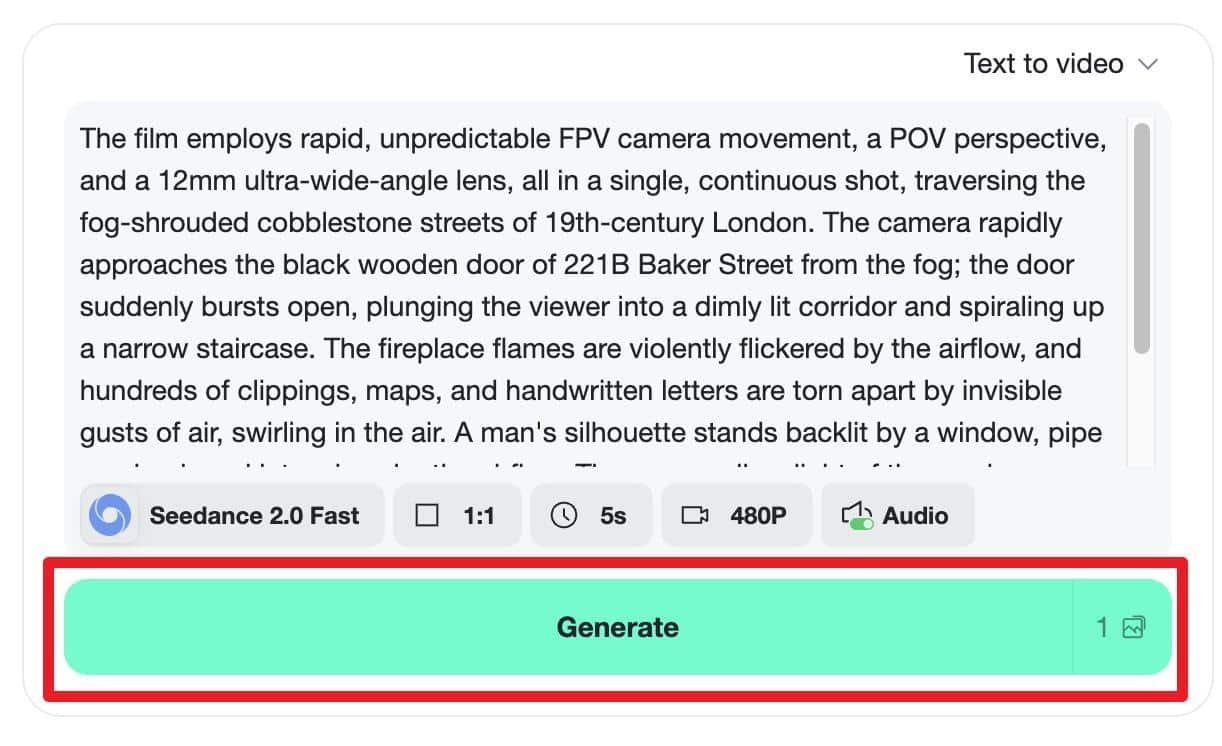
Add the scene, subject, motion, mood, and business purpose into the prompt. A product launch clip, for example, should include what appears on screen, how the camera moves, the tone of the video, and the intended platform. Once the prompt is ready, generate a preview and review whether the result matches the creative brief.
Step 4: Download the video and adapt it for distribution
After the preview is approved, download the finished MP4 and prepare platform-specific versions if needed. A wider format may work for a website or YouTube, while shorter vertical versions can support Reels, TikTok, Shorts, paid social, or product pages.
Why AI Video Matters for Marketing Efficiency
In digital marketing, speed and relevance often matter as much as polish. A highly produced video that arrives too late may miss the market moment. A simpler but timely video can support a product launch, trend, seasonal campaign, or customer question while it is still relevant.
AI video generation supports efficiency in several ways: it reduces the cost of producing multiple creative variations, helps teams adapt messages for different platforms, allows non-designers to participate in video creation, and makes it easier to test different hooks before committing to larger campaigns.
For businesses operating in competitive markets, this flexibility can become a real advantage. The ability to produce more relevant content in less time helps teams respond to changing customer behavior instead of relying only on long production calendars.
Practical Use Cases Across Business Functions
AI video generation is not limited to marketing departments. Its value can extend across several areas of a company.
Sales teams can create short product explainers to support outreach and presentations. Customer success teams can produce tutorial clips that answer common questions. HR departments can create onboarding videos or internal announcements. Ecommerce teams can turn product images into promotional clips for ads and storefronts.
For brands that rely heavily on digital storytelling, an AI business video generator can help create more consistent visual communication across departments. This is particularly valuable when a company needs to maintain brand presence across multiple channels without overloading its creative team.
Human Creativity Still Defines the Outcome
AI can speed up production, but it does not replace strategic thinking. Businesses still need clear messaging, audience understanding, brand guidelines, and creative judgment. A weak prompt or unclear script will usually lead to weak output, no matter how advanced the tool is.
The strongest results come when AI video tools are used as part of a thoughtful workflow. Teams should begin with a clear objective: explain a feature, introduce a product, promote an offer, educate a customer, or build awareness. From there, AI can help generate visual directions, draft clips, and accelerate revisions.
In this model, humans remain the directors. AI becomes the production assistant that helps transform ideas into usable assets more quickly.
Conclusion
As AI video tools continue to improve, businesses will likely move toward more agile content operations. Instead of treating video as a resource-heavy project, teams will use it as a flexible format for everyday communication.
This shift will not eliminate traditional production. Premium brand films, executive interviews, event coverage, and high-stakes campaigns will still benefit from professional crews and creative specialists. But for the growing number of short, practical, and platform-specific videos that businesses need, AI generation will become an important part of the content stack.
The companies that benefit most will be those that combine speed with strategy. They will use AI not simply to create more content, but to create more useful content: clearer product education, faster campaign testing, better customer communication, and more consistent brand visibility.
AI video generation is changing the economics of business content creation because it lowers the barrier between an idea and a finished visual asset. For modern companies, that can mean faster execution, broader creative capacity, and a more responsive approach to digital growth.