


For many businesses, receipts are small pieces of paper that create big problems. From faded ink and lost documents to manual data entry and disorganized folders, managing receipts can quickly become a time-consuming and error-prone task. Yet receipts are critical for accounting, expense tracking, tax compliance and audits.
As companies grow and transaction volumes increase, traditional methods of storing paper receipts in drawers or envelopes are no longer practical. This is where receipt scanners and OCR technology come into play. These tools allow businesses to digitize receipts, extract data automatically and maintain a clean searchable record of expenses.
- Why Businesses Need a Receipt Scanner
- What Is a Receipt Scanner?
- Features to Look for in a Receipt Scanner
- Fast Scanning Speed
- High Image Quality
- Reliable Paper Handling
- Companion Software for Sorting Receipts
- Capable of Scanning Directly to the Cloud
- OCR Technology and Why It Matters for Tax-Related Receipts
- How to Organize and Categorize Receipts After Scanning
- Conclusion
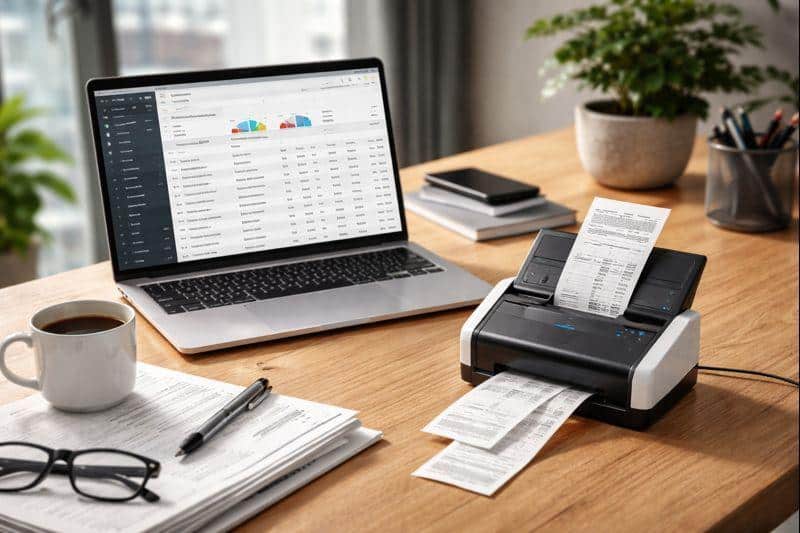
Why Businesses Need a Receipt Scanner
Managing receipts manually may work for individuals or very small operations, but for most businesses, it leads to inefficiency and risk. Lost receipts can result in missed tax deductions, inaccurate expense reports or compliance issues during audits.
A receipt scanner helps businesses centralize their financial records. Instead of handling piles of paper, employees can scan receipts immediately after a purchase ensuring nothing gets misplaced. This reduces reliance on memory and minimizes delays in bookkeeping.
Another major benefit is time savings. Manual data entry takes hours every month, especially for businesses with frequent expenses such as travel, inventory purchases, or client meetings. Scanning receipts and extracting data automatically allows accounting teams to focus on analysis rather than paperwork. Receipt scanners also improve accuracy. Human error is common when entering numbers manually, while digital scanning combined with OCR significantly reduces mistakes. For businesses aiming to maintain clean financial records this accuracy is invaluable.
What Is a Receipt Scanner?
A receipt scanner is a device or system designed specifically to capture images of receipts and convert them into digital files. Unlike traditional flatbed scanners, receipt scanners are optimized for small thin documents and continuous scanning.
These scanners can be standalone hardware devices or part of a broader document management system. Some are compact and portable, ideal for desks or shared offices while others are high-speed models built for accounting departments that process large volumes daily.
Modern receipt scanners don’t just store images. When paired with software, they can automatically organize receipts recognize text, and export data to accounting or cloud platforms. This makes them far more powerful than basic scanners or mobile phone photos.
Features to Look for in a Receipt Scanner
Not all receipt scanners are created equal. Choosing the right one depends on business size scanning volume and workflow needs. However, several core features are essential for most organizations.
Fast Scanning Speed
Scanning speed is critical, especially for businesses that process a high volume of receipts every day. A slow scanner can create workflow bottlenecks and reduce employee productivity. Devices with high-speed scanning capabilities can digitize multiple receipts in just seconds, keeping operations smooth and efficient.
During peak periods such as month-end closing or tax season, fast scanning becomes even more valuable, enabling businesses to handle large volumes of documents quickly and accurately. In these scenarios, a reliable document scanner plays a key role in maintaining efficiency.
High Image Quality
Clear images are crucial for accurate record-keeping. Poor image quality can make receipts unreadable especially when ink is light or paper is wrinkled.
High-resolution scanning ensures that details like dates, totals and vendor names remain visible. This is also essential for OCR accuracy as blurry scans lead to incorrect text recognition.
Reliable Paper Handling
Receipts come in many shapes and sizes from long thermal slips to small credit card stubs. A good receipt scanner must handle these variations without jamming or misfeeding.
Reliable paper handling reduces rescans and saves time. It also prevents damage to delicate receipts, which is important for businesses that must retain original records for compliance purposes.
Companion Software for Sorting Receipts
The scanner itself is only part of the solution. Companion software plays a critical role in managing scanned documents.
Quality software allows users to sort receipts by date, vendor, amount, or category. It may also support tagging, automatic file naming, and export options for accounting systems. This turns a collection of scanned images into an organized digital archive.
Capable of Scanning Directly to the Cloud
Cloud integration is now a must-have feature. Scanning directly to cloud platforms allows receipts to be accessed from anywhere, whether by accountants, managers or auditors. Cloud scanning also improves collaboration. Teams can review expenses in real time, share records securely and maintain backups without relying on physical storage.
OCR Technology and Why It Matters for Tax-Related Receipts
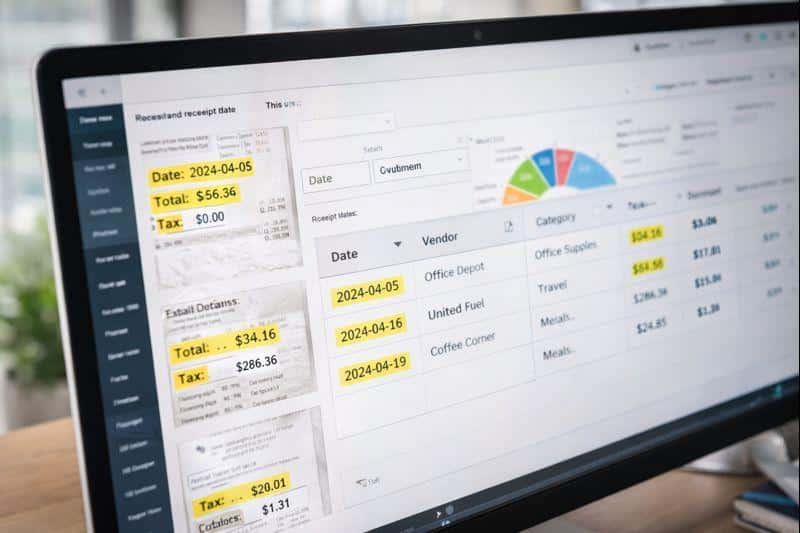
OCR, or Optical Character Recognition, is what transforms scanned receipts into usable data. Instead of storing receipts as static images, OCR extracts text such as merchant names, dates, tax amounts and totals. For tax-related receipts, OCR is especially important. Businesses often need to categorize expenses, calculate VAT or sales tax and verify deductions. OCR automates these processes significantly reducing manual effort.
Searchability is another major advantage. Instead of flipping through folders users can search for receipts by keyword, amount or vendor. This becomes invaluable during audits or financial reviews. Accurate OCR also improves compliance. Digital records with extracted data make it easier to prove expenses, match receipts to transactions and meet regulatory requirements.
How to Organize and Categorize Receipts After Scanning
Scanning receipts is only effective if they are organized properly. Without a system, businesses can still end up with digital clutter. One effective method is using consistent naming conventions. For example, including the date, vendor name and amount in the file name makes receipts easier to identify at a glance.
Categorization is equally important. Receipts should be grouped into categories such as travel, office supplies, meals or utilities. Many scanning tools allow automatic categorization based on OCR data, which saves time and improves consistency. Tags and labels add another layer of organization. Businesses can tag receipts for specific projects, clients or tax years making reporting more flexible.
Conclusion
Efficient receipt management is no longer optional for modern businesses. As financial operations become more complex and compliance requirements increase, relying on paper receipts or manual processes creates unnecessary risk and inefficiency. Receipt scanners, combined with OCR technology offer a practical solution. They save time, improve accuracy and provide businesses with better control over their financial records. From fast scanning speeds and reliable paper handling to cloud integration and smart software, the right tools can transform how receipts are managed.
By scanning receipts promptly, using OCR for data extraction and organizing documents systematically, businesses can streamline accounting workflows and stay prepared for audits and tax reporting. In the long run, efficient receipt management isn’t just about convenience it’s about building a smarter more resilient financial process.