


Google’s rumored native call recording feature may be closer to launching in the wild than we expected. Video clips that reportedly show the feature in action offer what could be some of our best looks yet at how it will work and how you’ll manage recordings when it arrives.
The clip, captured on a Pixel 8 Pro in India running Android 16 QPR1 and the beta Google Phone app (version 193.0.809761572-publicbeta), showcases a neat built-in workflow rather than a slap-on workaround.
Call recording is not a new feature for Android in general, but it has been absent in Pixels for the most part because some regions have stricter laws and another reason is entirely due to Google’s own platform and audio quality requirements. This most recent sighting indicates that Google is now activating first-party support for given countries and carriers — and it’s actually quite well done.
What the demo reveals about Pixel call recording
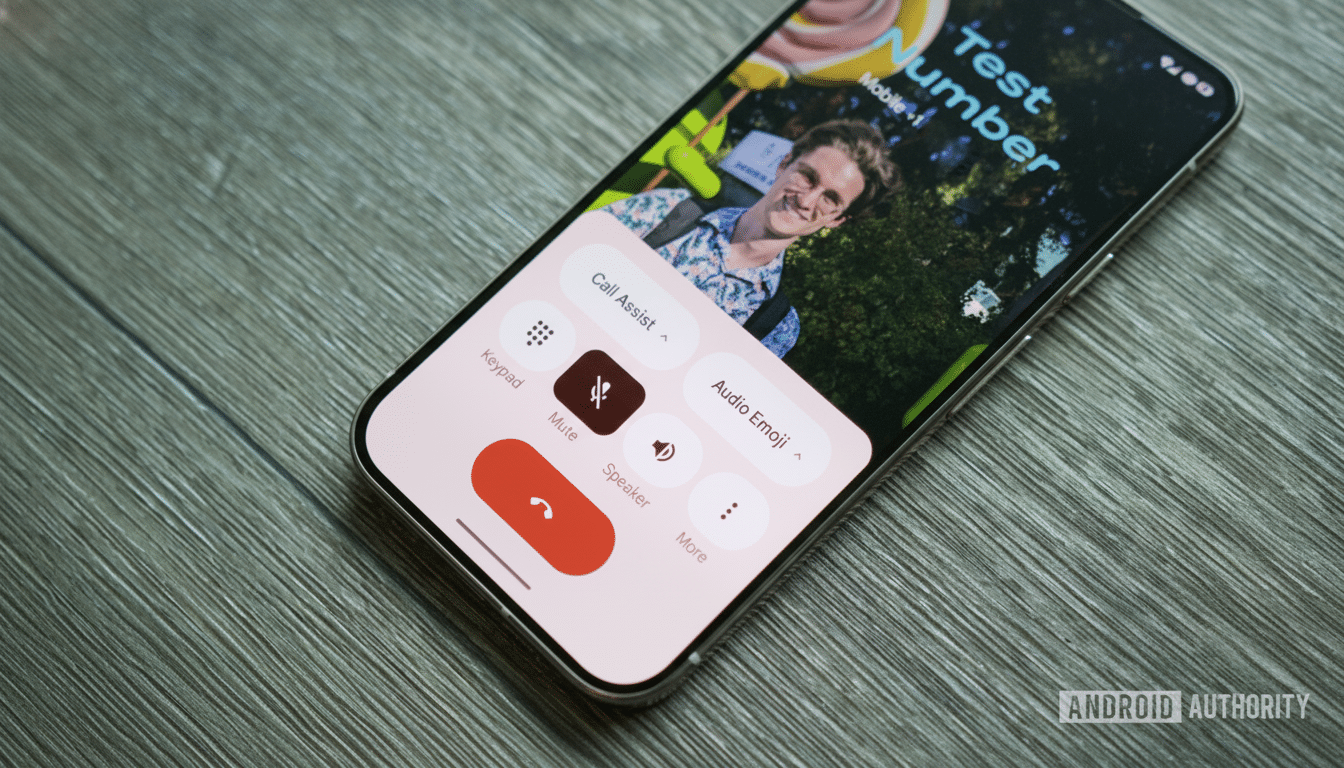
The recording lives in the Google Phone app, under Call Assist. Before the call, the user ensures that all recording settings are turned on. A tap of Call Assist from the call begins one-sided recording, and both parties get an audible disclosure, as Google likes to inform participants. Under the Recents tab, after you are done with the call, the call entry expands to display a “Call Recording” card.
Playback is integrated directly in the call details screen, complete with a basic timeline and transport controls. You can share the audio or delete it from this same panel. Recorded files are stored locally on the device, and settings come with an auto-deletion time threshold that you can apply to ensure that old recordings are automatically deleted after a certain number of days to protect privacy and manage storage. There’s no evidence in the demo of cloud backup or transcription hooks; Miyashita says this is purposefully a local, on-device feature.
The UI looks consistent with other Pixel “assistive” features. It’s fast, unobtrusive, and doesn’t tuck the result away in some app. That design decision cuts down on friction and allows users to treat recordings as just another call artifact.
Where call recording works and on which Pixel models
Native call recording is only supported for Pixel 6 and newer models running Android 14 or later, Google support explains, and the feature is available only in regions where native call recording is legal. The demo is coming out of India — another country where new Google Phone features have been spotted early in the past — and initial reports suggest that availability in the country is spreading. There have been isolated, anecdotal reports of access in other countries, including Canada, but the broad rollout continues to be patchy.
Like all telephony-based features, this is dependent on carrier settings, and SIM region can play a part in what’s shown as well. If you don’t see recording in Call Assist, it’s probably not enabled for your region or network yet, or you might not have the latest Phone app build. The demo device had a beta version of the Phone app running on it and used a stable quarterly platform release, which suggests that Google may be gatekeeping access on the app side while it verifies compliance and stability.
Privacy, legal limitations, and call recording notices
Google also has an automatic recording announcement where both parties will hear a voice prompt when the recording starts. This is an attempt to accommodate two-party consent — a rule that exists in much of the world. At least a dozen states in the United States require all-party consent when you record a call, according to guidelines from the Federal Communications Commission. Across Europe, the ePrivacy Directive and GDPR-led interpretations of local regulators also limit recording without explicit consent.
In India, telecom regulations established by the Telecom Regulatory Authority of India and local jurisprudence permit recording with disclosure, which is consistent with Google’s approach. In other words, if the toggle is present, the phone will continue to tell the parties that it is recording, and the audio stays on your phone unless you purposely share it. That local-first model limits inadvertent data exposure and makes it easier to meet requirements in more restrictive places.
Why this call recording feature matters for Pixel owners
Recordings will be useful for effective customer-support calls, interviews with consent, and audio confirmation of transactions.
In the past, Pixel owners had to use third-party apps that frequently stopped working after significant Android updates or ran into resistance from changes to call audio policies. A first-party solution in the dialer is more trustworthy and consistent with the Pixel/Google experience.
There are still open questions. Will Google layer on optional on-device transcription, like the Recorder app provides, in places where that’s legal? Will retention be manageable via API for enterprise management tools? I’m trying to stay pretty conservative here for now — local storage, explicit announcements, and manual starting/stopping and delete operations.
If you own a Pixel 6 or later, be mindful of the Google Phone app version and your regional settings. The new Call Assist toggle should appear when your market is cleared, although availability may be limited by region. Until then, this demo is the most explicit indicator of what Google has planned for call recording on Pixels: it’s an embedded functionality that’s designed to be totally transparent about which calls get recorded and why, and also aware of the regulations that pertain to its use.