


Google is working on a “Projects” feature for Gemini, which creates dedicated workspaces for files and chats to provide a tidier way of managing complex tasks. The interface has popped up in the latest Google app beta, showing an almost finished UI, although it is not yet live for users. The move reflects a larger trend in AI platforms toward modular, context-rich workflows.
What Gemini Projects Are Trying to Fix in Workflows
Generative AI works best when it knows what’s happening around it, and what’s happening around it is always a mess. To address this, Projects organizes your prompts, replies, and supporting files together under a single named goal, so planning out an upcoming product launch or drafting a research brief isn’t mixed in with unrelated conversations. It’s the same thinking behind projects in other assistants as well, and it’s all about keeping users focused and efficient regardless of whether they’ve changed context.

The need is real. Research from Gartner predicts that by 2026, over 80% of organizations will have deployed generative AI or AI-enabled applications — a significant increase from the slim base they’re sitting on presently. As teams start experimenting at scale, managing AI work and inputs becomes as important as model quality. Projects are a way to represent and be consistent about that organizational layer within Gemini.
How the Gemini Projects Interface Works for Users
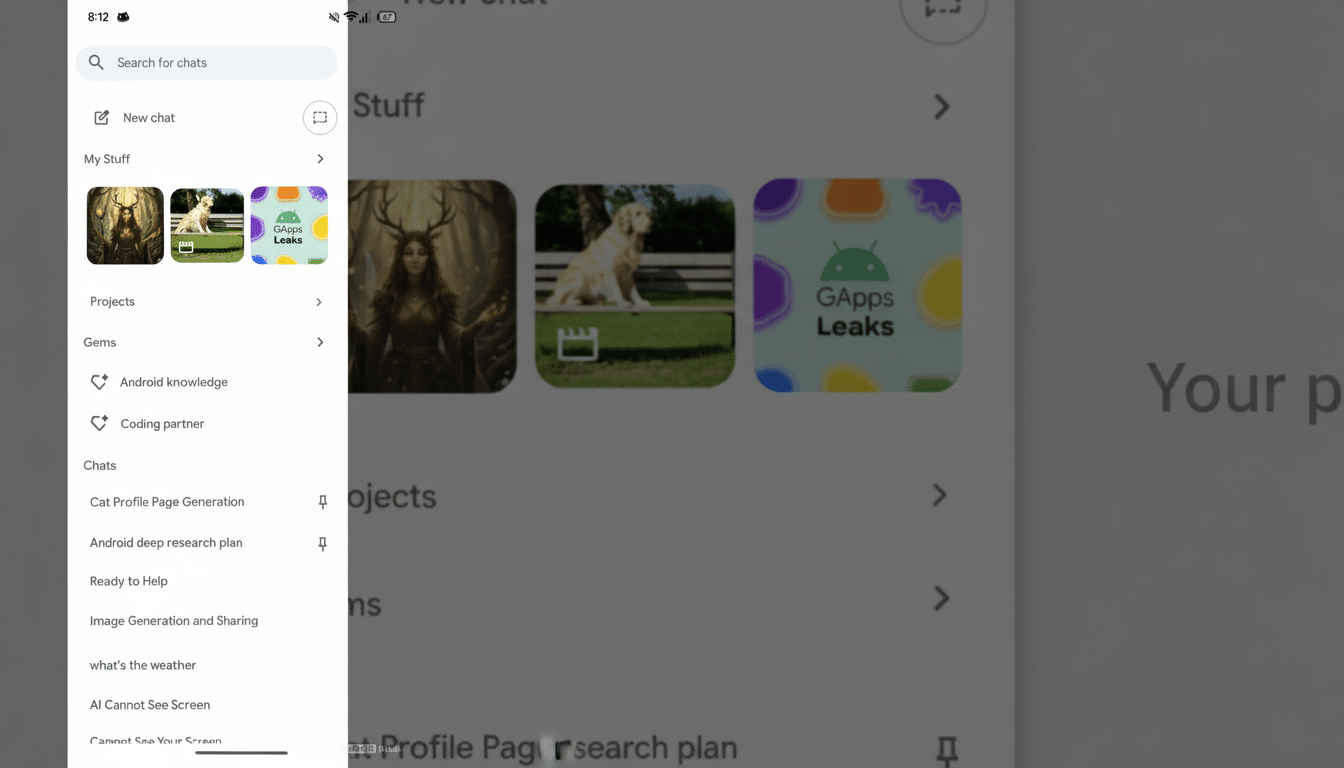
Users are welcomed to the Projects onboarding screen with a straightforward setup: name your workspace and provide a brief description explaining the purpose. That’s what the mission statement at the top of the project is; it sets up following prompts and responses. Underneath it, Gemini collects the files you attach so your model can refer to them without noise during project revisits.
Once they’re created, projects appear in Gemini’s sidebar. User-defined favorite items can be pinned to the top, turning them into high-priority switches. Early screenshots show a 10-file cap per project at launch. The picker comes with all of the sources Gemini provides today, so that you can save research PDFs, images, or documents without having to leave your assistant.
The Projects UI is in the beta build but blocked on server-side controls, so testers can see the structure, but they can’t use it.
The polish level implies that Google is very close to flipping the switch, likely waiting for wider release scheduling and capacity planning.
Key Boundaries and Early Red Flags for Gemini Projects
The 10-file limit appears to be a conservative starting point for balancing quality, latency, and cost. Tiered limits like these are a common feature in AI products, so if Gemini follows that model, paid plans might lift caps or offer features such as being able to upload larger files and processing priority. Pinning is indicative of workflows where users switch between many active initiatives without losing context, which, in business-critical scenarios, starts to become a pain point.
Also working as an assistant-level integration (as opposed to a siloed productivity app) is worth noting. That position implies that Gemini will treat contextual information in a project as a first-class signal to condition upon, ranging from retrieval to multimodal reasoning. For instance, if you attached a dataset and a design spec inside a project, Gemini would get more I/O during refined prompts to keep up with its changing understanding across both text and images.
How It Compares to the Competition from Rivals
Bot platforms from Microsoft, OpenAI, and others already provide project-style containers for files and conversations, which means this approach has traction. The concept is simple: leave your inputs where the work is, and run the model many times in that boundary. Google’s play appears to be a tight turn on this playbook, relying upon Gemini’s cross-product reach — a play that might appeal to people who do indeed want the same project available everywhere, be it Android, the web, or across Workspace surfaces.
What will differentiate the offerings won’t be the idea of projects, but rather how retrieval works with foot-dragging big files versus single-modality inputs, and what kind of permissions model drives shared content and any fine-grained controls teams can pack. “These are the kinds of things that make a nice UI into something you can depend on day in, day out,” he said.
Why Gemini Projects Matter for Users and Teams
For individuals, Projects promise fewer context switches and “fewer lost threads.” They provide organizations a means to keep AI work auditable and siloed. Knowledge workers lose a substantial amount of time in finding information and re-establishing context across tasks — structured workspaces reduce this drag, and therefore enhance answer quality, by providing the model with a consistent frame.
If Google integrates Projects with Workspace governance, IT admins might have clearer limits on sensitive information — though steps in that direction could make Gemini a safer proposition for regulated environments. Day one won’t get all of those enterprise layers, but the feature is likely to make Gemini more competitive with assistants that do package files and chats together already.
What to Watch Next as Google Prepares the Launch
Watch for the final file limits, sharing controls, and whether Google adds project-level settings such as default tools or memory. The proof of business-ready use will be cross-device sync and collaboration. Now that the interface is largely in place but disabled, all we have left to do is wait for Google to pull the trigger — and decide how widely it’ll roll all of this out on day one.