


If your phone’s volume buttons suddenly stopped behaving, you’re not imagining it. Google has acknowledged a software bug causing Android’s volume keys to adjust the wrong audio stream and, in some cases, break volume-button shortcuts in apps like the camera. The company says an accessibility feature named Select to Speak is the culprit and a fix is on the way.
Until the patch lands, the recommended workaround is to turn Select to Speak off. That’s easier said than done for people who rely on it daily, making this a disruptive glitch for a core user group.
Why Android volume keys are adjusting the wrong stream
Android routes sound through multiple “streams” (media, ring, call, alarm, and accessibility). Normally, tapping the volume rocker while watching a video controls media volume; when a call is active, it controls call volume. The bug reroutes those adjustments to the accessibility stream instead, so the system may raise or lower the text-to-speech voice rather than your music or video.
Users have also reported volume-key shortcuts misfiring. For example, pressing a volume key to snap a photo in the camera app may fail because the phone is busy adjusting the wrong stream or invoking accessibility behavior behind the scenes.
Google explains the cause and promises a fix
In a post on the Android support forums, a member of the Android community team said the issue is tied to Select to Speak, an accessibility tool that reads on-screen text aloud for people with low vision. Google confirmed a fix is in development but did not provide an exact timeline or list of affected models. Reports span multiple brands, suggesting this is not limited to a single device line.
Select to Speak is part of the Android Accessibility Suite, which Google updates via the Play Store. That distribution model increases the chances of a faster rollout once the patch is ready, without waiting for a full operating system update.
How to fix it now: temporary workarounds and tips
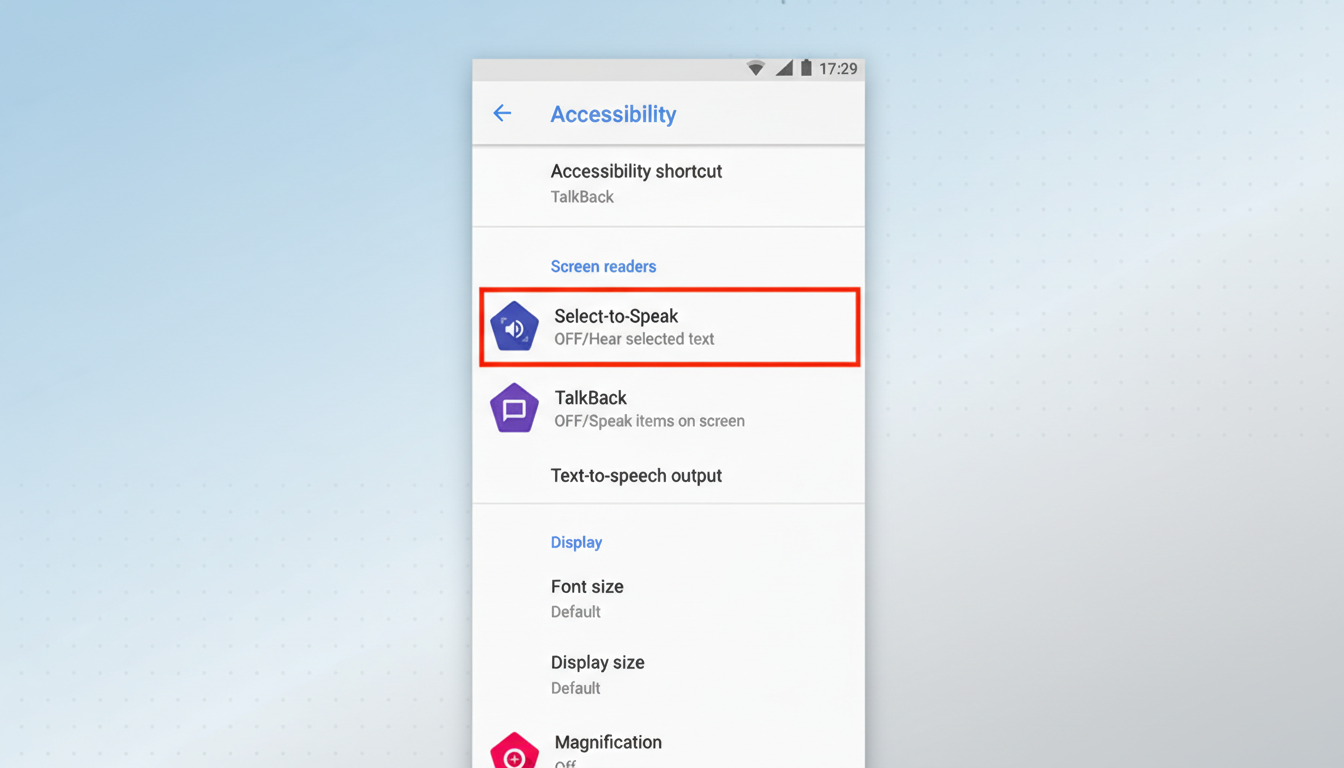
If you can temporarily go without Select to Speak, turn it off: Settings > Accessibility > Select to Speak, then toggle it off. This should restore normal behavior for volume keys and related shortcuts.
If you need to keep Select to Speak on, manage sound via Settings: go to Settings > Sound and vibration to adjust Media, Call, Ring, Alarm, and Notification volumes independently. You can also use the on-screen volume panel to pick the correct stream when available. For camera use, rely on the on-screen shutter or voice controls as a stopgap if the volume-key shutter isn’t responding.
How to tell if you are affected by the volume bug
Signs include pressing the rocker during a video and seeing the on-screen slider labeled for accessibility (or noticing the text-to-speech voice getting louder or quieter) instead of media. Another clue: volume-button shortcuts—like using a rocker as a shutter—stop working even though the app is open and responsive.
To confirm whether Select to Speak is active, visit Settings > Accessibility. If it’s on and your volume controls are misbehaving, you’re likely hitting this bug.
Why this Android volume and accessibility bug matters
Android powers roughly 70% of smartphones worldwide according to StatCounter, so even a niche bug can affect millions. Accessibility users are particularly impacted; Select to Speak is essential for people who need auditory feedback to navigate apps and read content. The World Health Organization estimates at least 2.2 billion people live with a vision impairment or blindness globally, underscoring how critical reliable accessibility tools are.
Beyond accessibility, misrouted audio can interfere with everyday use—turning down a song, quieting a game, or taking a quick photo with hardware keys—all of which are muscle-memory tasks that should just work.
When a fix might arrive through Play Store updates
Google hasn’t provided an ETA, but because Select to Speak resides in the Android Accessibility Suite, a resolution can ship as an app update through the Play Store. Keep automatic updates enabled, and check for updates to Android Accessibility Suite, Google Play system updates, and your device’s system apps.
If your device is affected, the best interim approach is to toggle Select to Speak off when practical or adjust sounds via Settings until the patch arrives. We’ll be watching for the update and early reports confirming that volume keys and shortcuts are behaving as expected again.