


Imagine uploading a video in English and downloading it minutes later in Spanish, Mandarin, Arabic, and French—each with natural voices and perfect lip-sync.
That’s AI dubbing in 2026.
- Why 75% of Your Potential Audience Can’t Watch Your Videos
- How AI Dubbing Works
- Why Creators Choose This Technology
- Who’s Winning with AI Dubbing
- How to Create Dubbed Videos: Your Complete Guide
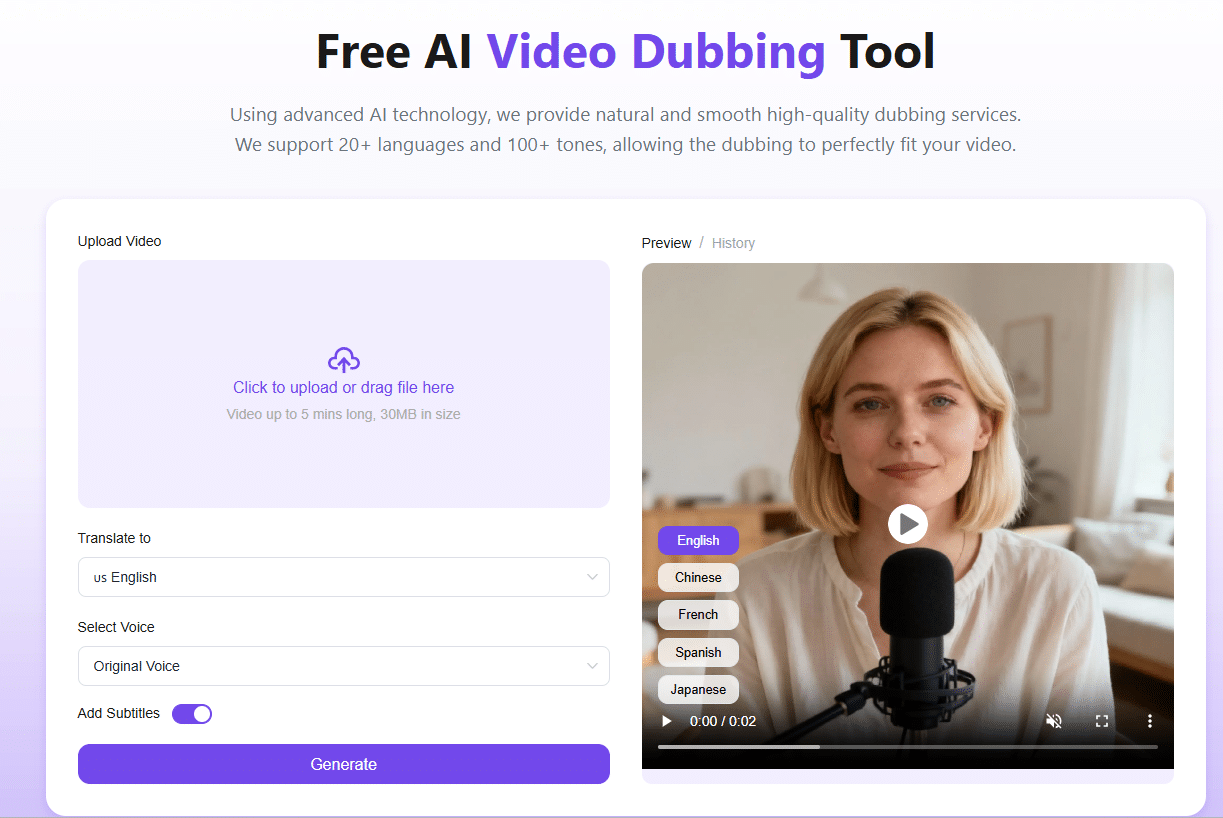
- Step 1: Upload Your Source Video
- Step 2: Select Target Language
- Step 3: Choose Your Voice
- Step 4: Configure Additional Settings
- Step 5: Click Generate
- Step 7: Download and Deploy
- Maximize Your Results
- The Numbers Don’t Lie
- Start Your Global Expansion Today
Why 75% of Your Potential Audience Can’t Watch Your Videos
Here’s the problem: 75% of internet users don’t speak English as their first language.
Every English-only video ignores massive markets in Latin America, Asia, Europe, and the Middle East. Traditional video translation meant spending $10,000+ per language or settling for awkward subtitles.
AI dubbing changes everything. Now anyone can create multilingual content with a few clicks.
How AI Dubbing Works
Traditional dubbing: Hire translators → Record voice actors → Edit audio → Sync lips → 4-6 weeks later, one language
AI dubbing: Upload video → Select languages → Click generate → 10 minutes later, unlimited languages
The technology combines speech recognition, neural translation, voice synthesis, and lip-sync algorithms. The result? Videos that look and sound originally created in each language.
Why Creators Choose This Technology
Massive market access: Spanish (550M), Mandarin (1.1B), Hindi (600M), Arabic (420M) speakers—each language represents audiences 5-10x your current reach.
Speed advantage: Publish multilingual content same-day while competitors wait weeks for video translation.
Cost efficiency: Traditional localization costs scale linearly. Modern dubbing stays flat whether you create 1 or 20 language versions.
Risk-free testing: Try multiple markets simultaneously at zero cost. Let data guide expansion decisions.
Brand consistency: Voice cloning recreates your spokesperson’s voice across all languages, maintaining personality worldwide.
Who’s Winning with AI Dubbing
YouTube Creators: A cooking channel added Spanish/Portuguese dubbing and grew from 200K to 550K subscribers in 4 months.
E-Commerce Brands: Shopify stores using dubbed product videos report 40-60% higher conversion rates internationally.
EdTech Platforms: Course creators offer content in 15+ languages. Native-language courses see 3x higher completion rates vs. subtitles.
SaaS Companies: Keep all tutorial versions current without ballooning costs as features update.
Corporate Teams: Train global workforces effectively in employees’ preferred languages.
Independent Filmmakers: Access global distribution without Hollywood budgets.
How to Create Dubbed Videos: Your Complete Guide
Ready to go global? Here’s your step-by-step workflow for using AI dubbing effectively.
Step 1: Upload Your Source Video
Start by preparing your original video file.
Best practices:
- Use MP4 format for maximum compatibility
- Ensure clear audio (minimal background noise)
- Keep videos under 5 minutes for fastest processing
- Check that speech is clearly audible
Simply drag and drop your file into the AI dubbing platform. Upload typically takes 30-60 seconds depending on file size.
The platform automatically detects your video’s original language—no manual configuration needed.
Step 2: Select Target Language
Now comes the exciting part: choosing your markets.
Strategic language selection:
For maximum reach: Start with Spanish, Mandarin, and Hindi—these three alone add 2+ billion potential viewers.
For high-value markets: Add Japanese, German, and French—these markets have strong purchasing power.
For emerging opportunities: Consider Arabic, Portuguese, and Indonesian—fast-growing internet populations with less competition.
Many AI dubbing platforms let you select multiple languages simultaneously. Create 5-10 versions in one processing session.
Step 3: Choose Your Voice
This decision significantly impacts how audiences receive your content.
Option 1: Clone Original Voice
The AI dubbing system can recreate your original speaker’s voice in any language. This maintains:
- Brand identity
- Personal connection
- Consistent personality across markets
Best for branded content, personal channels, and thought leadership videos.
Option 2: Select Library Voice
Browse 100+ professional voice options:
Male voices: Deep and authoritative, friendly and casual, energetic and youthful, calm and trustworthy
Female voices: Professional and confident, warm and friendly, upbeat and enthusiastic, soothing and gentle
Specialized voices: Child voices for kids’ content, elderly voices for mature audiences, character voices for entertainment
Match voice characteristics to your content type and target audience expectations.
Pro tip: Different cultures prefer different voice qualities. Latin American audiences often respond better to expressive, energetic voices. Asian markets may prefer calmer, more measured tones.
Option 3: Multiple Voices
For videos with multiple speakers (interviews, panels, dialogues), assign different voices to each person. This maintains clarity and makes conversations easy to follow.
Step 4: Configure Additional Settings
Add subtitles: Enable automatic subtitle generation in the target language. This boosts accessibility and SEO performance.
Step 5: Click Generate
Hit the generate button and watch AI dubbing work its magic.
What happens during processing:
The system transcribes all speech, translates to target languages, synthesizes new voice audio, synchronizes lip movements, and combines everything into a polished final video.
Step 6: Preview and Perfect
Before downloading, preview your dubbed video carefully.
Quality checklist:
✓ Voice quality sounds natural
✓ Translation accuracy preserves meaning
✓ Lip-sync looks convincing
✓ Audio levels are balanced
✓ Subtitles (if added) are timed correctly
If anything needs adjustment, simply regenerate with different voices or settings. Most AI dubbing platforms offer unlimited iterations.
Step 7: Download and Deploy
Download your video translation in your preferred format—typically MP4 for maximum compatibility.
Distribution strategy:
Create separate channels: Many creators run language-specific YouTube channels (e.g., @YourChannel_ES for Spanish)
Use platform features: YouTube allows multiple audio tracks on one video—upload all languages to a single video
Social media: Share dubbed versions on region-specific social platforms (Weibo for China, VK for Russia)
Website embedding: Offer visitors language selection for embedded videos
Track performance by language to identify your strongest markets and optimize future content accordingly.
Maximize Your Results
Cultural adaptation: Translate text overlays, adjust cultural references, convert currencies and measurements.
SEO optimization: Translate titles/descriptions with local keywords, use region-specific tags, schedule for target time zones.
Voice consistency: Maintain same AI dubbing voices across series episodes for audience familiarity.
A/B testing: Try original voice vs. library voices, with/without subtitles—let data guide decisions.
Track metrics: Monitor audience growth, engagement rates, watch time, and conversions by language.
The Numbers Don’t Lie
Traditional dubbing (one 5-min video, 5 languages):
- Total cost: $7,000
- Timeline: 3-4 weeks
AI dubbing (same project):
- Total cost: $0
- Timeline: 1 hour
For weekly content creators, AI dubbing saves $364,000 annually versus traditional methods.
Start Your Global Expansion Today
The barrier to international audiences has collapsed. What once required Hollywood budgets now requires only a few clicks.
Your 30-day plan:
- Week 1: Choose your top 3 target markets based on audience potential
- Week 2: Create multilingual versions of your 3 best-performing videos
- Week 3: Publish and promote in target markets
Week 4: Analyze results and scale what works
Stop limiting yourself to one language. Start dubbing your videos and watch your global audience multiply.
Common Questions
How natural do AI dubbing voices sound?
Modern voices are 85-90% indistinguishable from humans in blind tests.
Can I use AI dubbing commercially?
Yes, most platforms grant full commercial rights to generated content.
Which languages work best?
All major languages perform well. Spanish, Mandarin, Hindi, Arabic, and French offer the largest audiences.
How long does processing take?
Typically 5-15 minutes per video depending on length.