


Google is now launching a significant, free upgrade to its Google Home app that widely rolls out Gemini for Home to most Nest devices, even those dating back several years. The update swaps out Google Assistant on eligible cameras, doorbells, speakers, and smart displays for a chattier AI that can understand context, recap recent events, and even help you automate your daily routines with simplified commands.
What Gemini for Home Changes Across Nest Devices
Gemini for Home will also be able to handle natural language better than the old voice assistant. Instead of commands set in stone, you can ask subtle questions like “When did the kids come in?” or “What did you do on the front porch while I was gone?” and get directly answered or briefed, not merely served a notification log.
- What Gemini for Home Changes Across Nest Devices
- Which Nest Devices Are Part of the Free Upgrade Deal
- Pricing and Subscription Tiers for Gemini for Home
- Smarter Security and Automations with Ask Home
- New Nest Hardware Coming Soon with Higher Resolution
- What the Upgrade Means for Your Smart Home and Privacy
- How to Get Ready for the Google Home and Nest Update
Notifications are getting smarter, too. Rather than generic “motion detected” alerts, the system can now offer richer and more unique AI-generated descriptions of motion events, as well as a zoomed-in preview allowing you to make the decision to act faster. New, more natural-sounding voices will also help interactions feel less robotic and “more conversational,” Google says.
Which Nest Devices Are Part of the Free Upgrade Deal
Google said the upgrade will be available on virtually all Nest-branded devices introduced over the past 10 years. That spans core categories such as Nest smart displays, speakers, indoor and outdoor cameras, and both wired and battery-powered video doorbells. Some devices will also usher in Gemini Live, which allows for reciprocal voice conversations.
The broad compatibility is noteworthy. Bringing advanced AI features to legacy hardware maintains the value of installed units and cuts down on e-waste (an approach consumers have become more vocal about as smart home ecosystems develop).
Pricing and Subscription Tiers for Gemini for Home
The essential Gemini for Home experience lands as part of the app update for free, but is accompanied by Google taking home-oriented subscriptions up a notch in a similar two-tier model to Nest Aware. The Standard plan is $10 a month and comes with the following:
What the Standard plan includes
- Home access to Gemini
- Gemini Live access
- Advanced automations
- 30 days of event video history
- Smart alerts
- Familiar face detection
- Package detection for garages
- Virtual receptionist
- Smoke & CO alarm detection
- Enhanced alerts
The $20 per month Advanced plan gets you Ask Home video history (more on that in a moment), AI notifications and descriptions, the Home Brief daily recap, 60 days of event history, and continuous 24/7 video history where available.
What the Advanced plan includes
- Ask Home video history
- AI notifications and descriptions
- Home Brief daily recap
- 60 days of event history
- Continuous 24/7 video history where available
Those subscribers also get those Home features included with Google AI Pro and Google AI Ultra at no additional charge, according to Google.
Smarter Security and Automations with Ask Home
Ask Home is the star for security users. Instead of having to fast-forward and rewind through clips, you can say, “Show me when a package was delivered,” or even, “Did something eat my plants?” and have the system retrieve matching video clips. This is a shift from simply passive alerts for home monitoring to contextual responses, which saves time and decreases false alarms.
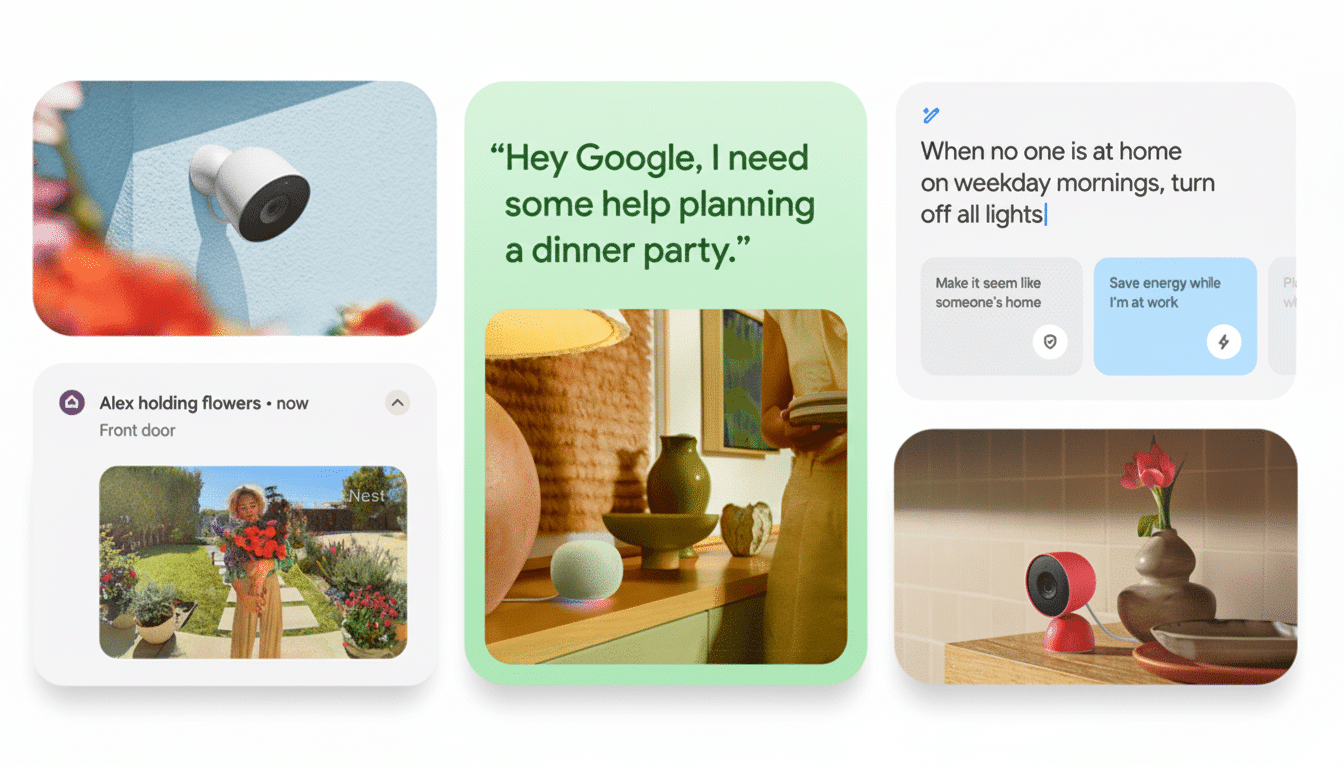
Home Briefing provides a look ahead to the day’s news at home and abroad. You can personalize the focus — pets, deliveries, visitors — so that you see what matters to you first. And on the automation side, generative AI allows you to begin with ends rather than means: “Make it look like somebody’s home after sunset” or “Help me feel more secure when I’m traveling” might generate suggested routines that you can tweak.
New Nest Hardware Coming Soon with Higher Resolution
To go along with the drop of the software, Google teased a new Google Home speaker coming in at $99 that offers 360-degree sound and can also act as your sound-delivering device for a Google TV streamer. The updated Nest Cam models — one for outdoor use and one for indoor spaces — move to 2K resolution and offer a wider, taller field of view; the new version of the Nest Doorbell moves to a 1:1 aspect ratio in order to better frame visitors and packages.
For budget customers, a retail deal will offer an onn Indoor Camera for around $23 and an onn Video Doorbell for approximately $50. It’s a bold play in a price-conscious category and could help widen access to AI-infused monitoring without the need for an expensive hardware buy-in up front.
What the Upgrade Means for Your Smart Home and Privacy
This kind of upgrade pushes smart homes in the direction of assistants that know scenes and context, not just sensors and triggers. It’s also setting a bar for its competitors, especially as Amazon and Apple spend on generative capabilities of their own ecosystems. For customers, the big wins are saving time, having easier automations, and getting more actionable security insights.
Like any AI-driven service, privacy and data management are paramount. Google has been putting a lot of emphasis on control in the Google Home app, so you can expect on-device and cloud processing depending on hardware capability, settings, and the like. Power users who worry about privacy can audit sharing and retention settings before turning on things like familiar faces or 24/7 recording.
How to Get Ready for the Google Home and Nest Update
Make sure you have updated the Google Home app, that all your Nest devices are under the correct home, and that there isn’t a firmware update pending. Review your notifications so you don’t get overwhelmed by rich alerts. If you depend on cameras for concrete evidence or peace of mind, compare the Standard vs. Advanced packages to see which tier is right based on your needs for event history and continuous recording.
Give natural language queries a test run and let Gemini suggest automations once the upgrade lands. Begin with low-stakes patterns — say, presence-based lighting — before graduating to security-critical paths. With careful configuration, even older Nest gadgets are set to feel new again.