


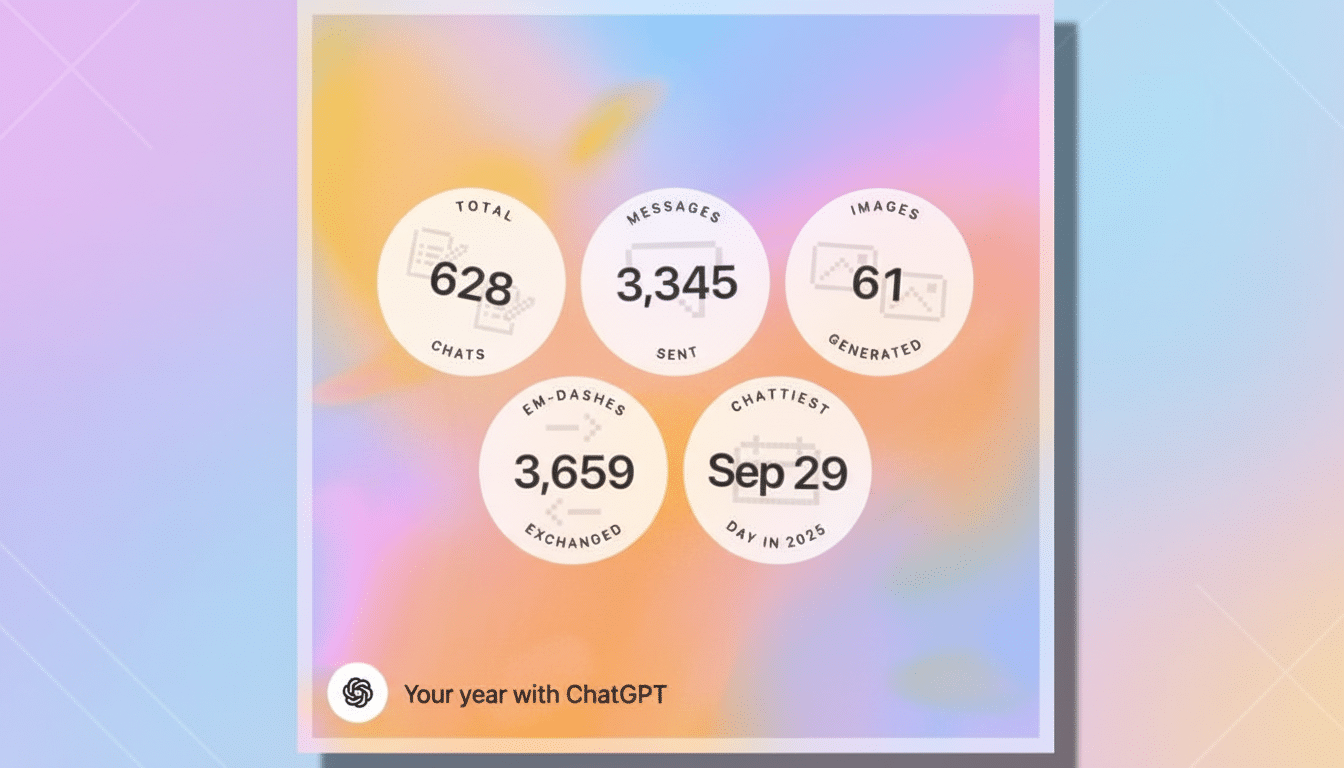
OpenAI is today testing a Spotify-style feature called “Your Year with ChatGPT,” an interactive recap that transforms a year’s worth of prompts and responses into themes, stats and even a playful poem. It’s clever and often delightful. It can also be brutally honest. For heavy users, the experience is like a mirror that points out habits and late-night binging — creative detours you might not even have realized were accumulating — sometimes straight into the top 1 percent of message senders.
What the ChatGPT recap actually shows in detail
The recap is a multi-page slideshow that starts with a few paragraphs about the “year in poetry,” then reflects on big themes you explored, offers up learnings from your conversational style, and ends off with one or two lighthearted “superlative” bites. It might churn out patterns like Creative Worlds or What-If Scenarios, determine whether you are a meticulous planner or an improviser, and even autogenerate an image lighting up your vibe. It’s more like a gallery than a chat: You swipe through, reflect and — if you’re brave enough — ask follow-up questions to probe deeper into your ways.
- What the ChatGPT recap actually shows in detail
- Why the recap experience can feel uncomfortably real
- Privacy and eligibility basics for using the recap feature
- How people are using the insights from the ChatGPT recap
- How to make the ChatGPT recap work better for you
- Bottom line: a helpful mirror to guide mindful use

It is widely available but not omnipresent. The tool is now available to users in the US and certain other countries on free, Plus and Pro plans. For a useful summary, you’ll also have had to use the service regularly, and set chat history and memory tracking options on. If you turned those off, or just popped in every so often, your year will appear threadbare.
Why the recap experience can feel uncomfortably real
Unlike the kinds of social media wraps that show off music tastes or travel photos, this one counts up the hours you spent thinking with a machine. When the subject of a recap is named one of someone’s top 1% listeners by message volume, it hits differently than “Top Fan of Indie Pop.” It’s a stand-in for cognitive outsourcing and curiosity-on-tap — useful, to be sure, but also a reminder of how frequently we crave instant feedback or validation.
Behavioral scientists have long observed that when behaviors are visualized on awesome blossoming dashboards, it can edge people into change; they use the term “make the invisible visible.” The American Psychological Association recommends the use of feedback loops to help modify behaviors, and the Center for Humane Technology has advocated for transparent metrics that can enable people to take command of their attention. That larger situation helps to explain why a bit of playful moonlighting can turn into a gentle wake-up call.
There’s also scale to consider. ChatGPT, OpenAI has said, is used by more than 100 million weekly active users, and so it’s likely that the new recap will reach a wide audience quickly. The more people acknowledge late-night streaks or “just one more prompt” spirals, the more the recap turns into a cultural moment — not dissimilar from how Spotify Wrapped became a ritual that evokes both pride and self-awareness.
Privacy and eligibility basics for using the recap feature
It uses saved memories and chat history to produce the summary. Users may toggle these features off and organizations can set policies to limit data retention. It’s a good idea to at least skim your settings before you share screenshots of the recap; what feels fun and playful to you might bring out sensitive work or personal themes for other users. In enterprise environments, admins have the ability to disable recap availability altogether.
OpenAI says the experience is intended to be informative, not comprehensive. It scoops up patterns and highlights, but doesn’t reveal entire message histories. And yet the best rule is this: Undercut any summary of your year by assuming it represents all of the data you decided to collect.
How people are using the insights from the ChatGPT recap
Early reactions suggest two camps. Some users view the recap as a fun pat on the back for them — evidence that they prototyped faster, brainstormed better or kept up whatever new learning habit they set out to accomplish. Some consider it a digital checkup. One product manager observed “decision paralysis” sessions that would bunch up right before deadlines. One student saw a dramatic swing toward studying late at night. One freelancer noticed a drop in inquiries about client-facing work and an increase in speculative projects — not ideal for reaching income goals.
These little revelations dovetail with what the Pew Research Center has found regarding tech use and well-being: People are growing more ambivalent, valuing utility but also craving more control over time spent. Presented in that light, ChatGPT’s recap isn’t so much a trophy case as an attention dashboard.
How to make the ChatGPT recap work better for you
Combine the recap with one or two commitments. If it signals a top 1% message count, guardrail — time-box sessions, turn off notifications or toss casual brainstorming into a fixed block. If it has a strong theme that you like, formalize it: a weekly-prompt ritual for language learning, a research day every month, or some sort of personal knowledge base composed from your best chats.
And again, it’s not about guilt. As Nielsen media trend reports indicate, people flock to tools that slather ease on top of effort. The trick is to direct that efficiency toward what matters — shipping projects, learning faster, or getting more offline time to think deeply — so next year’s recap looks less like a blur and more like a map.
Bottom line: a helpful mirror to guide mindful use
“Your Year with ChatGPT” is a delightful, occasionally brutal mirror. It is a spotlight on how you think, when you think and how often you outsource that thinking to an A.I. If it’s something that makes you wince, maybe that’s the best gift of all: a clear, data-informed kick in the pants to use the tool with purpose — so your next recap feels more like progress and less like confession.