


Content marketing has always been a coordination problem.
A successful campaign requires strategy, research, writing, design, video production, editing, approvals, distribution, and performance analysis, often across multiple people and teams. The challenge has never only been creating more content. It has been keeping every piece aligned with the brand, audience, and campaign goal while moving fast enough to matter.
- 1. Start With Strategy: Turning Ideas Into Clear Briefs
- 2. Build a Brand and Content Foundation
- 3. Use AI for Content Development and Production
- 4. Build a Workflow for Review and Collaboration
- 5. Repurpose Content Across Channels
- 6. Where AI Agents Fit Into Content Marketing Workflows
- 8. What AI Still Cannot Do
- Closing Thought
AI does not remove that coordination problem. It changes where teams spend their time.
Instead of spending hours on repetitive production tasks, teams can spend more time on the decisions that require judgment: what message matters, who it is for, what format fits the audience, and how the brand should show up.
The next challenge is not access to AI tools. There are more tools than ever. The challenge is building a workflow where those tools work from the same strategy, brand context, and creative direction.
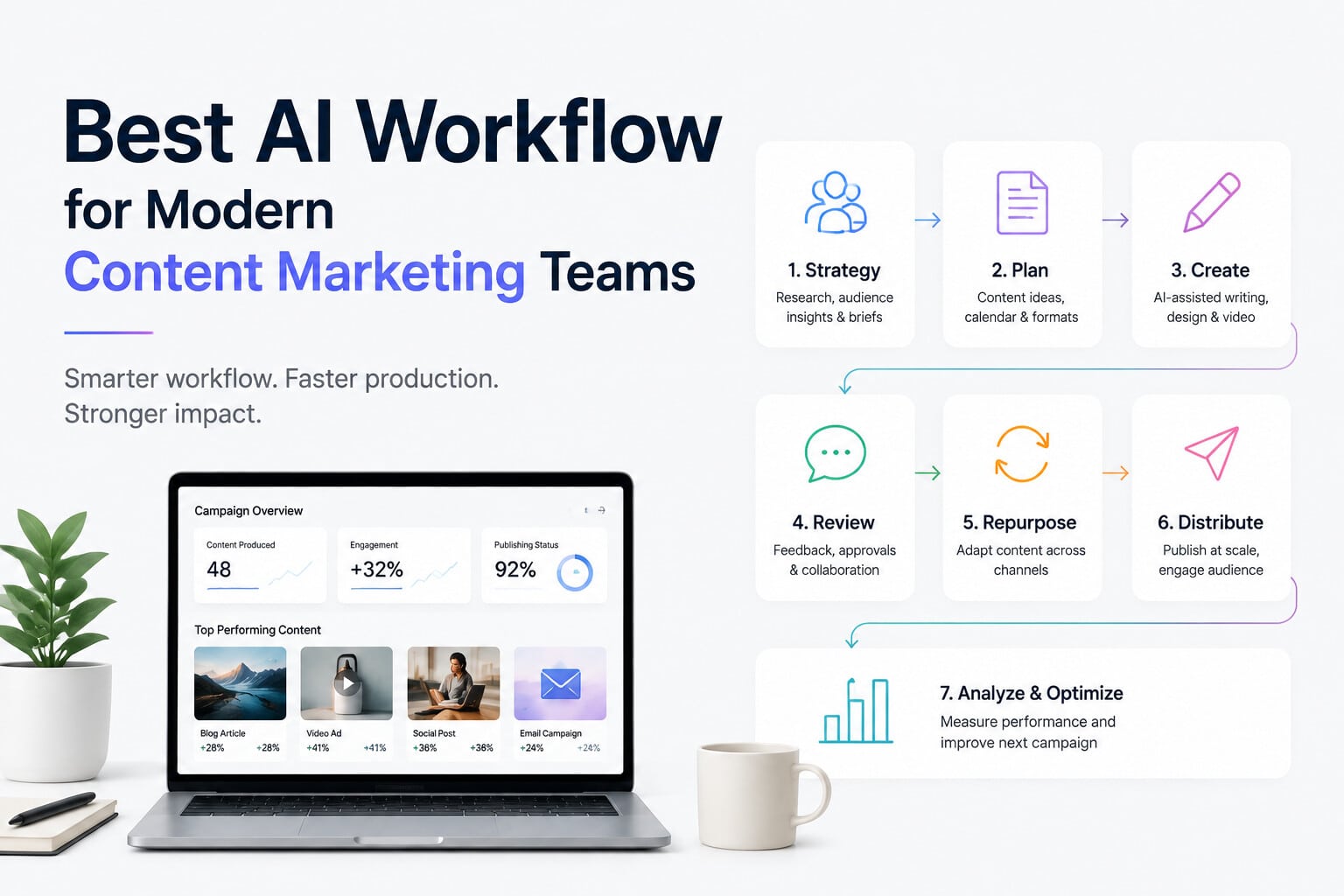
This guide walks through a practical AI workflow for modern content marketing teams, from planning and production to review, distribution, and optimization.
1. Start With Strategy: Turning Ideas Into Clear Briefs
Every successful campaign starts with four questions:
- Who is the audience?
- What problem does the content solve?
- What does the brand want to communicate?
- What action should the audience take?
AI is most useful at this stage as a research and thinking partner, not as a content generator.
Teams can use AI to:
- Explore campaign angles
- Summarize customer research
- Analyze audience questions
- Generate content ideas
- Challenge assumptions
- Improve campaign briefs
Tools like ChatGPT, Claude, and Gemini can help marketing teams explore messaging directions and structure ideas before production begins.
Research-focused tools like Perplexity or Exploding Topics can help identify emerging topics and audience interests, while platforms like SparkToro can provide insight into what audiences actually read, watch, and follow.
The important discipline is simple: do not start with content creation. Start with clarity.
A weak brief produces weak content, no matter how advanced the production tools become.
2. Build a Brand and Content Foundation
The biggest risk in AI-powered content production is not poor output. It is inconsistency.
A team can produce hundreds of assets that each look acceptable individually but fail to feel like they belong to the same brand.
Before scaling production, teams need a shared foundation:
- Brand guidelines
- Messaging frameworks
- Product information
- Audience insights
- Visual references
- Previous campaign learnings
Tools like Notion or Airtable can help organize this information into a living knowledge base.
The teams that get the most value from AI are not always the ones producing the most content. They are the ones giving AI enough context to make better decisions.
AI works better when it understands the rules behind the work.
3. Use AI for Content Development and Production
Once strategy and brand direction are clear, AI can accelerate production across different content formats.
The goal is not replacing creative teams. It is reducing the distance between an idea and a testable draft.
Written Content
AI can support:
- First drafts
- Content outlines
- Research summaries
- Headline variations
- Content repurposing
Tools like ChatGPT and Claude are useful for developing ideas and creating early drafts.
Marketing-focused platforms like Jasper and Copy.ai can help teams produce variations for high-volume content such as the following:
- Product descriptions
- Email campaigns
- Ad copy
- Social captions
Human review remains essential for:
- Brand voice
- Accuracy
- Original thinking
- Final quality
The strongest teams use AI to accelerate writing, not outsource their thinking.
Visual Content
AI has changed how marketing teams explore creative directions.
Instead of spending days creating early concepts, teams can quickly explore:
- Campaign visuals
- Product concepts
- Social graphics
- Creative references
- Design directions
Tools like Midjourney and Adobe Firefly are useful for exploring visual ideas quickly.
The purpose is not generating endless images. It is helping teams make better creative decisions earlier.
Video Content
Video is often the most complex part of content production.
A traditional workflow involves:
- Script development
- Storyboarding
- Shooting
- Editing
- Voiceover
- Sound design
- Version creation
AI is reducing the time required across several of these stages.
Teams can use AI for:
- Visual concept development
- Supplementary footage
- Voice generation
- Editing assistance
- Creating content variations
Video generation tools can help create:
- Product visualizations
- Background environments
- Concept sequences
- Short-form campaign assets
Voice tools can help with:
- Narration
- Draft voiceovers
- Localization
- Audio variations
For assembly, a newer category of AI workflow tools helps teams move from scripts and assets to editable first cuts faster. invideo agent is one example built around this stage of production — helping teams move from creative direction to video drafts while keeping the work editable rather than producing only a final export.
The goal is not removing the creative review process. The first version still needs human decisions around pacing, messaging, and brand fit.
4. Build a Workflow for Review and Collaboration
Most content delays do not happen during creation. They happen during feedback.
Multiple stakeholders, unclear versions, scattered comments, and changing requirements can slow down even strong creative work.
A workflow that scales looks like this:
- Create the first version.
- Review it against the original brief.
- Collect feedback in one place.
- Make targeted changes.
- Document what changed and why.
Tools like Frame.io for video or Figma for visual design help keep feedback connected to the work instead of scattered across emails and messages.
AI becomes more useful during review when it has access to the original context:
- What was the campaign goal?
- Who is the audience?
- What creative decisions were already made?
- Which elements are approved?
The more context teams preserve, the less time they spend repeating decisions.
5. Repurpose Content Across Channels
Modern campaigns rarely produce one asset for one platform.
A single campaign might become:
- A long-form article
- Social posts
- Short videos
- Email campaigns
- Paid advertisements
- Landing page content
AI helps teams get more value from each creative investment.
Examples:
A webinar can become:
- Blog articles
- Short clips
- Social posts
- Email summaries
A product video can become:
- Paid ads
- Product page content
- Sales material
- Customer education assets
Tools like OpusClip can help transform longer videos into shorter clips, while AI writing tools can adapt the same idea into different formats.
The goal is not creating more content for the sake of volume.
It is extending the life and impact of strong ideas.
6. Where AI Agents Fit Into Content Marketing Workflows
As content operations grow, the biggest challenge is often not creating individual assets. It is maintaining context between stages.
A campaign brief may live in one tool. Visual references may exist somewhere else. Video edits may happen in another workspace. Important decisions can easily get lost between teams and tools.
This is where AI agents become useful.
Instead of working as isolated generators, AI agents can help maintain:
- Project context
- Creative direction
- References
- Previous decisions
- Workflow continuity
For video teams, invideo agent is designed around keeping project information connected throughout the creative process. Its workflow uses concepts such as Context and Briefs to help maintain the rules, references, and decisions of a project rather than treating every session as a new starting point.
For editing workflows, invideo Semantic Editor extends this approach into an editable timeline where creators and AI agents can work together. Editors can make manual changes or direct the agent while keeping changes visible and editable on the timeline.
The future workflow is not humans versus AI.
It is teams using AI to handle more execution while spending more time on strategy, creativity, and judgment.
7. A Practical End-to-End AI Content Workflow
A modern AI-assisted content workflow looks like this:
Step 1: Define the campaign goal
Identify the audience, message, and desired outcome.
Step 2: Create the brief
Document brand guidelines, creative direction, and requirements.
Step 3: Develop concepts
Use AI for research, brainstorming, and exploring creative approaches.
Step 4: Produce assets
Create written, visual, and video content using the tools best suited for each format.
Step 5: Review against the brief
Apply human judgment, feedback, and brand standards.
Step 6: Repurpose and distribute
Adapt strong ideas across channels and audiences.
Step 7: Measure and improve
Use performance insights to improve future campaigns.
8. What AI Still Cannot Do
AI can increase production capacity, but successful marketing still depends on human decisions.
Strategy
Understanding what message matters to a specific audience is still a human responsibility.
Creative risk
The ideas that stand out often come from people making unexpected connections, not from generating the safest possible option.
Brand judgment
Knowing when something is technically correct but creatively wrong requires experience and context.
Prioritization
AI can generate many directions. Teams still decide which ideas deserve time, budget, and attention.
Closing Thought
The best AI workflow for a content marketing team is not the one with the most tools or the highest output volume.
It is the one that creates a better connection between strategy, production, and distribution.
AI can help teams move faster, test more ideas, and reduce repetitive work.
But the direction still comes from the people behind the brand, the marketers, creators, and strategists who decide what is worth creating and why.