


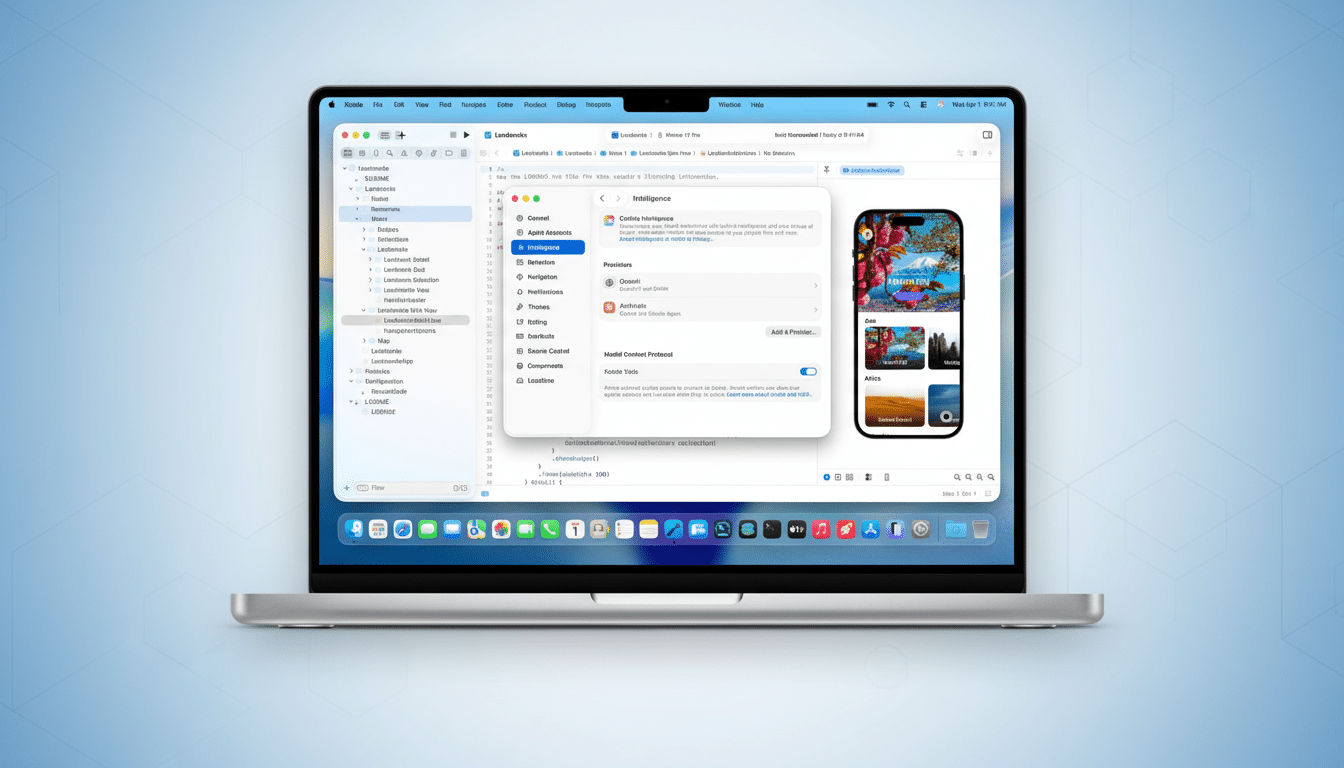
Apple is bringing agentic coding directly into Xcode, introducing first-class agents from Anthropic and OpenAI in the Xcode 26.3 Release Candidate. The update embeds autonomous coding workflows inside Apple’s IDE so developers can ask an agent to explore a project, plan changes, run builds and tests, and iterate until the code passes—all without leaving Xcode.
The company says the agents tap Xcode’s tooling and Apple’s latest developer documentation, promising smarter API usage and fewer dead ends. The RC is available via the developer portal, with a broader rollout to follow.
What Agentic Coding Means In Xcode 26.3 Release
Agentic coding moves beyond autocomplete. In Xcode 26.3, agents can inspect a project’s structure and metadata, reason through tasks, and execute actions—compiling, testing, and editing files—while keeping a visible transcript of every step. When an issue crops up, the agent diagnoses test failures and proposes fixes, then verifies its own changes by re-running suites.
Because the agents consult Apple’s current documentation, they can align with new APIs in Swift, SwiftUI, and platform frameworks. That should reduce common mismatches seen when external tools lag behind SDK changes. Apple emphasizes transparency: diffs are highlighted inline, and a side panel explains the plan and each tool call so developers can supervise and step in at any time.
Claude And Codex Inside The IDE Via MCP Integration
Apple worked with Anthropic and OpenAI to tune token usage and tool-calling semantics so agents feel fast and predictable inside Xcode. The integration rides on the Model Context Protocol (MCP), which exposes Xcode capabilities—project discovery, code edits, file management, previews and snippets, and documentation access—to any MCP-compatible agent.
Getting started is straightforward: developers choose and download agents from Xcode settings, sign in to provider accounts or add an API key, then select a model variant from a drop-down—options include choices like GPT-5.2-Codex or GPT-5.1 mini. A prompt panel lets you describe a feature in natural language, such as “Add a SwiftUI onboarding flow using Sign in with Apple and wire it to existing authentication,” and watch the agent plan, implement, and test the change.
Every agent action creates a milestone. If the direction isn’t right, rolling back to a clean state is one click, lowering the risk of letting an automated assistant touch production code. Apple also encourages prompting the agent to outline its plan before writing code, which often yields more coherent edits and faster convergence.
Developer Workflow And Controls For Xcode Agents
Xcode’s agents begin with reconnaissance: scanning targets, schemes, test bundles, and dependencies to map the work. From there, they decompose requests into atomic steps—create files, update build settings if needed, add tests, run the suite, address failures—surfacing each decision in the transcript. Developers can approve or modify steps, use the transcript as a teaching tool, or convert the plan into a review checklist.
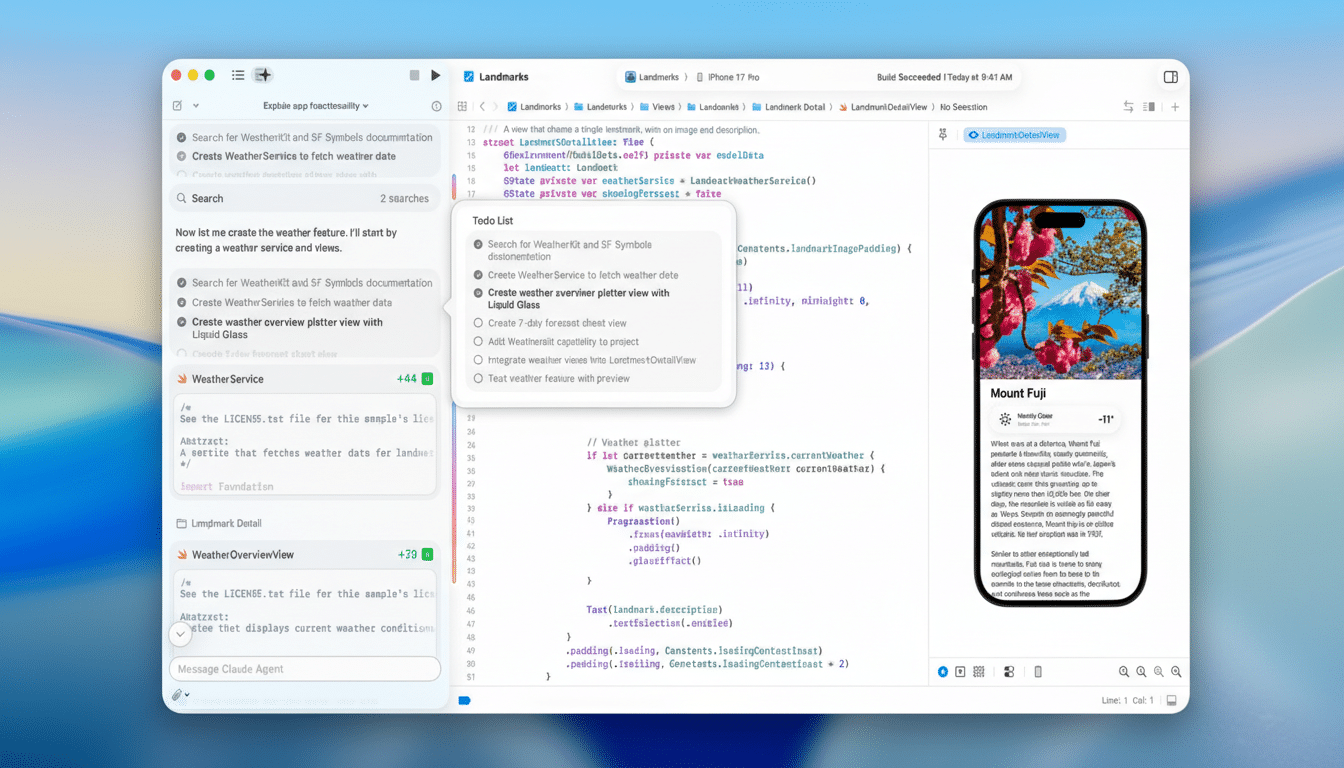
The approach suits both greenfield features and maintenance. For example, an agent can migrate API calls to a newer framework, update Info.plist entries, and validate entitlements, then prove correctness by running unit and UI tests. Because the process is deterministic and logged, teams can incorporate it into code review norms and maintain traceability.
Why This Matters And How It Compares To Rivals
Rivals have shown the appetite for AI-native development. GitHub has reported developers complete tasks up to 55% faster with AI pair programming in controlled studies, and the Stack Overflow Developer Survey has found that roughly 70% of respondents use or plan to use AI tools in their work. JetBrains and Google have also layered assistants into their IDEs and cloud workspaces.
Apple’s differentiator is the deep, platform-aware integration. Tying agents to Xcode’s build system, testing harnesses, and documentation pipeline gives the models structured context and reliable tools. The MCP foundation also hints at a broader ecosystem: any MCP-compatible agent can, in principle, plug into the same capabilities, opening the door to specialized domain agents for accessibility, performance tuning, or localization.
Practical Considerations For Teams Adopting Agents
As with any cloud-model integration, teams will weigh code privacy, vendor lock-in, and compliance. Xcode supports provider sign-in and API keys, and the milestone system makes it easy to review or revert generated changes before they land in a repository. Apple positions the visible plan, diffs, and tests as guardrails to keep humans in the loop.
Beyond productivity, Apple argues the transparency is a teaching advantage. New developers can watch the agent reason through a problem, read relevant docs, and see how tests validate behavior. Apple plans to host a code-along workshop on its developer site to help teams adopt the new workflows.
For now, the headline is clear: agentic coding is no longer an add-on panel or a browser tab. It’s part of Xcode, wired into the core loop of planning, coding, testing, and shipping. If Apple’s bet pays off, the next wave of iOS and macOS apps may be built with agents sitting in the driver’s seat—under close human supervision.